OEHighlightOverlayByBallAndStick
class OEHighlightOverlayByBallAndStick : public OEHighlightOverlayBase
The OEHighlightOverlayByBallAndStick class allows the
customization of the ball and stick highlighting style that is
associated with the OEHighlightOverlayStyle_BallAndStick
constant.
This style enables the highlighting of overlapping patterns.
See example in Figure: Example of overlay highlighting using the
‘ball and stick’ style.
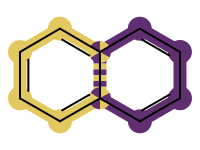
Example of overlay highlighting using the ‘ball and stick’ style
See also
OEAddHighlightOverlayfunction.OEHighlightOverlayStylenamespaceHighlighting Overlapped Patterns section
Note
It is recommended to select colors with high contrast when highlighting overlapped patterns with the OEHighlightOverlayByBallAndStick class.
See also
OEGetContrastColorsfunction
The following methods are publicly inherited from OEHighlightOverlayBase:
Constructors
OEHighlightOverlayByBallAndStick(colors: OEColorIter,
                                 stickWidthScale: float = 3.0,
                                 ballRadiusScale: float = 3.0,
                                 monochrome: bool = True) -> OEHighlightOverlayByBallAndStick
Creates an OEHighlightOverlayByBallAndStick object with the specified parameters
- colors
The colors used for highlighting. See also
OEHighlightOverlayBase.SetColorsmethod.- stickWidthScale
The multiplier that can be used to increase or decrease the stick width of the highlighted bond(s). See also
OEHighlightOverlayByBallAndStick.SetStickWidthScalemethod.- ballRadiusScale
The multiplier that can be used to increase or decrease the ball radius of the highlighted atoms(s). See also
OEHighlightOverlayByBallAndStick.SetBallRadiusScalemethod.- monochrome
Defines whether or not to change the color of the atom label of the highlighted atom(s). See also
OEHighlightOverlayByBallAndStick.SetAtomLabelMonochromemethod.
OEHighlightOverlayByBallAndStick(rhs: OEHighlightOverlayByBallAndStick) -> OEHighlightOverlayByBallAndStick
Copy constructor.
GetAtomLabelMonochrome
GetAtomLabelMonochrome() -> bool
Returns whether or not the color of the atom label of the highlighted atom(s) is changed.
See also
GetBallRadiusScale
GetBallRadiusScale() -> float
Returns the multiplier that can be used to increase or decrease the ball radius of the highlighted atoms(s).
See also
GetStickWidthScale
GetStickWidthScale() -> float
Returns the multiplier that can be used to increase or decrease the stick width of the highlighted bond(s).
See also
SetAtomLabelMonochrome
SetAtomLabelMonochrome(monochrome: bool) -> None
Sets whether or not to change the color of the atom label of the highlighted atom(s).
Example (Figure: Example of using the SetAtomLabelMonochrome method)
highlight = oedepict.OEHighlightOverlayByBallAndStick(oechem.OEGetVividColors())
highlight.SetAtomLabelMonochrome(False)
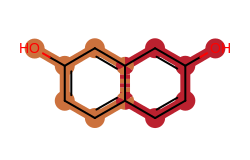
Example of using the SetAtomLabelMonochrome method
See also
SetBallRadiusScale
SetBallRadiusScale(ballRadiusScale: float) -> None
Sets the multiplier that can be used to increase or decrease the ball radius of the highlighted atoms(s).
Example (Figure: Example of using the SetBallRadiusScale method)
highlight = oedepict.OEHighlightOverlayByBallAndStick(oechem.OEGetVividColors())
highlight.SetBallRadiusScale(4.0)
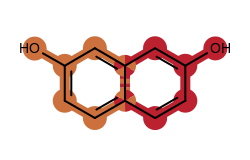
Example of using the SetBallRadiusScale method
See also
SetStickWidthScale
SetStickWidthScale(stickWidthScale: float) -> None
Sets the multiplier that can be used to increase or decrease the stick width of the highlighted bond(s).
Example (Figure: Example of using the SetStickWidthScale method)
highlight = oedepict.OEHighlightOverlayByBallAndStick(oechem.OEGetVividColors())
highlight.SetStickWidthScale(5.0)
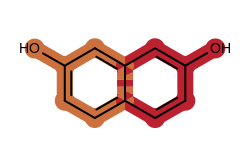
Example of using the SetStickWidthScale method
See also