OEBitVector
class OEBitVector
The OEBitVector class is used to represent a resizable bitmap. These are commonly used to store fingerprints in cheminformatics.
See also
OESubSearchScreen class
OEFingerPrint class in GraphSim TK manual
Constructors
OEBitVector() -> OEBitVector
OEBitVector(size: int) -> OEBitVector
OEBitVector(src: OEBitVector) -> OEBitVector
When constructed with a size argument, this specifies the
initial number of bits in the OEBitVector.
When constructed without an argument, the default number of bits
is architecture dependent, 32 bits on 32-bit hosts and
64 bits on 64-bit hosts. Initially, all the bits are set to
zero.
OEBitVector(rand: OERandom, size: int) -> OEBitVector
Creates a OEBitVector with size bits
randomly initialized from the rand object.
OEBitVector(data: str, size: int) -> OEBitVector
Using this constructor is equivalent to creating a default
constructed OEBitVector and then immediately
calling OEBitVector.SetData with the
data and size arguments.
ClearBits
ClearBits() -> None
Clears all of the bits of the OEBitVector to zero.
CountBits
CountBits() -> int
Counts the number of bits that are set to one, in the OEBitVector object.
CountRangeBits
CountRangeBits(start: int, end: int) -> int
Counts the number of bits that are set to one in the given bit range.
FirstBit
FirstBit() -> int
Returns the index of the first bit, i.e. the
set bit with the lowest index, in the
OEBitVector.
Bit position
indices are numbered from zero, and have a maximum of
OEBitVector.GetSize -1.
If the OEBitVector has no bits set,
i.e. OEBitVector.IsEmpty returns
true, this method return will
return the value -1.
FromHexString
FromHexString(bvs: str) -> None
Converts a hexadecimal string, in either upper, lower or mixed case,
into an OEBitVector. Each valid hexadecimal digit
(0-9, a-f, A-F) translates to four bits in the
OEBitVector.
Note: Because OEBitVectors may have a
length not divisible by four,
the last character of an OEChem-generated hexadecimal string may
be a non-hex digit encoding the correct length of the
OEBitVector. Don’t worry if you see a non-hex
digit at the end of a hexadecimal string.
See also
OEBitVector.ToHexStringmethod
GetData
GetData() -> str
Returns a pointer to the internal storage of
the OEBitVector’s bitmap.
This pointer to a sequence of at least
(OEBitVector.GetSize +7)/8 consecutive bytes. Bit index zero
corresponds to the least significant bit of the first byte. All
bits beyond OEBitVector.GetSize in the last byte are guaranteed
to be zero. The OEBitVector.GetData method always returns a valid non-NULL
pointer even if the number of bits is zero.
GetSize
GetSize() -> int
Returns the size, in bits, of the OEBitVector. An OEBitVector may potentially contain zero bits.
IsBitOn
IsBitOn(bit: int) -> bool
Tests whether the bit as the
specified position/index of an OEBitVector is set.
Bit position
indices are numbered from zero, and have a maximum of
OEBitVector.GetSize -1. This method returns false for all
indices greater than or equal to OEBitVector.GetSize.
IsEmpty
IsEmpty() -> bool
Returns true if all the bits of an OEBitVector are zero.
This is
equivalent to, but much more efficient than, testing that
OEBitVector.CountBits == 0. An OEBitVector of
zero size is considered empty.
LastBit
LastBit() -> int
Returns the index of the last bit, i.e. the
set bit with the highest index, in the
OEBitVector.
Bit position indices are numbered from zero, and have a maximum of
OEBitVector.GetSize -1. If the
OEBitVector has no bits set,
i.e. OEBitVector.IsEmpty returns
true, this method return will
return the value -1.
NegateBits
NegateBits() -> None
Inverts all of the bits of an OEBitVector.
NextBit
NextBit(arg2: int) -> int
Returns the next set bit after the specified
bit position, i.e. the set bit with the lowest index greater
than the argument. If there are no such set bits, or the value
of bit is greater than or equal to OEBitVector.GetSize, this
method returns the value -1.
PrevBit
PrevBit(arg2: int) -> int
Returns the previous set bit before the
specified bit position, i.e. the set bit with the highest index
less than the argument. If there are no such set bits, this
method returns the value -1. If the specified value of bit is
greater than or equal to OEBitVector.GetSize, this method
returns the same values as OEBitVector.LastBit.
SetBitOff
SetBitOff(bit: int) -> None
Clears the bit at the specified bit
position/index of an OEBitVector. Bit position indices are
numbered from zero, and have a maximum of
OEBitVector.GetSize -1. If the value of ‘bit’ is greater than
or equal to OEBitVector.GetSize, the bitmap is resized to
‘bit’+1 bits. All of the new bits are initialized to zero.
SetBitOn
SetBitOn(bit: int) -> None
Tests whether the bit as the
specified position/index of an OEBitVector is set. Bit position
indices are numbered from zero, and have a maximum of
OEBitVector.GetSize -1. This method returns false for all
indices greater than or equal to OEBitVector.GetSize.
SetData
SetData(data: str, nbits: int) -> None
Initialize the OEBitVector by the binary data
pointed to by data, possibly resizing the
OEBitVector to accommodate the nbits of
data. data should point to at least nbits/8 bytes of
data. If a non-multiple of 8 bits is to be copied it is the
users responsibility to make sure the remainder of bits in the
last byte are zeroed out.
SetRangeOff
SetRangeOff(start: int, end: int) -> None
SetRangeOn
SetRangeOn(start: int, end: int) -> None
SetSize
SetSize(bits: int) -> None
Resizes an OEBitVector to the specified number of bits. A size argument of zero is allowed. If this method increases the size of an OEBitVector all of the new bit positions are initialized to zero.
ToHexString
ToHexString() -> str
Generates a hexadecimal string representation of an OEBitVector. Each “nibble” of four bits is converted into an uppercase hexadecimal character.
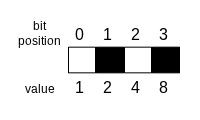
The interpretation of the four-bit long “nibble”-s (big-endian system)
The four-bit long “nibble” shown above is encoded as hexadecimal ‘A’:
\(0 * 2^0 + 1 * 2^1 + 0 * 2^2 + 1 * 2^3 = 0 + 2 + 0 + 8 = 10 (dec) = A (hex)\)
Because OEBitVectors may have a length
that is not a multiple of four, an extra non-hexadecimal digit is added
to the end of the string to encode the correct
OEBitVector length.
last character |
number of extra bits |
|---|---|
‘J’ |
0 |
‘G’ |
1 |
‘H’ |
2 |
‘I’ |
3 |
For example, if the size of the bit-vector is 8 (multiple of four), then the last character of the returned string will be ‘J’. If the size of the bit-vector is 9, then the last character will be ‘I’, since there will be three extra bits to add up to a number that can be multiplied by four.
See also
OEBitVector.FromHexStringmethod
ToggleBit
ToggleBit(bit: int) -> None
Inverts the bit at the specified bit
position/index of an OEBitVector. Bit position indices are
numbered from zero, and have a maximum of
OEBitVector.GetSize -1. If the value of ‘bit’ is greater than
or equal to OEBitVector.GetSize, the bitmap is resized to
‘bit’+1 bits. All of the new bits other than the one specified in
the argument, i.e. the last, are initialized to zero.