Manipulating Large Molecule Files
Problem
You want to manipulate large molecule files.
Ingredients
|
Difficulty Level
🌶️ 🌶️
Solution
This recipe discusses several examples that handle large molecule files:
All solutions presented here utilize the OEMolDatabase class that provides fast read-only random access to molecular file formats that are readable by OEChem TK.
Hint
The usage of OEMolDatabase is highly recommended when:
You want to manipulate molecule files without parsing the molecules.
You want to access molecules in a file randomly.
You want to handle a large set of molecules that can not be held in memory all at once.
Creating Molecule Database Index File
moldb_create
#!/usr/bin/env python3
# (C) 2026 Cadence Design Systems, Inc. (Cadence)
# All rights reserved.
# TERMS FOR USE OF SAMPLE CODE The software below ("Sample Code") is
# provided to current licensees or subscribers of Cadence products or
# SaaS offerings (each a "Customer").
# Customer is hereby permitted to use, copy, and modify the Sample Code,
# subject to these terms. Cadence claims no rights to Customer's
# modifications. Modification of Sample Code is at Customer's sole and
# exclusive risk. Sample Code may require Customer to have a then
# current license or subscription to the applicable Cadence offering.
# THE SAMPLE CODE IS PROVIDED "AS IS", WITHOUT WARRANTY OF ANY KIND,
# EXPRESS OR IMPLIED.  OPENEYE DISCLAIMS ALL WARRANTIES, INCLUDING, BUT
# NOT LIMITED TO, WARRANTIES OF MERCHANTABILITY, FITNESS FOR A
# PARTICULAR PURPOSE AND NONINFRINGEMENT. In no event shall Cadence be
# liable for any damages or liability in connection with the Sample Code
# or its use.


"""Code snippet for creating a molecule database index file."""

import os
import sys
from pathlib import Path

import rich.console
from openeye import oechem


def main() -> int:
    """Create a molecule database index file."""
    if len(sys.argv) != 2:  # noqa: PLR2004
        oechem.OEThrow.Usage(f"Usage: {sys.argv[0]} <mol-file>")
        return os.EX_USAGE

    input_filename = Path(sys.argv[1])
    create_mol_database_index_file(input_filename)
    return os.EX_OK


def create_mol_database_index_file(input_filename: Path) -> None:
    """Create a molecule database index file for the given molecule file."""
    console = rich.console.Console()

    idx_filename = Path(oechem.OEGetMolDatabaseIdxFileName(str(input_filename)))

    if idx_filename.exists():
        oechem.OEThrow.Warning(f"{idx_filename} index file already exists")
    elif not oechem.OECreateMolDatabaseIdx(str(input_filename)):
        oechem.OEThrow.Warning(f"Unable to create {idx_filename} molecule index file")
    console.print(f"Index file created: {idx_filename.name}")


if __name__ == "__main__":
    sys.exit(main())
The first simple example shows how to create an index file by calling the OECreateMolDatabaseIdx function. The OEGetMolDatabaseIdxFileName function returns the name of the index file associated with the given molecule filename.
The index file of a molecule database stores file position offsets of the molecules in the file. Generating an index file can be expensive, but it can be created only once and then it can speed up the handling of large molecule files significantly.
def create_mol_database_index_file(input_filename: Path) -> None:
    """Create a molecule database index file for the given molecule file."""
    console = rich.console.Console()

    idx_filename = Path(oechem.OEGetMolDatabaseIdxFileName(str(input_filename)))

    if idx_filename.exists():
        oechem.OEThrow.Warning(f"{idx_filename} index file already exists")
    elif not oechem.OECreateMolDatabaseIdx(str(input_filename)):
        oechem.OEThrow.Warning(f"Unable to create {idx_filename} molecule index file")
    console.print(f"Index file created: {idx_filename.name}")
Download code
moldb_create.py and
drugs.sdf supporting data file
Usage:
> moldb_create drugs.sdf
Running the above command will generate the following output:
Index file created: drugs.sdf.idx
See also
Index files section in the OEChem TK manual
Counting Molecules
moldb_mol_count
#!/usr/bin/env python3
# (C) 2026 Cadence Design Systems, Inc. (Cadence)
# All rights reserved.
# TERMS FOR USE OF SAMPLE CODE The software below ("Sample Code") is
# provided to current licensees or subscribers of Cadence products or
# SaaS offerings (each a "Customer").
# Customer is hereby permitted to use, copy, and modify the Sample Code,
# subject to these terms. Cadence claims no rights to Customer's
# modifications. Modification of Sample Code is at Customer's sole and
# exclusive risk. Sample Code may require Customer to have a then
# current license or subscription to the applicable Cadence offering.
# THE SAMPLE CODE IS PROVIDED "AS IS", WITHOUT WARRANTY OF ANY KIND,
# EXPRESS OR IMPLIED.  OPENEYE DISCLAIMS ALL WARRANTIES, INCLUDING, BUT
# NOT LIMITED TO, WARRANTIES OF MERCHANTABILITY, FITNESS FOR A
# PARTICULAR PURPOSE AND NONINFRINGEMENT. In no event shall Cadence be
# liable for any damages or liability in connection with the Sample Code
# or its use.

"""Code snippet for counting molecules in input files."""

import os
import sys
from pathlib import Path

from openeye import oechem
from rich.console import Console


def main() -> int:
    """Count molecules in input files."""
    if len(sys.argv) < 2:  # noqa: PLR2004
        oechem.OEThrow.Usage(f"Usage: {sys.argv[0]} <mol-file> ...")

    console = Console()

    total_mols = 0
    for fname in sys.argv[1:]:
        total_mols += mol_count(Path(fname), console)
    console.print("===========================================================")
    console.print(f"Total {total_mols} molecules")

    return os.EX_OK


def mol_count(fname: Path, console: Console) -> int:
    """Count the number of molecules in a file."""
    ifs = oechem.oemolistream()
    if not ifs.open(str(fname)):
        oechem.OEThrow.Warning(f"Unable to open {fname.name} for reading")
        return 0

    mol_database = oechem.OEMolDatabase(ifs)
    num_mols = mol_database.NumMols()
    console.print(f"{fname.name} contains {num_mols} molecule(s).")
    return num_mols


if __name__ == "__main__":
    sys.exit(main())
This simple example shows how to count the number of molecules in a file. After initializing an OEMolDatabase object with an input stream, the OEMolDatabase.NumMols method returns the number of molecule records read from the file into the database.
def mol_count(fname: Path, console: Console) -> int:
    """Count the number of molecules in a file."""
    ifs = oechem.oemolistream()
    if not ifs.open(str(fname)):
        oechem.OEThrow.Warning(f"Unable to open {fname.name} for reading")
        return 0

    mol_database = oechem.OEMolDatabase(ifs)
    num_mols = mol_database.NumMols()
    console.print(f"{fname.name} contains {num_mols} molecule(s).")
    return num_mols
Download code
moldb_mol_count.py and
drugs.sdf
supporting data file
Usage:
> moldb_mol_count drugs.sdf
Running the above command will generate the following output:
drugs.sdf contains 6 molecule(s).
===========================================================
Total 6 molecules
When the drugs.sdf file is opened by the molecule database,
it automatically detects the presence of the corresponding index file drugs.sdf.idx.
When the index file exists, the number of file offsets stored in the index file
equals the number of molecules stored in the corresponding drugs.sdf molecule file.
Therefore, returning the number of molecules stored in the drugs.sdf file does
not require actually reading and parsing the molecules.
Output Molecule Titles
moldb_get_titles
#!/usr/bin/env python3
# (C) 2026 Cadence Design Systems, Inc. (Cadence)
# All rights reserved.
# TERMS FOR USE OF SAMPLE CODE The software below ("Sample Code") is
# provided to current licensees or subscribers of Cadence products or
# SaaS offerings (each a "Customer").
# Customer is hereby permitted to use, copy, and modify the Sample Code,
# subject to these terms. Cadence claims no rights to Customer's
# modifications. Modification of Sample Code is at Customer's sole and
# exclusive risk. Sample Code may require Customer to have a then
# current license or subscription to the applicable Cadence offering.
# THE SAMPLE CODE IS PROVIDED "AS IS", WITHOUT WARRANTY OF ANY KIND,
# EXPRESS OR IMPLIED.  OPENEYE DISCLAIMS ALL WARRANTIES, INCLUDING, BUT
# NOT LIMITED TO, WARRANTIES OF MERCHANTABILITY, FITNESS FOR A
# PARTICULAR PURPOSE AND NONINFRINGEMENT. In no event shall Cadence be
# liable for any damages or liability in connection with the Sample Code
# or its use.


"""Code snippet for outputting all molecule titles from a database."""

import os
import sys

import rich.console
from openeye import oechem


def main() -> int:
    """Output all molecule titles."""
    if len(sys.argv) != 2:  # noqa: PLR2004
        oechem.OEThrow.Usage(f"Usage: {sys.argv[0]} <mol-file>")

    ifs = oechem.oemolistream()
    if not ifs.open(sys.argv[1]):
        oechem.OEThrow.Fatal(f"Unable to open {sys.argv[1]} for reading")

    console = rich.console.Console()
    output_mol_titles(ifs, console)
    return os.EX_OK


def output_mol_titles(ifs: oechem.oemolistream, console: rich.console.Console) -> None:
    """Output all molecule titles from a molecule database."""
    mol_database = oechem.OEMolDatabase(ifs)
    for idx in range(mol_database.GetMaxMolIdx()):
        title = mol_database.GetTitle(idx)
        if len(title) == 0:
            title = "untitled"
        console.print(f"{title}")


if __name__ == "__main__":
    sys.exit(main())
The next example outputs the titles of the molecules stored in a file. After initializing an OEMolDatabase object, the molecules stored in the database can be accessed by their index. The title of each molecule can be retrieved by looping over the indices and calling the OEMolDatabase.GetTitle method, which returns the title of the molecule at the given index.
def output_mol_titles(ifs: oechem.oemolistream, console: rich.console.Console) -> None:
    """Output all molecule titles from a molecule database."""
    mol_database = oechem.OEMolDatabase(ifs)
    for idx in range(mol_database.GetMaxMolIdx()):
        title = mol_database.GetTitle(idx)
        if len(title) == 0:
            title = "untitled"
        console.print(f"{title}")
Download code
moldb_get_titles.py and
drugs.sdf
supporting data file
Usage:
> moldb_get_titles drugs.sdf
Running the above command will generate the following output:
acetsali
acyclovi
alprenol
aminopy
atenolol
caffeine
Extracting Molecules by Title
moldb_mol_extract
#!/usr/bin/env python3
# (C) 2026 Cadence Design Systems, Inc. (Cadence)
# All rights reserved.
# TERMS FOR USE OF SAMPLE CODE The software below ("Sample Code") is
# provided to current licensees or subscribers of Cadence products or
# SaaS offerings (each a "Customer").
# Customer is hereby permitted to use, copy, and modify the Sample Code,
# subject to these terms. Cadence claims no rights to Customer's
# modifications. Modification of Sample Code is at Customer's sole and
# exclusive risk. Sample Code may require Customer to have a then
# current license or subscription to the applicable Cadence offering.
# THE SAMPLE CODE IS PROVIDED "AS IS", WITHOUT WARRANTY OF ANY KIND,
# EXPRESS OR IMPLIED.  OPENEYE DISCLAIMS ALL WARRANTIES, INCLUDING, BUT
# NOT LIMITED TO, WARRANTIES OF MERCHANTABILITY, FITNESS FOR A
# PARTICULAR PURPOSE AND NONINFRINGEMENT. In no event shall Cadence be
# liable for any damages or liability in connection with the Sample Code
# or its use.


"""Code snippet for extracting compounds from a file based on molecule title."""

import argparse
import os
import sys
from pathlib import Path

from openeye import oechem
from rich.console import Console


def parse_args() -> argparse.Namespace:
    """Parse command-line arguments."""
    parser = argparse.ArgumentParser(
        description="Extract compounds from a file based on molecule title.",
    )
    parser.add_argument("-i", "--input", required=True, help="Input file name")
    parser.add_argument("-o", "--output", required=True, help="Output file name")

    group = parser.add_mutually_exclusive_group(required=True)
    group.add_argument("-t", "--title", help="Single mol title to extract")
    group.add_argument(
        "-l", "--list", type=Path, help="List file of mol titles to extract"
    )

    return parser.parse_args()


def main() -> int:
    """Extract compounds from a file based on molecule title."""
    args = parse_args()
    console = Console()

    ifs = oechem.oemolistream()
    if not ifs.open(args.input):
        oechem.OEThrow.Fatal(f"Unable to open {args.input} for reading")

    ofs = oechem.oemolostream()
    if not ofs.open(args.output):
        oechem.OEThrow.Fatal(f"Unable to open {args.output} for writing")

    title_set: set[str] = set()
    if args.list:
        list_path: Path = args.list
        if not list_path.exists():
            oechem.OEThrow.Fatal(f"Unable to open {list_path} for reading")
        for name in list_path.read_text().splitlines():
            title = name.strip()
            if title:
                title_set.add(title)
    elif args.title:
        title_set.add(args.title)

    if len(title_set) == 0:
        oechem.OEThrow.Fatal("No titles requested")

    mol_extract(ifs, ofs, title_set, console=console)
    console.print(
        f"Extracted {len(title_set)} title(s) from {Path(args.input).name} to {Path(args.output).name}"
    )

    return os.EX_OK


def mol_extract(
    ifs: oechem.oemolistream,
    ofs: oechem.oemolostream,
    title_set: set[str],
    console: Console,
) -> None:
    """Extract molecules from a database whose titles match the given set."""
    mol_database = oechem.OEMolDatabase(ifs)

    for idx in range(mol_database.GetMaxMolIdx()):
        title = mol_database.GetTitle(idx)
        if title in title_set:
            console.print(f"Extracting {title} (mol index {idx+1})")
            mol_database.WriteMolecule(ofs, idx)


if __name__ == "__main__":
    sys.exit(main())
The next example extracts compound(s) from a file based on a molecule title or a set of titles. This example uses the same OEMolDatabase.GetTitle method to access the title of the molecules. Molecules with a matching title are then written directly to the output stream using the OEMolDatabase.WriteMolecule method.
This example illustrates one of the main advantages of using molecule databases. Extracting molecules this way does not require actually parsing the molecules. The code below simply copies the bytes that encode the molecules from an input stream to an output stream without ever calling OEReadMolecule or OEWriteMolecule.
def mol_extract(
    ifs: oechem.oemolistream,
    ofs: oechem.oemolostream,
    title_set: set[str],
    console: Console,
) -> None:
    """Extract molecules from a database whose titles match the given set."""
    mol_database = oechem.OEMolDatabase(ifs)

    for idx in range(mol_database.GetMaxMolIdx()):
        title = mol_database.GetTitle(idx)
        if title in title_set:
            console.print(f"Extracting {title} (mol index {idx+1})")
            mol_database.WriteMolecule(ofs, idx)
Download code
moldb_mol_extract.py and
drugs.sdf supporting data file
Usage:
> moldb_mol_extract --input drugs.sdf --title aminopy --output extracted.sdf
Running the above command will generate the following output:
Extracting aminopy (mol index 4)
Extracted 1 title(s) from drugs.sdf to extracted.sdf
Extracting Random Set of Molecules
moldb_random_sample
#!/usr/bin/env python3
# (C) 2026 Cadence Design Systems, Inc. (Cadence)
# All rights reserved.
# TERMS FOR USE OF SAMPLE CODE The software below ("Sample Code") is
# provided to current licensees or subscribers of Cadence products or
# SaaS offerings (each a "Customer").
# Customer is hereby permitted to use, copy, and modify the Sample Code,
# subject to these terms. Cadence claims no rights to Customer's
# modifications. Modification of Sample Code is at Customer's sole and
# exclusive risk. Sample Code may require Customer to have a then
# current license or subscription to the applicable Cadence offering.
# THE SAMPLE CODE IS PROVIDED "AS IS", WITHOUT WARRANTY OF ANY KIND,
# EXPRESS OR IMPLIED.  OPENEYE DISCLAIMS ALL WARRANTIES, INCLUDING, BUT
# NOT LIMITED TO, WARRANTIES OF MERCHANTABILITY, FITNESS FOR A
# PARTICULAR PURPOSE AND NONINFRINGEMENT. In no event shall Cadence be
# liable for any damages or liability in connection with the Sample Code
# or its use.


"""Code snippet for randomly reordering molecules and obtaining a random subset."""

import argparse
import os
import sys
from random import Random

from openeye import oechem


def parse_args() -> argparse.Namespace:
    """Parse command-line arguments."""
    parser = argparse.ArgumentParser(
        description="Randomly reorder molecules and optionally obtain a random subset.",
    )
    parser.add_argument("-i", "--input", required=True, help="Input file name")
    parser.add_argument("-o", "--output", default=None, help="Output file name")
    parser.add_argument(
        "--seed", type=int, default=None, help="Random seed (default: system time)"
    )

    group = parser.add_mutually_exclusive_group()
    group.add_argument(
        "-p", "--percent", type=float, help="Percentage of output molecules"
    )
    group.add_argument("-n", "--number", type=int, help="Number of output molecules")

    return parser.parse_args()


def main() -> int:
    """Randomly reorder and sample molecules."""
    args = parse_args()

    ifs = oechem.oemolistream()
    if not ifs.open(args.input):
        oechem.OEThrow.Fatal(f"Unable to open {args.input} for reading")

    ofs = oechem.oemolostream(".ism")
    if args.output and not ofs.open(args.output):
        oechem.OEThrow.Fatal(f"Unable to open {args.output} for writing")

    rand = Random(args.seed)  # noqa: S311

    if args.number is not None:
        randomize_n(ifs, ofs, args.number, rand)
    elif args.percent is not None:
        randomize_percent(ifs, ofs, args.percent, rand)
    else:
        randomize(ifs, ofs, rand)

    return os.EX_OK


def randomize(ifs: oechem.oemolistream, ofs: oechem.oemolostream, rand: Random) -> None:
    """Randomly reorder all molecules in the database."""
    randomize_percent(ifs, ofs, 100.0, rand)


def randomize_percent(
    ifs: oechem.oemolistream,
    ofs: oechem.oemolostream,
    percent: float,
    rand: Random,
) -> None:
    """Randomly sample a percentage of molecules from the database."""
    mol_database = oechem.OEMolDatabase(ifs)
    indices = range(mol_database.GetMaxMolIdx())
    size = max(1, int(percent * 0.01 * mol_database.GetMaxMolIdx()))
    mol_indices = rand.sample(indices, size)
    _write_database(mol_database, ofs, mol_indices)


def randomize_n(
    ifs: oechem.oemolistream,
    ofs: oechem.oemolostream,
    count: int,
    rand: Random,
) -> None:
    """Randomly sample a fixed number of molecules from the database."""
    mol_database = oechem.OEMolDatabase(ifs)
    indices = range(mol_database.GetMaxMolIdx())
    mol_indices = rand.sample(indices, count)
    _write_database(mol_database, ofs, mol_indices)


def _write_database(
    mol_database: oechem.OEMolDatabase, ofs: oechem.oemolostream, mol_indices: list[int]
) -> None:
    """Write selected molecules to the output stream."""
    for mol_idx in mol_indices:
        mol_database.WriteMolecule(ofs, mol_idx)


if __name__ == "__main__":
    sys.exit(main())
Extracting a random set of molecules from a large molecule file is a frequently
occurring task. The code below first creates a random index set using the
random.sample() function.
The molecules corresponding to the selected indices are then copied from the input
stream to the output stream.
The random access feature provided by the OEMolDatabase class makes this process very
fast.
Implementing the same process without the OEMolDatabase class would either require
holding all molecules in memory at once or, in the case of a very large molecule file,
reading the molecule file more than once.
 1def randomize_percent(
 2    ifs: oechem.oemolistream,
 3    ofs: oechem.oemolostream,
 4    percent: float,
 5    rand: Random,
 6) -> None:
 7    """Randomly sample a percentage of molecules from the database."""
 8    mol_database = oechem.OEMolDatabase(ifs)
 9    indices = range(mol_database.GetMaxMolIdx())
10    size = max(1, int(percent * 0.01 * mol_database.GetMaxMolIdx()))
11    mol_indices = rand.sample(indices, size)
12    _write_database(mol_database, ofs, mol_indices)
1def _write_database(
2    mol_database: oechem.OEMolDatabase, ofs: oechem.oemolostream, mol_indices: list[int]
3) -> None:
4    """Write selected molecules to the output stream."""
5    for mol_idx in mol_indices:
6        mol_database.WriteMolecule(ofs, mol_idx)
Download code
moldb_random_sample.py and
drugs.sdf
supporting data file
Usage:
> moldb_random_sample --input drugs.sdf --output random_sample.sdf --percent 50 --seed 1
> moldb_get_titles random_sample.sdf
Running the above commands will generate the following output:
acyclovi
atenolol
acetsali
Splitting Molecule Database
moldb_mol_chunk
#!/usr/bin/env python3
# (C) 2026 Cadence Design Systems, Inc. (Cadence)
# All rights reserved.
# TERMS FOR USE OF SAMPLE CODE The software below ("Sample Code") is
# provided to current licensees or subscribers of Cadence products or
# SaaS offerings (each a "Customer").
# Customer is hereby permitted to use, copy, and modify the Sample Code,
# subject to these terms. Cadence claims no rights to Customer's
# modifications. Modification of Sample Code is at Customer's sole and
# exclusive risk. Sample Code may require Customer to have a then
# current license or subscription to the applicable Cadence offering.
# THE SAMPLE CODE IS PROVIDED "AS IS", WITHOUT WARRANTY OF ANY KIND,
# EXPRESS OR IMPLIED.  OPENEYE DISCLAIMS ALL WARRANTIES, INCLUDING, BUT
# NOT LIMITED TO, WARRANTIES OF MERCHANTABILITY, FITNESS FOR A
# PARTICULAR PURPOSE AND NONINFRINGEMENT. In no event shall Cadence be
# liable for any damages or liability in connection with the Sample Code
# or its use.


"""Code snippet for splitting a molecule file into N chunks or chunks of size N."""

import argparse
import os
import sys
from pathlib import Path

from openeye import oechem


def parse_args() -> argparse.Namespace:
    """Parse command-line arguments."""
    parser = argparse.ArgumentParser(
        description="Split molecule file into N chunks or chunks of size N.",
    )
    parser.add_argument("--input", required=True, help="Input file name")
    parser.add_argument("--output", required=True, help="Output file name base")

    group = parser.add_mutually_exclusive_group(required=True)
    group.add_argument("--num", type=int, help="The number of chunks")
    group.add_argument("--size", type=int, help="The size of each chunk")

    return parser.parse_args()


def main() -> int:
    """Split molecule file into chunks."""
    args = parse_args()

    ifs = oechem.oemolistream()
    if not ifs.open(args.input):
        oechem.OEThrow.Fatal(f"Unable to open {args.input} for reading")

    ifs.SetConfTest(oechem.OEIsomericConfTest(False))

    out_path = Path(args.output)
    suffixes = out_path.suffixes
    if not suffixes:
        oechem.OEThrow.Fatal("Failed to find file extension")

    ext = "".join(suffixes)
    out_base = str(out_path).removesuffix(ext)

    if args.num is not None:
        split_n_parts(ifs, args.num, out_base, ext)
    else:
        split_chunk(ifs, args.size, out_base, ext)

    return os.EX_OK


def split_n_parts(
    ifs: oechem.oemolistream, num_parts: int, out_base: str, ext: str
) -> None:
    """Split the molecule database into a fixed number of equal parts."""
    mol_database = oechem.OEMolDatabase(ifs)
    mol_count = mol_database.NumMols()

    chunk_size, lft = divmod(mol_count, num_parts)
    if lft != 0:
        chunk_size += 1
    chunk, count = 1, 0

    ofs = _new_output_stream(out_base, ext, chunk)
    for idx in range(mol_database.GetMaxMolIdx()):
        count += 1
        if count > chunk_size:
            if chunk == lft:
                chunk_size -= 1

            ofs.close()
            chunk, count = chunk + 1, 1
            ofs = _new_output_stream(out_base, ext, chunk)

        mol_database.WriteMolecule(ofs, idx)


def split_chunk(
    ifs: oechem.oemolistream, chunk_size: int, out_base: str, ext: str
) -> None:
    """Split the molecule database into chunks of a fixed size."""
    mol_database = oechem.OEMolDatabase(ifs)
    chunk, count = 1, chunk_size

    for idx in range(mol_database.GetMaxMolIdx()):
        if count == chunk_size:
            ofs = _new_output_stream(out_base, ext, chunk)
            chunk, count = chunk + 1, 0
        count += 1
        mol_database.WriteMolecule(ofs, idx)


def _new_output_stream(out_base: str, ext: str, chunk: int) -> oechem.oemolostream:
    """Create a new output molecule stream for a chunk."""
    new_name = f"{out_base}_{chunk:07d}{ext}"
    ofs = oechem.oemolostream()
    if not ofs.open(new_name):
        oechem.OEThrow.Fatal(f"Unable to open {new_name} for writing")
    return ofs


if __name__ == "__main__":
    sys.exit(main())
The next example shows how to split a large molecule file into smaller pieces. There are two possible ways to do this.
The first function split_chunk shows how to split a molecule file into \(n\)-sized chunks. Each output file is going to contain \(n\) number of molecules except the last one that will have the remainder.
def split_chunk(
    ifs: oechem.oemolistream, chunk_size: int, out_base: str, ext: str
) -> None:
    """Split the molecule database into chunks of a fixed size."""
    mol_database = oechem.OEMolDatabase(ifs)
    chunk, count = 1, chunk_size

    for idx in range(mol_database.GetMaxMolIdx()):
        if count == chunk_size:
            ofs = _new_output_stream(out_base, ext, chunk)
            chunk, count = chunk + 1, 0
        count += 1
        mol_database.WriteMolecule(ofs, idx)
The second function split_n_parts shows how to split a molecule file by specifying the number of chunks rather than the size of each chunk.
def split_n_parts(
    ifs: oechem.oemolistream, num_parts: int, out_base: str, ext: str
) -> None:
    """Split the molecule database into a fixed number of equal parts."""
    mol_database = oechem.OEMolDatabase(ifs)
    mol_count = mol_database.NumMols()

    chunk_size, lft = divmod(mol_count, num_parts)
    if lft != 0:
        chunk_size += 1
    chunk, count = 1, 0

    ofs = _new_output_stream(out_base, ext, chunk)
    for idx in range(mol_database.GetMaxMolIdx()):
        count += 1
        if count > chunk_size:
            if chunk == lft:
                chunk_size -= 1

            ofs.close()
            chunk, count = chunk + 1, 1
            ofs = _new_output_stream(out_base, ext, chunk)

        mol_database.WriteMolecule(ofs, idx)
Download code
moldb_mol_chunk.py and
drugs.sdf supporting data file
Usage:
Splitting a molecule file into chunks of size \(n\)
> moldb_mol_chunk --input drugs.sdf --output chunked-sized.sdf --size 4
> moldb_mol_count chunked-sized_0000001.sdf chunked-sized_0000002.sdf
Running the above commands will generate the following output:
chunked-sized_0000001.sdf contains 4 molecule(s).
chunked-sized_0000002.sdf contains 2 molecule(s).
===========================================================
Total 6 molecules
Splitting a molecule file into \(n\) chunks:
> moldb_mol_chunk --input drugs.sdf --output chunked-num.sdf --num 3
> moldb_mol_count chunked-num_0000003.sdf chunked-num_0000002.sdf chunked-num_0000001.sdf
Running the above commands will generate the following output:
chunked-num_0000003.sdf contains 2 molecule(s).
chunked-num_0000002.sdf contains 2 molecule(s).
chunked-num_0000001.sdf contains 2 molecule(s).
===========================================================
Total 6 molecules
Sorting Molecules
The last two examples show how to sort large molecule files. In the first example, the sorting criterion is the molecule title of the input compounds. In the sort_by_title function, an OEMolDatabase object is first constructed with an input molecule stream. Then a list of (title, molecule index) tuples is constructed using the OEMolDatabase.GetTitles method, which returns all the titles in the database. After sorting this list in alphabetical order, the indices are extracted and the molecules in the database are re-ordered by calling the OEMolDatabase.Order method. Subsequent calls to the OEMolDatabase.Save method output the database in this new order.
 1def sort_by_title(ifs: oechem.oemolistream, ofs: oechem.oemolostream) -> None:
 2    """Sort molecules in a database by their title and write to output."""
 3    mol_database = oechem.OEMolDatabase(ifs)
 4
 5    titles = [(t, i) for i, t in enumerate(mol_database.GetTitles())]
 6    titles.sort()
 7
 8    indices = [i for t, i in titles]
 9
10    mol_database.Order(indices)
11    mol_database.Save(ofs)
Download code
moldb_title_sort.py and
drugs.sdf
supporting data file
Usage:
> moldb_title_sort drugs.sdf sorted-titles.sdf
> moldb_get_titles sorted-titles.sdf
Running the above commands will generate the following output:
acetsali
acyclovi
alprenol
aminopy
atenolol
caffeine
The last example shows how to sort molecules by their molecular complexity. In the sort_by_complexity function, an OEMolDatabase object is first constructed with an input molecule stream. Then by looping over all entries of the database, a list is generated that stores (complexity score - molecule index) tuples. After sorting this list (by the complexity scores), the indices are extracted and the molecules in the database are re-ordered by calling the OEMolDatabase.Order method. Subsequent calls to the OEMolDatabase.Save method output the database in this new order.
 1def sort_by_complexity(ifs: oechem.oemolistream, ofs: oechem.oemolostream) -> None:
 2    """Sort molecules in a database by their molecular complexity and write to output."""
 3    mol_database = oechem.OEMolDatabase(ifs)
 4
 5    complexity_list: list[tuple[float, int]] = []
 6
 7    mol = oechem.OEGraphMol()
 8    for idx in range(mol_database.GetMaxMolIdx()):
 9        complex_score = float("inf")
10        if mol_database.GetMolecule(mol, idx):
11            oechem.OEPerceiveChiral(mol)
12            complex_score = oemedchem.OETotalMolecularComplexity(mol)
13
14        complexity_list.append((complex_score, idx))
15
16    complexity_list.sort()
17
18    indices = [idx for _, idx in complexity_list]
19
20    mol_database.Order(indices)
21    mol_database.Save(ofs)
Download code
moldb_complexity_sort.py and
drugs.sdf supporting data file
Usage:
> moldb_complexity_sort drugs.sdf sorted-complexity.sdf
> moldb_get_titles sorted-complexity.sdf
Running the above commands will generate the following output:
acetsali
caffeine
acyclovi
aminopy
alprenol
atenolol
Hint
The OEMolDatabase.Save method is optimized for the case whenever the output file format is the same as the input file format used to initialize the database. If the same file format is used, the molecule record’s bytes will be streamed directly, without an intermediate OEMolBase to do the conversion.
Discussion
The above examples perform various tasks of manipulating molecule files. Most of the scripts described here do not actually require fully parsing the molecules. The OEMolDatabase class was designed for performing these kinds of operations very rapidly. Figure 1 illustrates the performance improvement that can be achieved when using molecule databases.
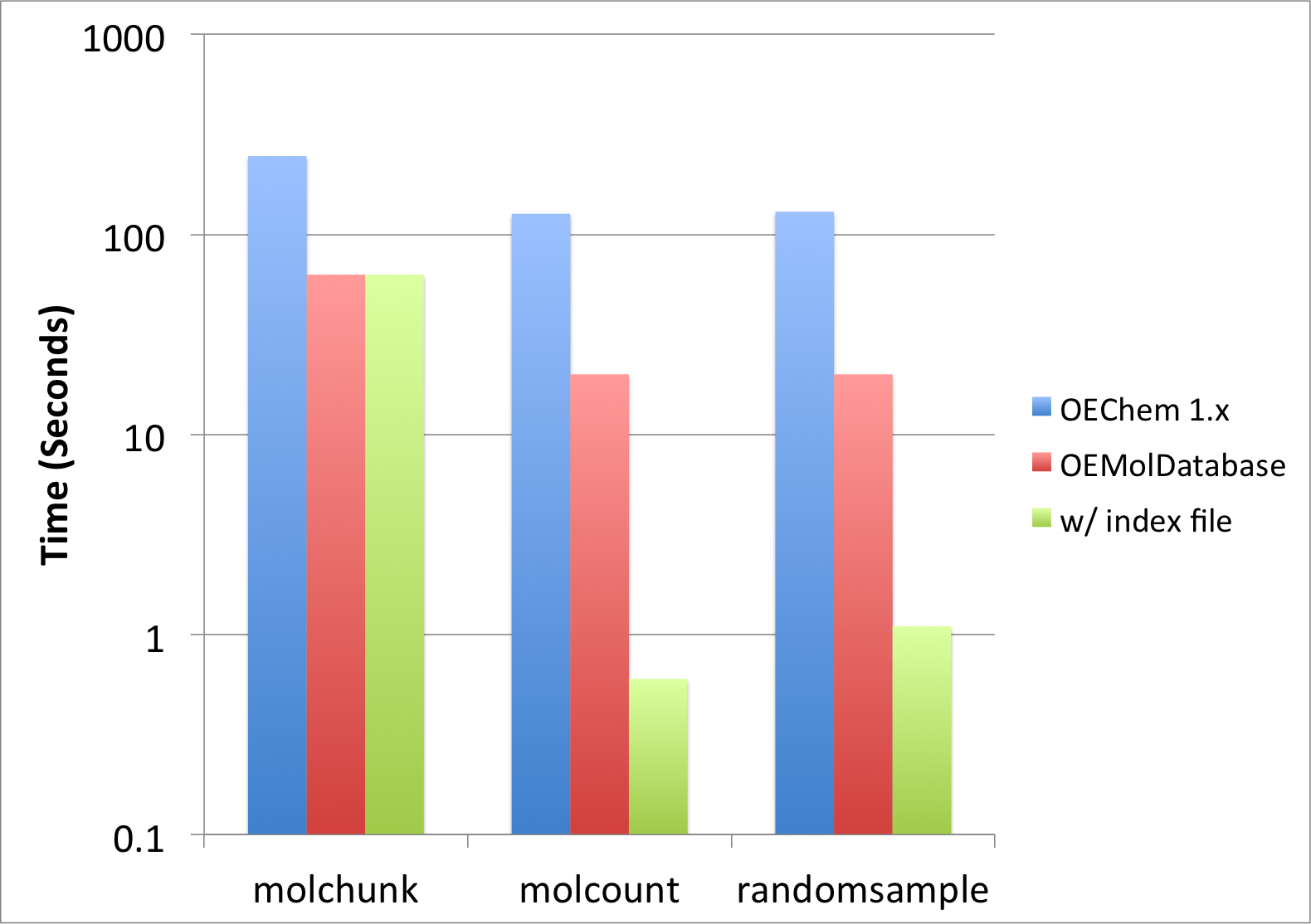
Figure 1: Performance improvement when using OEMolDatabase
The molecule file drugs.sdf (containing only 6 molecules) used in this recipe
to show the usage of the examples does not illustrate how awesome and
powerful molecule databases are.
See also
Rapid Similarity Searching of Large Molecule Files recipe, which shows how to perform 2D similarity search on large molecule files.
See also in Python documentation
random.sample()
See also in OEChem TK manual
Theory
Molecular Database Handling chapter
API
OECreateMolDatabaseIdx function
OEGetMolDatabaseIdxFileName function
OEMolDatabase class
See also in OEMedChem TK manual
API
OETotalMolecularComplexity function