Depicting Multiple Matches
Problem
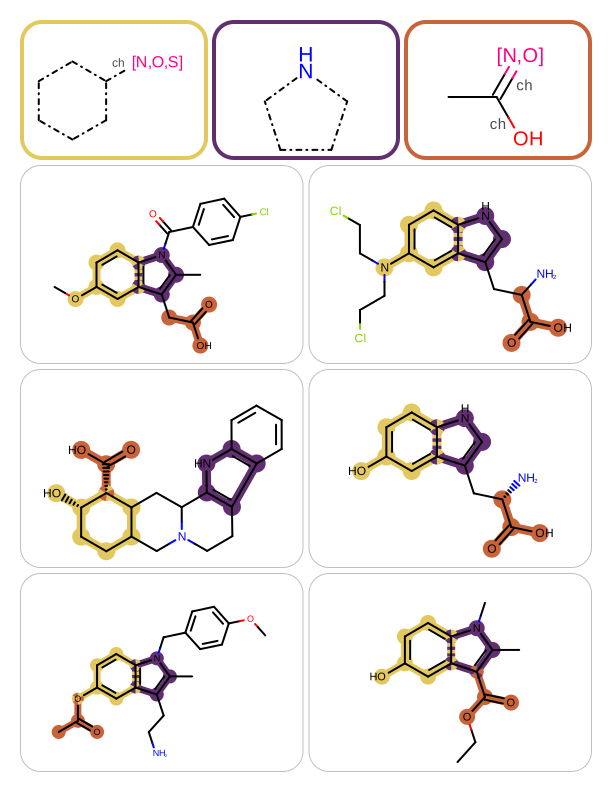
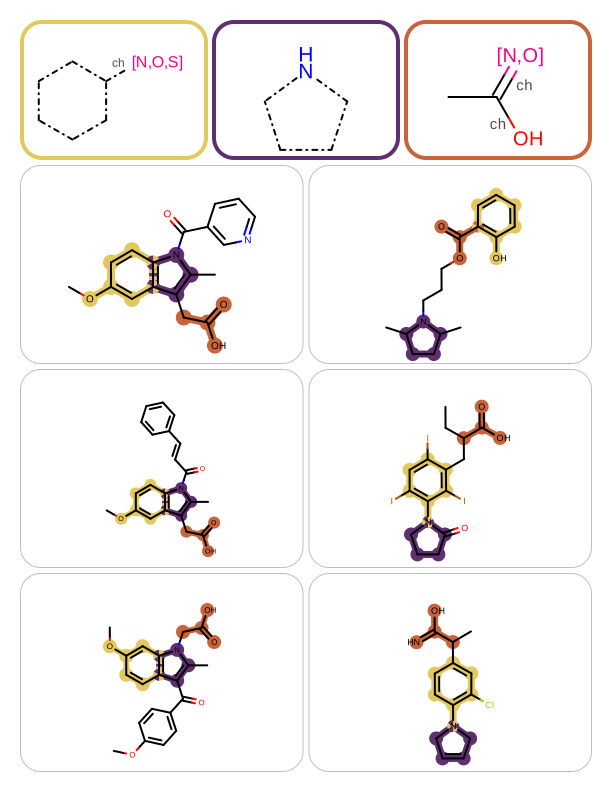
You want to perform multiple substructure searches and highlight the matches on the hit molecules. See example in Table 1.
page 1 |
page 2 |
|
|
Ingredients
|
Difficulty Level
🌶️ 🌶️
Download
Source Code
mdlsearches2pdf
#!/usr/bin/env python3
# (C) 2026 Cadence Design Systems, Inc. (Cadence)
# All rights reserved.
# TERMS FOR USE OF SAMPLE CODE The software below ("Sample Code") is
# provided to current licensees or subscribers of Cadence products or
# SaaS offerings (each a "Customer").
# Customer is hereby permitted to use, copy, and modify the Sample Code,
# subject to these terms. Cadence claims no rights to Customer's
# modifications. Modification of Sample Code is at Customer's sole and
# exclusive risk. Sample Code may require Customer to have a then
# current license or subscription to the applicable Cadence offering.
# THE SAMPLE CODE IS PROVIDED "AS IS", WITHOUT WARRANTY OF ANY KIND,
# EXPRESS OR IMPLIED.  OPENEYE DISCLAIMS ALL WARRANTIES, INCLUDING, BUT
# NOT LIMITED TO, WARRANTIES OF MERCHANTABILITY, FITNESS FOR A
# PARTICULAR PURPOSE AND NONINFRINGEMENT. In no event shall Cadence be
# liable for any damages or liability in connection with the Sample Code
# or its use.

"""Create a report that visualizes multiple MDL substructure matches."""

import argparse
import os
import pathlib
import sys

from openeye import oechem, oedepict
from rich.console import Console
from rich_argparse import HelpPreviewAction, RichHelpFormatter

__SCRIPT_NAME__ = pathlib.Path(__file__).absolute().stem
__SCRIPT_DESC__ = "Create a report that visualizes multiple MDL substructure matches."
__SCRIPT_TOOLKITS__ = ["oechem", "oedepict"]
__SCRIPT_CATEGORIES__ = ["depiction"]


def parse_args() -> argparse.Namespace:
    """Parse command-line arguments."""
    parser = argparse.ArgumentParser(
        add_help=True,
        formatter_class=RichHelpFormatter,
        description="[yellow]" + __SCRIPT_DESC__ + "[/yellow]",
    )

    input_group = parser.add_argument_group("Input options")
    input_group.add_argument(
        "--queries",
        type=str,
        nargs="+",
        required=True,
        metavar="QUERY-FILE",
        help="input MDL query file(s)",
    )
    input_group.add_argument(
        "--target",
        type=str,
        required=True,
        metavar="TARGET-FILE",
        help="input target molecule file",
    )

    report_group = parser.add_argument_group("Report options")
    report_group.add_argument(
        "--report",
        type=str,
        required=True,
        metavar="REPORT-FILE",
        help="output report file (PDF)",
    )
    report_group.add_argument(
        "--rows",
        type=int,
        default=3,
        choices=range(1, 4),
        metavar="N",
        help="number of rows per page (default: %(default)s)",
    )
    report_group.add_argument(
        "--cols",
        type=int,
        default=2,
        choices=range(1, 3),
        metavar="N",
        help="number of columns per page (default: %(default)s)",
    )
    report_group.add_argument(
        "--page-by-page",
        action="store_true",
        help="write pages of report to separate numbered image files (default: %(default)s)",
    )

    parser.add_argument("--help-image", action=HelpPreviewAction)
    return parser.parse_args()


def main() -> int:
    """Create a report that visualizes multiple MDL substructure matches."""
    args = parse_args()
    console = Console()

    _check_report_file(args)

    # open target molecule file
    input_stream = oechem.oemolistream()
    if not input_stream.open(args.target):
        oechem.OEThrow.Fatal("Cannot open target input file!")

    # read and initialize MDL queries
    queries, sub_searches = get_substructure_searches(args.queries)
    console.print(f"Number of queries: {len(queries)}")

    # initialize multi-page report
    report_options = oedepict.OEReportOptions(args.rows, args.cols)
    report_options.SetHeaderHeight(140.0)
    report = oedepict.OEReport(report_options)

    # setup depiction options
    display_options = oedepict.OE2DMolDisplayOptions()
    cell_width, cell_height = report.GetCellWidth(), report.GetCellHeight()
    display_options.SetDimensions(cell_width, cell_height, oedepict.OEScale_AutoScale)

    colors = oechem.OEGetContrastColors()

    # import molecules and prepare for search
    mol_list: list[oechem.OEGraphMol] = []
    for mol in input_stream.GetOEGraphMols():
        for ss in sub_searches:
            oechem.OEPrepareSearch(mol, ss)
        mol_list.append(oechem.OEGraphMol(mol))

    # depict hit molecules with highlighted matches
    depict_molecules_with_substructure_matches(
        report, mol_list, sub_searches, display_options, colors
    )

    if report.NumPages() == 0:
        oechem.OEThrow.Info("No match found!")
        return os.EX_OK

    # render query structures into headers
    depict_queries(report, queries, colors)

    if args.page_by_page:
        oedepict.OEWriteReportPageByPage(args.report, report)
    else:
        oedepict.OEWriteReport(args.report, report)

    return os.EX_OK


def depict_molecules_with_substructure_matches(
    report: oedepict.OEReport,
    mol_list: list[oechem.OEGraphMol],
    sub_searches: list[oechem.OESubSearch],
    opts: oedepict.OE2DMolDisplayOptions,
    colors: oechem.OEColorIter,
) -> None:
    """
    Depict molecules with highlighted substructure matches.

    Iterates over molecules, finds substructure matches for all queries,
    and renders matched molecules into report cells with overlay highlighting.
    """
    highlight = oedepict.OEHighlightOverlayByBallAndStick(colors)

    for mol in mol_list:
        matches = get_substructure_matches(sub_searches, mol)
        if len(matches) == 0:
            continue

        oedepict.OEPrepareDepiction(mol)
        disp = oedepict.OE2DMolDisplay(mol, opts)
        oedepict.OEAddHighlightOverlay(disp, highlight, matches)

        cell = report.NewCell()
        oedepict.OERenderMolecule(cell, disp)
        oedepict.OEDrawCurvedBorder(cell, oedepict.OELightGreyPen, 20)


def depict_queries(
    report: oedepict.OEReport,
    queries: list[oechem.OEGraphMol],
    colors: oechem.OEColorIter,
) -> None:
    """
    Render query structures into report page headers.

    Each query is drawn in its own grid cell within the header, surrounded
    by a colored border matching the highlight color used in the body.
    """
    for header in report.GetHeaders():
        grid = oedepict.OEImageGrid(header, 1, len(queries))
        grid.SetCellGap(4)
        cell_width, cell_height = grid.GetCellWidth(), grid.GetCellHeight()
        opts = oedepict.OE2DMolDisplayOptions(
            cell_width, cell_height, oedepict.OEScale_AutoScale
        )

        colors.ToFirst()
        for cell, query, color in zip(grid.GetCells(), queries, colors, strict=False):
            disp = oedepict.OE2DMolDisplay(query, opts)
            oedepict.OERenderMolecule(cell, disp)
            pen = oedepict.OEPen(oechem.OEWhite, color, oedepict.OEFill_Off, 4.0)
            oedepict.OEDrawCurvedBorder(cell, pen, 20)


def get_substructure_search(
    query_fname: str,
) -> tuple[oechem.OEMolBase, oechem.OESubSearch]:
    """Load a single MDL query file and build a substructure search."""
    query_ifs = oechem.oemolistream()
    if not query_ifs.open(query_fname):
        oechem.OEThrow.Fatal("Cannot open MDL query file!")
    if query_ifs.GetFormat() != oechem.OEFormat_MDL:
        oechem.OEThrow.Fatal("Query file has to be an MDL file!")

    mol = oechem.OEGraphMol()
    if not oechem.OEReadMDLQueryFile(query_ifs, mol):
        oechem.OEThrow.Fatal("Cannot read query molecule!")
    oedepict.OEPrepareDepiction(mol)

    query_mol = oechem.OEQMol()
    query_opts = oechem.OEMDLQueryOpts_Default | oechem.OEMDLQueryOpts_SuppressExplicitH
    oechem.OEBuildMDLQueryExpressions(query_mol, mol, query_opts)

    sub_search = oechem.OESubSearch()
    if not sub_search.Init(query_mol):
        oechem.OEThrow.Fatal("Cannot initialize substructure search!")
    sub_search.SetMaxMatches(1)

    return (mol, sub_search)


def get_substructure_searches(
    query_filenames: list[str],
) -> tuple[list[oechem.OEGraphMol], list[oechem.OESubSearch]]:
    """Load MDL query files and build substructure searches for each."""
    query_mols: list[oechem.OEGraphMol] = []
    sub_searches: list[oechem.OESubSearch] = []

    for query_fname in query_filenames:
        query_mol, sub_search = get_substructure_search(query_fname)
        query_mols.append(oechem.OEGraphMol(query_mol))
        sub_searches.append(oechem.OESubSearch(sub_search))

    return query_mols, sub_searches


def get_substructure_matches(
    sub_searches: list[oechem.OESubSearch],
    mol: oechem.OEMolBase,
) -> list[oechem.OEAtomBondSet]:
    """Return atom/bond sets for all query matches, or empty list if any fails."""
    unique = True
    matches: list[oechem.OEAtomBondSet] = []
    for ss in sub_searches:
        miter = ss.Match(mol, unique)
        if not miter.IsValid():
            return []
        match = miter.Target()
        matches.append(
            oechem.OEAtomBondSet(match.GetTargetAtoms(), match.GetTargetBonds())
        )

    return matches


def _check_report_file(args: argparse.Namespace) -> None:
    """Validate report file format and adjust page-by-page if needed."""
    ext = pathlib.Path(args.report).suffix[1:]
    if not args.page_by_page and not oedepict.OEIsRegisteredMultiPageImageFile(ext):
        oechem.OEThrow.Warning("Report will be generated into separate pages!")
        args.page_by_page = True


setattr(main, "__SCRIPT_NAME__", __SCRIPT_NAME__)
setattr(main, "__SCRIPT_DESC__", __SCRIPT_DESC__)
setattr(main, "__SCRIPT_TOOLKITS__", __SCRIPT_TOOLKITS__)
setattr(main, "__SCRIPT_CATEGORIES__", __SCRIPT_CATEGORIES__)

if __name__ == "__main__":
    sys.exit(main())
Solution
The get_substructure_search
function shows how to read MDL query files (OEReadMDLQueryFile) and initialize
an OEQMol object by calling the OEBuildMDLQueryExpressions function.
This OEQMol object is then used to initialize the OESubSearch object that
performs substructure searches.
Setting the maximum number of matches to 1 ensures the
search will terminate upon finding one match.
The get_substructure_search
function returns both the query molecule that will be depicted at the top of
each page of the report and the substructure search object.
See also
Substructure Search with MDL Queries chapter in the OEChem TK manual.
def get_substructure_search(
    query_fname: str,
) -> tuple[oechem.OEMolBase, oechem.OESubSearch]:
    """Load a single MDL query file and build a substructure search."""
    query_ifs = oechem.oemolistream()
    if not query_ifs.open(query_fname):
        oechem.OEThrow.Fatal("Cannot open MDL query file!")
    if query_ifs.GetFormat() != oechem.OEFormat_MDL:
        oechem.OEThrow.Fatal("Query file has to be an MDL file!")

    mol = oechem.OEGraphMol()
    if not oechem.OEReadMDLQueryFile(query_ifs, mol):
        oechem.OEThrow.Fatal("Cannot read query molecule!")
    oedepict.OEPrepareDepiction(mol)

    query_mol = oechem.OEQMol()
    query_opts = oechem.OEMDLQueryOpts_Default | oechem.OEMDLQueryOpts_SuppressExplicitH
    oechem.OEBuildMDLQueryExpressions(query_mol, mol, query_opts)

    sub_search = oechem.OESubSearch()
    if not sub_search.Init(query_mol):
        oechem.OEThrow.Fatal("Cannot initialize substructure search!")
    sub_search.SetMaxMatches(1)

    return (mol, sub_search)
The get_substructure_searches function iterates over a list of query file names and collects the query molecules and the substructure search objects (returned by the get_substructure_search function) in two separate lists.
def get_substructure_searches(
    query_filenames: list[str],
) -> tuple[list[oechem.OEGraphMol], list[oechem.OESubSearch]]:
    """Load MDL query files and build substructure searches for each."""
    query_mols: list[oechem.OEGraphMol] = []
    sub_searches: list[oechem.OESubSearch] = []

    for query_fname in query_filenames:
        query_mol, sub_search = get_substructure_search(query_fname)
        query_mols.append(oechem.OEGraphMol(query_mol))
        sub_searches.append(oechem.OESubSearch(sub_search))

    return query_mols, sub_searches
depict_molecules_with_substructure_matches iterates over the target molecules and performs substructure searches by calling the get_substructure_matches function that:
returns an empty list if the target molecule does not contain all substructures, or
returns the list of substructure matches, one match for each successful substructure search.
In the latter case, the molecule (i.e. the hit) is rendered into the next cell of the report and the matched substructures are highlighted by calling the OEAddHighlightOverlay function. The OEAddHighlightOverlay function takes all matches being highlighted and colors the overlapped atoms and bonds using the colors in turn. The colors used for highlighting are determined when the OEHighlightOverlayByBallAndStick object is constructed.
 1def depict_molecules_with_substructure_matches(
 2    report: oedepict.OEReport,
 3    mol_list: list[oechem.OEGraphMol],
 4    sub_searches: list[oechem.OESubSearch],
 5    opts: oedepict.OE2DMolDisplayOptions,
 6    colors: oechem.OEColorIter,
 7) -> None:
 8    """
 9    Depict molecules with highlighted substructure matches.
10
11    Iterates over molecules, finds substructure matches for all queries,
12    and renders matched molecules into report cells with overlay highlighting.
13    """
14    highlight = oedepict.OEHighlightOverlayByBallAndStick(colors)
15
16    for mol in mol_list:
17        matches = get_substructure_matches(sub_searches, mol)
18        if len(matches) == 0:
19            continue
20
21        oedepict.OEPrepareDepiction(mol)
22        disp = oedepict.OE2DMolDisplay(mol, opts)
23        oedepict.OEAddHighlightOverlay(disp, highlight, matches)
24
25        cell = report.NewCell()
26        oedepict.OERenderMolecule(cell, disp)
27        oedepict.OEDrawCurvedBorder(cell, oedepict.OELightGreyPen, 20)
The get_substructure_matches function iterates over the substructure searches. If a substructure search fails, the function returns an empty list. After each successful search, the match list is appended with a new match stored in an OEAtomBondSet object.
 1def get_substructure_matches(
 2    sub_searches: list[oechem.OESubSearch],
 3    mol: oechem.OEMolBase,
 4) -> list[oechem.OEAtomBondSet]:
 5    """Return atom/bond sets for all query matches, or empty list if any fails."""
 6    unique = True
 7    matches: list[oechem.OEAtomBondSet] = []
 8    for ss in sub_searches:
 9        miter = ss.Match(mol, unique)
10        if not miter.IsValid():
11            return []
12        match = miter.Target()
13        matches.append(
14            oechem.OEAtomBondSet(match.GetTargetAtoms(), match.GetTargetBonds())
15        )
16
17    return matches
After generating the report with the substructure search matches, the queries can be depicted on each page of the report. The depict_queries function iterates over the headers of the OEReport object and depicts each query in a row that is generated using an OEImageGrid object. A border is drawn around each query molecule with its associated color to aid in finding the corresponding substructure matches in the hit molecules.
 1def depict_queries(
 2    report: oedepict.OEReport,
 3    queries: list[oechem.OEGraphMol],
 4    colors: oechem.OEColorIter,
 5) -> None:
 6    """
 7    Render query structures into report page headers.
 8
 9    Each query is drawn in its own grid cell within the header, surrounded
10    by a colored border matching the highlight color used in the body.
11    """
12    for header in report.GetHeaders():
13        grid = oedepict.OEImageGrid(header, 1, len(queries))
14        grid.SetCellGap(4)
15        cell_width, cell_height = grid.GetCellWidth(), grid.GetCellHeight()
16        opts = oedepict.OE2DMolDisplayOptions(
17            cell_width, cell_height, oedepict.OEScale_AutoScale
18        )
19
20        colors.ToFirst()
21        for cell, query, color in zip(grid.GetCells(), queries, colors, strict=False):
22            disp = oedepict.OE2DMolDisplay(query, opts)
23            oedepict.OERenderMolecule(cell, disp)
24            pen = oedepict.OEPen(oechem.OEWhite, color, oedepict.OEFill_Off, 4.0)
25            oedepict.OEDrawCurvedBorder(cell, pen, 20)
Usage
See Download section to download the script.
> activity2pdf --help
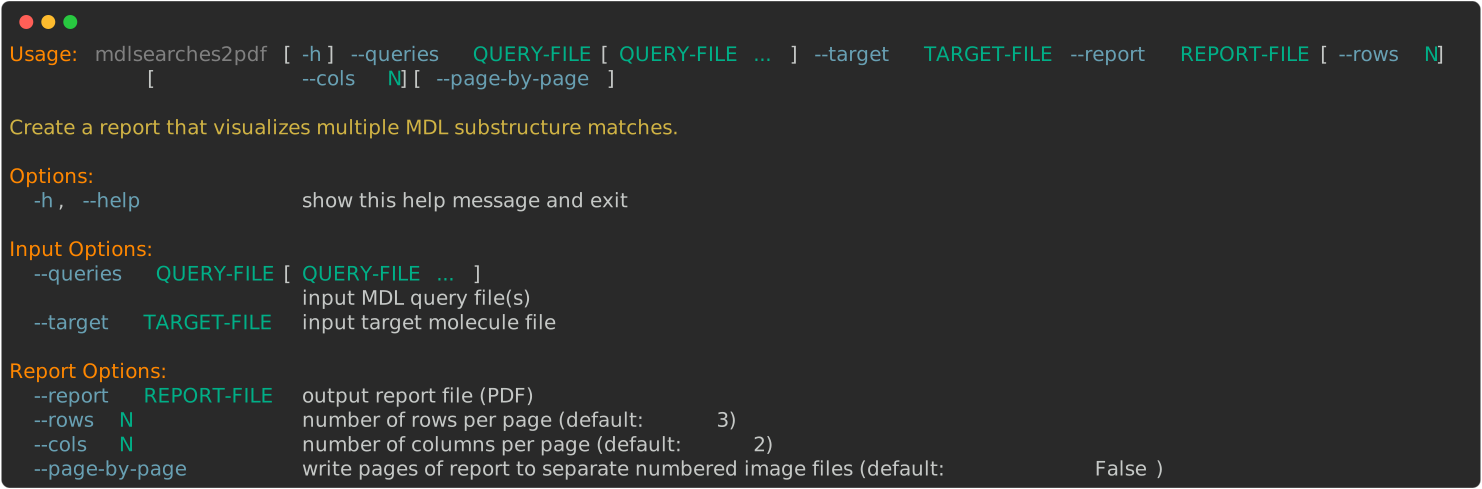
> mdlsearches2pdf --help
The command below will generate a multi-page PDF report (mdlsearches2pdf.pdf)
with the molecules depicted in Table 1.
> mdlsearches2pdf --target targets.ism --queries query-A.mol query-B.mol query-C.mol --report report.pdf
Discussion
Using colors with high contrast is recommended when highlighting overlapping matches by the OEAddHighlightOverlay function. In this example, the colors returned by the OEGetContrastColors function are used.

Figure 1: Colors of maximum contrast returned by the OEGetContrastColors function
Even though there is no limit on the number of overlapping patterns that can be highlighted simultaneously by the OEAddHighlightOverlay function, attempting to highlight too many patterns will result in a complex image that will be difficult to visually interpret (see example in Figure 2).
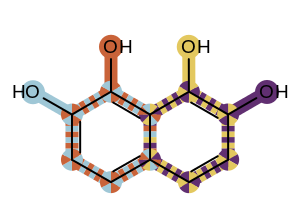
Figure 2: Example of highlighting extremely overlapping patterns
See also in OEChem TK manual
Theory
API
OESubSearch class
OEGetContrastColors function
See also in OEDepict TK manual
Theory
Molecule Depiction chapter
Highlighting Overlapped Patterns section
API
OE2DMolDisplay class
OE2DMolDisplayOptions class
OEAddHighlightOverlay function
OEImage class
OEImageGrid class
OEPrepareDepiction function
OERenderMolecule function
OEReport class