Depicting Reaction Components
Problem
You want to depict your MDL reaction with highlighting of its reactant and product components.
OEDepict TK provides the ability to depict the mapping index between reactant and product atoms. See an example in Figure 1.
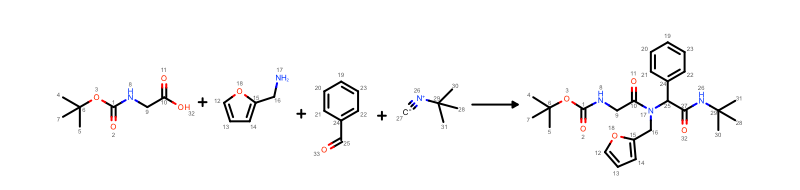
Figure 1. Example of MDL reaction depiction with atom mapping
However, there is a better way to visualize this information using highlighting. In the image below, each reactant of the reaction is highlighted using a different color and then the same color is used to highlight the atoms of the product(s) which are mapped to atoms of the given reactant. See an example in Figure 2.
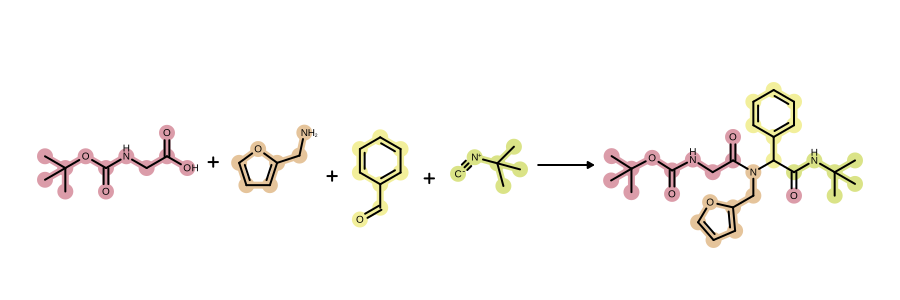
Figure 2. Example of MDL reaction depiction with component highlighting
Or you can also mark the reaction centers of the reaction as shown in Figure 3.
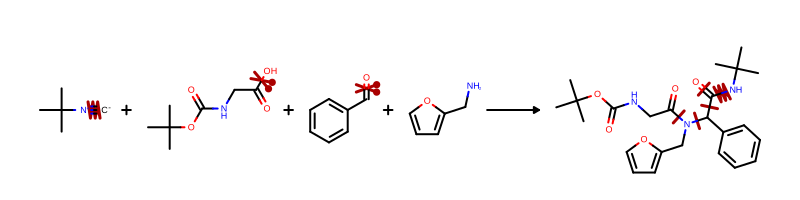
Figure 3. Example of MDL reaction depiction with marked reaction centers
Ingredients
|
Difficulty Level
🌶️ 🌶️
Download
Source Code
reaction2img
#!/usr/bin/env python3
# (C) 2026 Cadence Design Systems, Inc. (Cadence)
# All rights reserved.
# TERMS FOR USE OF SAMPLE CODE The software below ("Sample Code") is
# provided to current licensees or subscribers of Cadence products or
# SaaS offerings (each a "Customer").
# Customer is hereby permitted to use, copy, and modify the Sample Code,
# subject to these terms. Cadence claims no rights to Customer's
# modifications. Modification of Sample Code is at Customer's sole and
# exclusive risk. Sample Code may require Customer to have a then
# current license or subscription to the applicable Cadence offering.
# THE SAMPLE CODE IS PROVIDED "AS IS", WITHOUT WARRANTY OF ANY KIND,
# EXPRESS OR IMPLIED.  OPENEYE DISCLAIMS ALL WARRANTIES, INCLUDING, BUT
# NOT LIMITED TO, WARRANTIES OF MERCHANTABILITY, FITNESS FOR A
# PARTICULAR PURPOSE AND NONINFRINGEMENT. In no event shall Cadence be
# liable for any damages or liability in connection with the Sample Code
# or its use.


"""Depict MDL reactions with colored highlights by component and map index."""


import argparse
import io
import os
import pathlib
import sys

from openeye import oechem, oedepict
from PIL import Image
from rich_argparse import HelpPreviewAction, RichHelpFormatter

__SCRIPT_NAME__ = pathlib.Path(__file__).absolute().stem
__SCRIPT_DESC__ = (
    "Depict MDL reactions with colored highlights by component and map index."
)
__SCRIPT_TOOLKITS__ = ["oechem", "oedepict"]
__SCRIPT_KEYWORDS__ = ["monomer", "reaction", "depiction"]
__SCRIPT_CATEGORIES__ = ["depiction"]


def parse_args() -> argparse.Namespace:
    """Set up command line options."""
    parser = argparse.ArgumentParser(
        add_help=True,
        formatter_class=RichHelpFormatter,
        description="[yellow]" + __SCRIPT_DESC__ + "[/yellow]",
    )

    input_group = parser.add_argument_group("Input reaction")
    input_group.add_argument(
        "--rxn",
        metavar="RXN-FILE",
        type=str,
        required=True,
        help="input reaction file (rxn)",
    )

    image_group = parser.add_argument_group("Image options")
    image_group.add_argument(
        "--image",
        type=str,
        required=False,
        metavar="IMAGE-FILE",
        help="output image file (PNG, SVG) (required: %(required)s) -- if no output is provided the image will be displayed on the  screen",
    )
    image_group.add_argument(
        "--width",
        type=int,
        default=900,
        help="width of output image (default: %(default)s)",
    )
    image_group.add_argument(
        "--height",
        type=int,
        default=300,
        help="height of output image (default: %(default)s)",
    )

    parser.add_argument("--help-image", action=HelpPreviewAction)
    return parser.parse_args()


def main() -> int:
    """Render an MDL reaction file with component highlighting."""
    args = parse_args()

    _check_image_file(args)

    ifs = oechem.oemolistream()
    if not ifs.open(args.rxn):
        oechem.OEThrow.Fatal("Cannot open input file!")

    reaction_mol = oechem.OEGraphMol()
    if not oechem.OEReadMDLReactionQueryFile(ifs, reaction_mol):
        oechem.OEThrow.Fatal("Cannot read reaction file!")

    image = oedepict.OEImage(args.width, args.height)

    opts = oedepict.OE2DMolDisplayOptions(
        args.width, args.height, oedepict.OEScale_AutoScale
    )
    opts.SetAtomColorStyle(oedepict.OEAtomColorStyle_WhiteMonochrome)

    # # depict reaction with component highlights

    reaction_display = oedepict.OE2DMolDisplay(reaction_mol, opts)
    color_reaction_by_components(reaction_display)
    oedepict.OERenderMolecule(image, reaction_display)

    if args.image:
        oedepict.OEWriteImage(args.image, image)
    else:
        image_view = Image.open(io.BytesIO(oedepict.OEWriteImageToBytes("png", image)))
        image_view.show()

    return os.EX_OK


def color_reaction_by_components(
    reaction_display: oedepict.OE2DMolDisplay,
) -> None:
    """Highlight reaction components with distinct colors."""
    reaction_mol = reaction_display.GetMolecule()
    num_parts, parts = oechem.OEDetermineComponents(reaction_mol)
    part_pred = oechem.OEPartPredAtom(parts)

    colors = list(oechem.OEGetLightColors())
    highlight_style = oedepict.OEHighlightStyle_BallAndStick

    for part_idx, color in zip(range(1, num_parts + 1), colors, strict=False):

        part_pred.SelectPart(part_idx)

        if is_reactant_component(reaction_mol, part_pred):

            reactant = oechem.OEAtomBondSet(reaction_mol.GetAtoms(part_pred))
            add_bonds_between_atoms(reaction_mol, reactant)
            oedepict.OEAddHighlighting(
                reaction_display, color, highlight_style, reactant
            )

            product = get_product_atoms(reaction_mol, reactant)
            add_bonds_between_atoms(reaction_mol, product)
            oedepict.OEAddHighlighting(
                reaction_display, color, highlight_style, product
            )


def get_product_atoms(
    reaction_mol: oechem.OEMolBase,
    reactant: oechem.OEAtomBondSet,
) -> oechem.OEAtomBondSet:
    """Retrieve product atoms corresponding to reactant atoms by map index."""
    product = oechem.OEAtomBondSet()
    for reactant_atom in reactant.GetAtoms():
        map_idx = reactant_atom.GetMapIdx()
        if map_idx != 0:
            product_atom = reaction_mol.GetAtom(
                oechem.OEAndAtom(
                    oechem.OEHasMapIdx(map_idx), oechem.OEAtomIsInProduct()
                )
            )
            if product_atom is not None:
                product.AddAtom(product_atom)

    return product


def is_reactant_component(
    reaction_mol: oechem.OEMolBase, part_pred: oechem.OEUnaryAtomPred
) -> bool:
    """Check if a component is part of the reaction reactants."""
    atom = reaction_mol.GetAtom(
        oechem.OEAndAtom(part_pred, oechem.OEAtomIsInReactant())
    )
    return atom is not None


def add_bonds_between_atoms(
    reaction_mol: oechem.OEMolBase,
    atom_bond_set: oechem.OEAtomBondSet,
) -> None:
    """Add bonds between atoms in a set."""
    pred = oechem.OEIsAtomMember(atom_bond_set.GetAtoms())
    for bond in reaction_mol.GetBonds():
        if pred(bond.GetBgn()) and pred(bond.GetEnd()):
            atom_bond_set.AddBond(bond)


def _check_image_file(args: argparse.Namespace) -> None:
    # script will terminate if there are some issues
    if not args.image:
        # image will be displayed on the screen
        return
    ext = pathlib.Path(args.image).suffix[1:].upper()
    if not oedepict.OEIsRegisteredImageFile(ext):
        oechem.OEThrow.Fatal("Unknown image output type!")

    ofs = oechem.oeofstream()
    if not ofs.open(args.image):
        oechem.OEThrow.Fatal("Cannot open output image file!")


setattr(main, "__SCRIPT_NAME__", __SCRIPT_NAME__)
setattr(main, "__SCRIPT_DESC__", __SCRIPT_DESC__)
setattr(main, "__SCRIPT_TOOLKITS__", __SCRIPT_TOOLKITS__)
setattr(main, "__SCRIPT_KEYWORDS__", __SCRIPT_KEYWORDS__)
setattr(main, "__SCRIPT_CATEGORIES__", __SCRIPT_CATEGORIES__)


if __name__ == "__main__":
    sys.exit(main())
reactioncenter2img
#!/usr/bin/env python3
# (C) 2026 Cadence Design Systems, Inc. (Cadence)
# All rights reserved.
# TERMS FOR USE OF SAMPLE CODE The software below ("Sample Code") is
# provided to current licensees or subscribers of Cadence products or
# SaaS offerings (each a "Customer").
# Customer is hereby permitted to use, copy, and modify the Sample Code,
# subject to these terms. Cadence claims no rights to Customer's
# modifications. Modification of Sample Code is at Customer's sole and
# exclusive risk. Sample Code may require Customer to have a then
# current license or subscription to the applicable Cadence offering.
# THE SAMPLE CODE IS PROVIDED "AS IS", WITHOUT WARRANTY OF ANY KIND,
# EXPRESS OR IMPLIED.  OPENEYE DISCLAIMS ALL WARRANTIES, INCLUDING, BUT
# NOT LIMITED TO, WARRANTIES OF MERCHANTABILITY, FITNESS FOR A
# PARTICULAR PURPOSE AND NONINFRINGEMENT. In no event shall Cadence be
# liable for any damages or liability in connection with the Sample Code
# or its use.


"""Depict MDL reactions with colored highlights by component and map index."""


import argparse
import io
import os
import pathlib
import sys

from openeye import oechem, oedepict
from PIL import Image
from rich_argparse import HelpPreviewAction, RichHelpFormatter

__SCRIPT_NAME__ = pathlib.Path(__file__).absolute().stem
__SCRIPT_DESC__ = (
    "Depict MDL reactions with colored highlights by component and map index."
)
__SCRIPT_TOOLKITS__ = ["oechem", "oedepict"]
__SCRIPT_KEYWORDS__ = ["monomer", "reaction", "depiction"]
__SCRIPT_CATEGORIES__ = ["depiction"]


def parse_args() -> argparse.Namespace:
    """Set up command line options."""
    parser = argparse.ArgumentParser(
        add_help=True,
        formatter_class=RichHelpFormatter,
        description="[yellow]" + __SCRIPT_DESC__ + "[/yellow]",
    )

    input_group = parser.add_argument_group("Input reaction")
    input_group.add_argument(
        "--rxn",
        metavar="RXN-FILE",
        type=str,
        required=True,
        help="input reaction file (rxn)",
    )

    image_group = parser.add_argument_group("Image options")
    image_group.add_argument(
        "--image",
        type=str,
        required=False,
        metavar="IMAGE-FILE",
        help="output image file (PNG, SVG) (required: %(required)s) -- if no output is provided the image will be displayed on the  screen",
    )
    image_group.add_argument(
        "--width",
        type=int,
        default=900,
        help="width of output image (default: %(default)s)",
    )
    image_group.add_argument(
        "--height",
        type=int,
        default=300,
        help="height of output image (default: %(default)s)",
    )

    parser.add_argument("--help-image", action=HelpPreviewAction)
    return parser.parse_args()


def main() -> int:
    """Render an MDL reaction file with component highlighting."""
    args = parse_args()

    _check_image_file(args)

    ifs = oechem.oemolistream()
    if not ifs.open(args.rxn):
        oechem.OEThrow.Fatal("Cannot open input file!")

    reaction_mol = oechem.OEGraphMol()
    if not oechem.OEReadMDLReactionQueryFile(ifs, reaction_mol):
        oechem.OEThrow.Fatal("Cannot read reaction file!")

    image = oedepict.OEImage(args.width, args.height)

    opts = oedepict.OE2DMolDisplayOptions(
        args.width, args.height, oedepict.OEScale_AutoScale
    )
    opts.SetAtomColorStyle(oedepict.OEAtomColorStyle_WhiteMonochrome)

    # # depict reaction with component highlights

    reaction_display = oedepict.OE2DMolDisplay(reaction_mol, opts)
    color_reaction_by_components(reaction_display)
    oedepict.OERenderMolecule(image, reaction_display)

    if args.image:
        oedepict.OEWriteImage(args.image, image)
    else:
        image_view = Image.open(io.BytesIO(oedepict.OEWriteImageToBytes("png", image)))
        image_view.show()

    return os.EX_OK


def color_reaction_by_components(
    reaction_display: oedepict.OE2DMolDisplay,
) -> None:
    """Highlight reaction components with distinct colors."""
    reaction_mol = reaction_display.GetMolecule()
    num_parts, parts = oechem.OEDetermineComponents(reaction_mol)
    part_pred = oechem.OEPartPredAtom(parts)

    colors = list(oechem.OEGetLightColors())
    highlight_style = oedepict.OEHighlightStyle_BallAndStick

    for part_idx, color in zip(range(1, num_parts + 1), colors, strict=False):

        part_pred.SelectPart(part_idx)

        if is_reactant_component(reaction_mol, part_pred):

            reactant = oechem.OEAtomBondSet(reaction_mol.GetAtoms(part_pred))
            add_bonds_between_atoms(reaction_mol, reactant)
            oedepict.OEAddHighlighting(
                reaction_display, color, highlight_style, reactant
            )

            product = get_product_atoms(reaction_mol, reactant)
            add_bonds_between_atoms(reaction_mol, product)
            oedepict.OEAddHighlighting(
                reaction_display, color, highlight_style, product
            )


def get_product_atoms(
    reaction_mol: oechem.OEMolBase,
    reactant: oechem.OEAtomBondSet,
) -> oechem.OEAtomBondSet:
    """Retrieve product atoms corresponding to reactant atoms by map index."""
    product = oechem.OEAtomBondSet()
    for reactant_atom in reactant.GetAtoms():
        map_idx = reactant_atom.GetMapIdx()
        if map_idx != 0:
            product_atom = reaction_mol.GetAtom(
                oechem.OEAndAtom(
                    oechem.OEHasMapIdx(map_idx), oechem.OEAtomIsInProduct()
                )
            )
            if product_atom is not None:
                product.AddAtom(product_atom)

    return product


def is_reactant_component(
    reaction_mol: oechem.OEMolBase, part_pred: oechem.OEUnaryAtomPred
) -> bool:
    """Check if a component is part of the reaction reactants."""
    atom = reaction_mol.GetAtom(
        oechem.OEAndAtom(part_pred, oechem.OEAtomIsInReactant())
    )
    return atom is not None


def add_bonds_between_atoms(
    reaction_mol: oechem.OEMolBase,
    atom_bond_set: oechem.OEAtomBondSet,
) -> None:
    """Add bonds between atoms in a set."""
    pred = oechem.OEIsAtomMember(atom_bond_set.GetAtoms())
    for bond in reaction_mol.GetBonds():
        if pred(bond.GetBgn()) and pred(bond.GetEnd()):
            atom_bond_set.AddBond(bond)


def _check_image_file(args: argparse.Namespace) -> None:
    # script will terminate if there are some issues
    if not args.image:
        # image will be displayed on the screen
        return
    ext = pathlib.Path(args.image).suffix[1:].upper()
    if not oedepict.OEIsRegisteredImageFile(ext):
        oechem.OEThrow.Fatal("Unknown image output type!")

    ofs = oechem.oeofstream()
    if not ofs.open(args.image):
        oechem.OEThrow.Fatal("Cannot open output image file!")


setattr(main, "__SCRIPT_NAME__", __SCRIPT_NAME__)
setattr(main, "__SCRIPT_DESC__", __SCRIPT_DESC__)
setattr(main, "__SCRIPT_TOOLKITS__", __SCRIPT_TOOLKITS__)
setattr(main, "__SCRIPT_KEYWORDS__", __SCRIPT_KEYWORDS__)
setattr(main, "__SCRIPT_CATEGORIES__", __SCRIPT_CATEGORIES__)


if __name__ == "__main__":
    sys.exit(main())
Solution
The color_reaction_by_components shows how a reaction is partitioned into components by calling the OEDetermineComponents function. The OEDetermineComponents function returns the number of components of a molecule i.e. in this case the number of reactants and products of the reaction and it also returns a list that stores which part each atom belongs to. This parts list is then used to set up an OEPartPredAtom predicate. A loop over the reactant components of the reaction associates each with a different color. Inside the loop the atoms of each reactant are highlighted along with the product atoms that are mapped to the given reactant.
def color_reaction_by_components(
    reaction_display: oedepict.OE2DMolDisplay,
) -> None:
    """Highlight reaction components with distinct colors."""
    reaction_mol = reaction_display.GetMolecule()
    num_parts, parts = oechem.OEDetermineComponents(reaction_mol)
    part_pred = oechem.OEPartPredAtom(parts)

    colors = list(oechem.OEGetLightColors())
    highlight_style = oedepict.OEHighlightStyle_BallAndStick

    for part_idx, color in zip(range(1, num_parts + 1), colors, strict=False):

        part_pred.SelectPart(part_idx)

        if is_reactant_component(reaction_mol, part_pred):

            reactant = oechem.OEAtomBondSet(reaction_mol.GetAtoms(part_pred))
            add_bonds_between_atoms(reaction_mol, reactant)
            oedepict.OEAddHighlighting(
                reaction_display, color, highlight_style, reactant
            )

            product = get_product_atoms(reaction_mol, reactant)
            add_bonds_between_atoms(reaction_mol, product)
            oedepict.OEAddHighlighting(
                reaction_display, color, highlight_style, product
            )
The is_reactant_component function identifies whether a given component is a reactant, in which case it returns True.
def is_reactant_component(
    reaction_mol: oechem.OEMolBase, part_pred: oechem.OEUnaryAtomPred
) -> bool:
    """Check if a component is part of the reaction reactants."""
    atom = reaction_mol.GetAtom(
        oechem.OEAndAtom(part_pred, oechem.OEAtomIsInReactant())
    )
    return atom is not None
The get_product_atoms function is used to identify the product atoms of the reaction that are mapped to the atoms of the given reactant. Two atoms are mapped to each other if they have the same index returned by the OEAtomBase.GetMapIdx method.
def get_product_atoms(
    reaction_mol: oechem.OEMolBase,
    reactant: oechem.OEAtomBondSet,
) -> oechem.OEAtomBondSet:
    """Retrieve product atoms corresponding to reactant atoms by map index."""
    product = oechem.OEAtomBondSet()
    for reactant_atom in reactant.GetAtoms():
        map_idx = reactant_atom.GetMapIdx()
        if map_idx != 0:
            product_atom = reaction_mol.GetAtom(
                oechem.OEAndAtom(
                    oechem.OEHasMapIdx(map_idx), oechem.OEAtomIsInProduct()
                )
            )
            if product_atom is not None:
                product.AddAtom(product_atom)

    return product
In order to highlight not only the atoms but also the bonds of the reaction, the add_bonds_between_atoms function is called. It adds a bond to the given OEAtomBondSet object if both of its end atoms belong to the same component.
def add_bonds_between_atoms(
    reaction_mol: oechem.OEMolBase,
    atom_bond_set: oechem.OEAtomBondSet,
) -> None:
    """Add bonds between atoms in a set."""
    pred = oechem.OEIsAtomMember(atom_bond_set.GetAtoms())
    for bond in reaction_mol.GetBonds():
        if pred(bond.GetBgn()) and pred(bond.GetEnd()):
            atom_bond_set.AddBond(bond)
Usage
See Download to download the script.
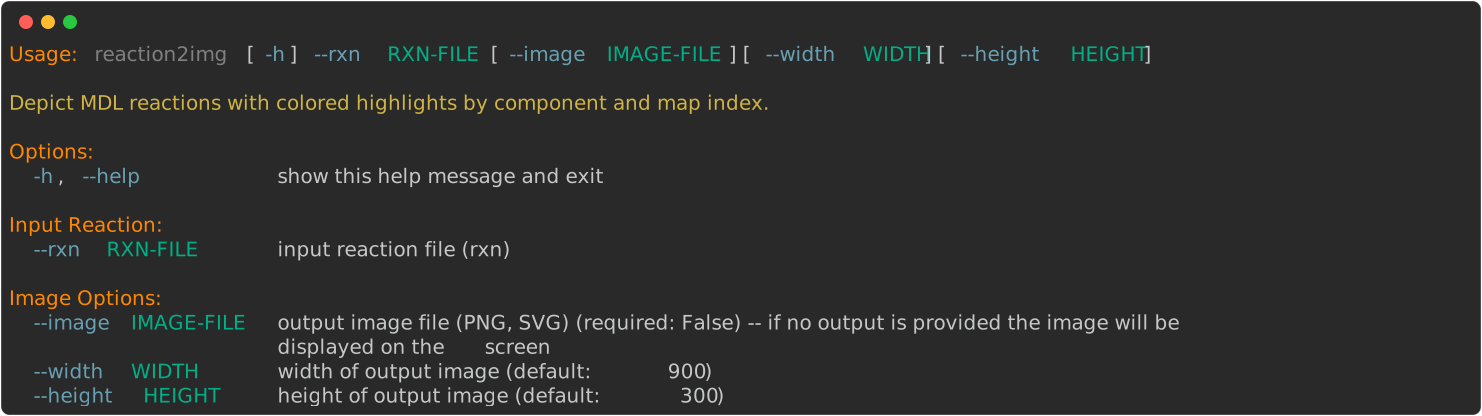
reaction2img
> reaction2img --help
The following command generates Figure 2
for the ugi.rxn reaction.
> reaction2img --rxn ugi.rxn --image image.svg
reactioncenter2img
> reactioncenter2img --help
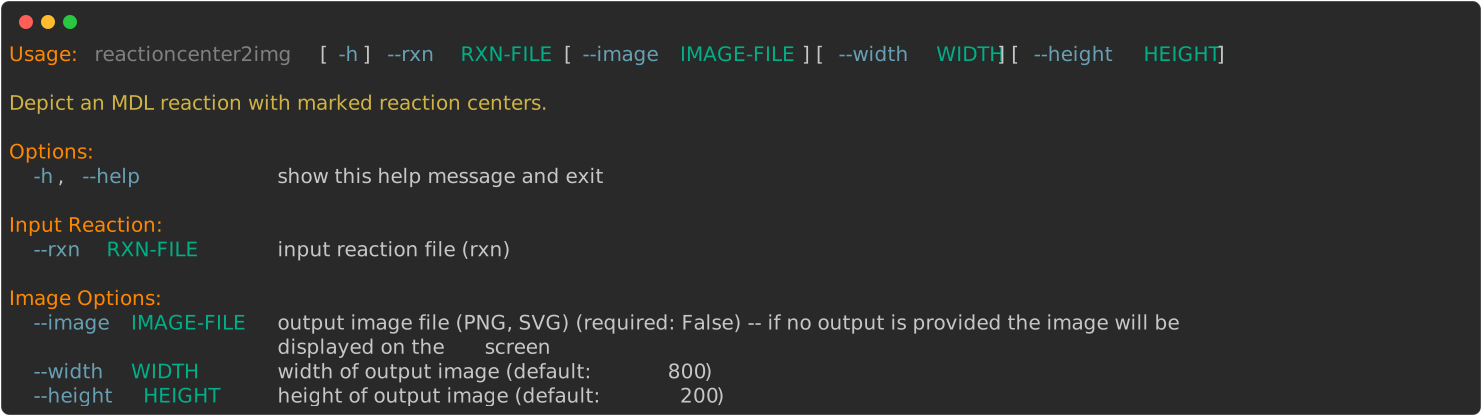
The following command generates Figure 3
for the ugi.rxn reaction.
> reactioncenter2img --rxn ugi.rxn --image image.svg
See also
Ugi reaction in Wikipedia
See also in OEChem TK manual
Theory
Predicate Functors chapter
MDL Reaction Query File section
API
OEAtomBase.GetMapIdx method
OEAtomIsInReactant predicate
OEAtomIsInProduct predicate
OEAtomBondSet class
OEDetermineComponents function
OEHasMapIdx predicate
OEIsAtomMember predicate
OEPartPredAtom predicate
See also in OEDepict TK manual
Theory
Highlighting chapter
MDL Reaction Depiction chapter
API
OEAddHighlighting function