Depicting CSV or SDF in PPTX (PowerPoint)
Problem
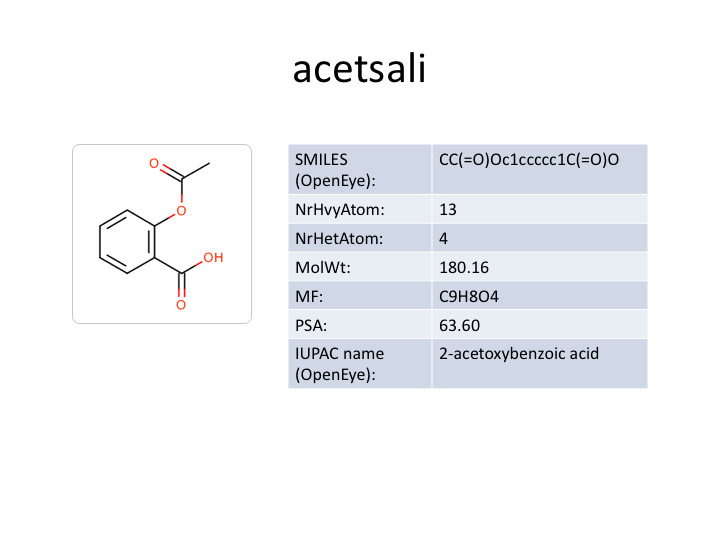
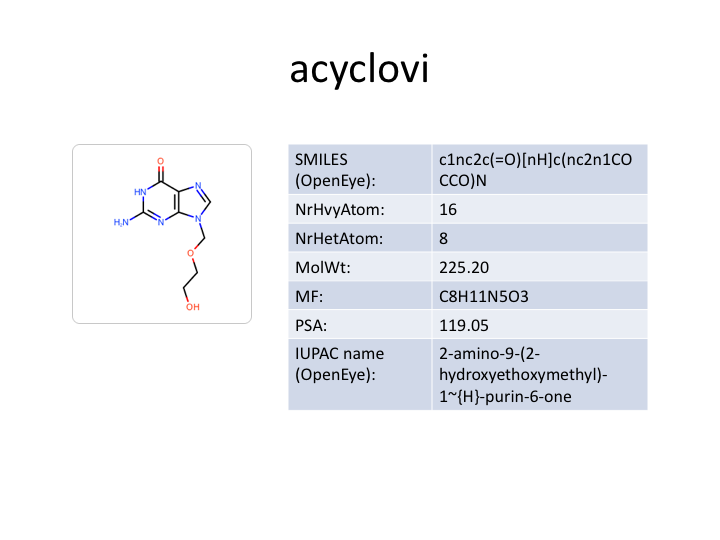
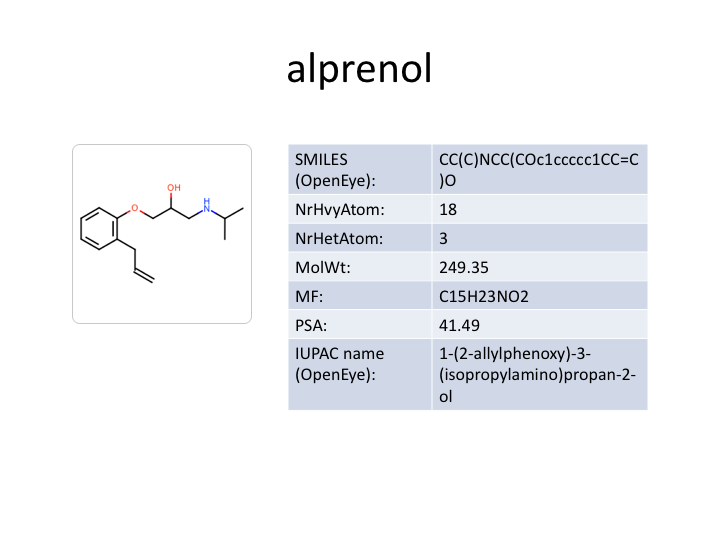
You want to depict molecules along with their associated data read from a
CSV file in a pptx PowerPoint file.
See example in drugs.pptx
and in Table 1.
slide 1 |
slide 2 |
slide 3 |
slide 4 |
|
|
|
|
Ingredients
|
Difficulty Level
🌶️ 🌶️
Download
Source Code
csv2pptx
#!/usr/bin/env python3
# (C) 2026 Cadence Design Systems, Inc. (Cadence)
# All rights reserved.
# TERMS FOR USE OF SAMPLE CODE The software below ("Sample Code") is
# provided to current licensees or subscribers of Cadence products or
# SaaS offerings (each a "Customer").
# Customer is hereby permitted to use, copy, and modify the Sample Code,
# subject to these terms. Cadence claims no rights to Customer's
# modifications. Modification of Sample Code is at Customer's sole and
# exclusive risk. Sample Code may require Customer to have a then
# current license or subscription to the applicable Cadence offering.
# THE SAMPLE CODE IS PROVIDED "AS IS", WITHOUT WARRANTY OF ANY KIND,
# EXPRESS OR IMPLIED.  CADENCE DISCLAIMS ALL WARRANTIES, INCLUDING, BUT
# NOT LIMITED TO, WARRANTIES OF MERCHANTABILITY, FITNESS FOR A
# PARTICULAR PURPOSE AND NONINFRINGEMENT. In no event shall Cadence be
# liable for any damages or liability in connection with the Sample Code
# or its use.

"""Converts a CSV or SDF file into a PowerPoint with molecular depictions."""

import argparse
import os
import pathlib
import sys
import tempfile

import pptx
from openeye import oechem, oedepict
from pptx.util import Inches
from rich_argparse import HelpPreviewAction, RichHelpFormatter

__SCRIPT_NAME__ = pathlib.Path(__file__).absolute().stem
__SCRIPT_DESC__ = "Convert CSV or SDF files into PowerPoint with molecular depictions"
__SCRIPT_TOOLKITS__ = ["oechem", "oedepict"]
__SCRIPT_CATEGORIES__ = ["depiction"]


def parse_options() -> argparse.Namespace:
    """Set up command line options."""
    parser = argparse.ArgumentParser(
        add_help=True,
        formatter_class=RichHelpFormatter,
        description="[yellow]" + __SCRIPT_DESC__ + "[/yellow]",
    )

    io_group = parser.add_argument_group("Input/output options")
    io_group.add_argument(
        "--mol",
        metavar="MOL-FILE",
        type=str,
        required=True,
        help="input molecule file (.csv or .sdf)",
    )
    io_group.add_argument(
        "--pptx",
        metavar="PPTX-FILE",
        type=str,
        required=True,
        help="output PowerPoint file (.pptx)",
    )

    parser.add_argument("--help-image", action=HelpPreviewAction)
    parser.add_argument(
        "--save-console-svg",
        default=False,
        action="store_true",
        help=f"run command and capture console output in {__SCRIPT_NAME__}.svg file",
    )
    return parser.parse_args()


def main() -> int:
    """Convert molecule file to PowerPoint presentation with molecular depictions."""
    args = parse_options()

    out_path = pathlib.Path(args.pptx)
    if out_path.suffix.lstrip(".").lower() != "pptx":
        oechem.OEThrow.Fatal("Output must be a PowerPoint file (.pptx)!")

    mol_list: list[oechem.OEMolBase] = read_molecules(args.mol)

    width, height = 250, 250
    opts = oedepict.OE2DMolDisplayOptions(width, height, oedepict.OEScale_AutoScale)
    opts.SetTitleLocation(oedepict.OETitleLocation_Hidden)

    tags = collect_data_tags(mol_list)

    write_pptx_file(out_path, mol_list, pathlib.Path(args.mol).name, tags, opts)
    return os.EX_OK


def read_molecules(mol_filename: str) -> list[oechem.OEMolBase]:
    """Read molecules from a CSV or SDF file and return a list of OEMolBase objects."""
    mol_path = pathlib.Path(mol_filename)
    if not mol_path.exists():
        oechem.OEThrow.Fatal(f"Cannot open input file '{mol_path.name}'!")

    ifs = oechem.oemolistream()
    if not ifs.open(str(mol_path)):
        oechem.OEThrow.Fatal(f"Cannot open input file '{mol_path.name}'!")

    if ifs.GetFormat() not in [oechem.OEFormat_CSV, oechem.OEFormat_SDF]:
        oechem.OEThrow.Fatal("Input must be a CSV or SDF file!")
    mol_list: list[oechem.OEMolBase] = [
        oechem.OEGraphMol(m) for m in ifs.GetOEGraphMols()
    ]
    return mol_list


def collect_data_tags(mol_list: list[oechem.OEMolBase]) -> list[str]:
    """Collect all unique SD data tags from a list of molecules."""
    tags: list[str] = []
    for mol in mol_list:
        for dp in oechem.OEGetSDDataIter(mol):
            if dp.GetTag() not in tags:
                tags.append(dp.GetTag())
    return tags


def write_pptx_file(
    out_path: pathlib.Path,
    mol_list: list[oechem.OEMolBase],
    input_name: str,
    tags: list[str],
    opts: oedepict.OE2DMolDisplayOptions,
) -> None:
    """Write a PowerPoint presentation with one slide per molecule."""
    pres = pptx.Presentation()

    title_slide = pres.slides.add_slide(pres.slide_layouts[0])
    title_slide.shapes.title.text = input_name

    with tempfile.TemporaryDirectory() as tmpdir:
        tmp_path = pathlib.Path(tmpdir)
        for idx, mol in enumerate(mol_list):
            slide = pres.slides.add_slide(pres.slide_layouts[5])

            if mol.GetTitle():
                slide.shapes.title.text = mol.GetTitle()

            img_file = tmp_path / f"mol_{idx}.png"
            _write_image_to_file(img_file, mol, opts)
            slide.shapes.add_picture(
                str(img_file), left=Inches(1.0), top=Inches(2.0), width=Inches(2.5)
            )

            render_data(slide, mol, tags)

    pres.save(str(out_path))


def _write_image_to_file(
    img_path: pathlib.Path,
    mol: oechem.OEMolBase,
    opts: oedepict.OE2DMolDisplayOptions,
) -> None:
    """Render a molecule to a PNG image file."""
    image = oedepict.OEImage(opts.GetWidth(), opts.GetHeight())
    oedepict.OEPrepareDepiction(mol)
    disp = oedepict.OE2DMolDisplay(mol, opts)
    oedepict.OERenderMolecule(image, disp, False)
    oedepict.OEDrawCurvedBorder(image, oedepict.OELightGreyPen, 10.0)
    oedepict.OEWriteImage(str(img_path), image)


def render_data(
    slide: pptx.slide.Slide, mol: oechem.OEMolBase, tags: list[str]
) -> None:
    """Render SD data as a two-column table on the slide."""
    data: list[tuple[str, str]] = []
    for tag in tags:
        value = oechem.OEGetSDData(mol, tag) if oechem.OEHasSDData(mol, tag) else "N/A"
        data.append((tag, value))

    rows, cols = len(data), 2
    table = slide.shapes.add_table(
        rows,
        cols,
        left=Inches(4.0),
        top=Inches(2.0),
        width=Inches(5.5),
        height=Inches(0.8),
    ).table

    table.columns[0].width = Inches(2.0)
    table.columns[1].width = Inches(3.5)
    table.first_row = False

    for row, (tag, value) in enumerate(data):
        table.cell(row, 0).text = tag + ":"
        table.cell(row, 1).text = value


setattr(main, "__SCRIPT_NAME__", __SCRIPT_NAME__)
setattr(main, "__SCRIPT_DESC__", __SCRIPT_DESC__)
setattr(main, "__SCRIPT_TOOLKITS__", __SCRIPT_TOOLKITS__)
setattr(main, "__SCRIPT_CATEGORIES__", __SCRIPT_CATEGORIES__)

if __name__ == "__main__":
    sys.exit(main())
Solution
The CSV file format is a text file format containing comma-separated values. In OEChem TK, this file format is implemented to enable data exchange with a wide variety of other software. Each line of a CSV file stores data for a molecule that is represented by a SMILES string.
See also
CSV File Format section of the OEChem TK documentation about the layout of the CSV file format.
When reading a CSV file, the fields of the file are attached to each molecule as SD data. This data can be accessed by the OEGetSDDataIter function that returns an iterator over all the SD data (tag - value) pairs of a molecule. The collect_data_tags function iterates over a list of molecules and returns the unique tags of the data attached to the molecules.
def collect_data_tags(mol_list: list[oechem.OEMolBase]) -> list[str]:
    """Collect all unique SD data tags from a list of molecules."""
    tags: list[str] = []
    for mol in mol_list:
        for dp in oechem.OEGetSDDataIter(mol):
            if dp.GetTag() not in tags:
                tags.append(dp.GetTag())
    return tags
The write_pptx_file function takes a list of molecules read from a CSV file along with the data tags returned by the collect_data_tags function.
First a new presentation is created with a title slide showing the name of the input file. Then, iterating over the molecules, each molecule is depicted on a new slide along with the corresponding data by calling the _render_data function. Molecule images are written into a temporary directory that is automatically cleaned up after the presentation is saved.
def write_pptx_file(
    out_path: pathlib.Path,
    mol_list: list[oechem.OEMolBase],
    input_name: str,
    tags: list[str],
    opts: oedepict.OE2DMolDisplayOptions,
) -> None:
    """Write a PowerPoint presentation with one slide per molecule."""
    pres = pptx.Presentation()

    title_slide = pres.slides.add_slide(pres.slide_layouts[0])
    title_slide.shapes.title.text = input_name

    with tempfile.TemporaryDirectory() as tmpdir:
        tmp_path = pathlib.Path(tmpdir)
        for idx, mol in enumerate(mol_list):
            slide = pres.slides.add_slide(pres.slide_layouts[5])

            if mol.GetTitle():
                slide.shapes.title.text = mol.GetTitle()

            img_file = tmp_path / f"mol_{idx}.png"
            _write_image_to_file(img_file, mol, opts)
            slide.shapes.add_picture(
                str(img_file), left=Inches(1.0), top=Inches(2.0), width=Inches(2.5)
            )

            render_data(slide, mol, tags)

    pres.save(str(out_path))
The _write_image_to_file function generates a molecule depiction and writes it to a PNG image file.
def _write_image_to_file(
    img_path: pathlib.Path,
    mol: oechem.OEMolBase,
    opts: oedepict.OE2DMolDisplayOptions,
) -> None:
    """Render a molecule to a PNG image file."""
    image = oedepict.OEImage(opts.GetWidth(), opts.GetHeight())
    oedepict.OEPrepareDepiction(mol)
    disp = oedepict.OE2DMolDisplay(mol, opts)
    oedepict.OERenderMolecule(image, disp, False)
    oedepict.OEDrawCurvedBorder(image, oedepict.OELightGreyPen, 10.0)
    oedepict.OEWriteImage(str(img_path), image)
The _render_data function generates a new table and adds each (tag - value) tuple into a separate row.
def render_data(
    slide: pptx.slide.Slide, mol: oechem.OEMolBase, tags: list[str]
) -> None:
    """Render SD data as a two-column table on the slide."""
    data: list[tuple[str, str]] = []
    for tag in tags:
        value = oechem.OEGetSDData(mol, tag) if oechem.OEHasSDData(mol, tag) else "N/A"
        data.append((tag, value))

    rows, cols = len(data), 2
    table = slide.shapes.add_table(
        rows,
        cols,
        left=Inches(4.0),
        top=Inches(2.0),
        width=Inches(5.5),
        height=Inches(0.8),
    ).table

    table.columns[0].width = Inches(2.0)
    table.columns[1].width = Inches(3.5)
    table.first_row = False

    for row, (tag, value) in enumerate(data):
        table.cell(row, 0).text = tag + ":"
        table.cell(row, 1).text = value
Usage
See Download section to download the script.
> csv2pptx --help
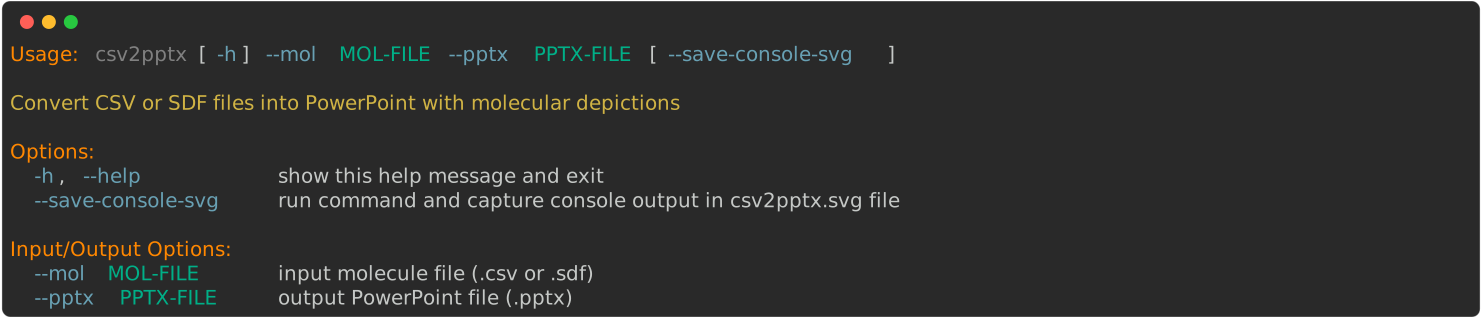
Running the above command with drugs.csv will generate the
drugs.pptx file.
> csv2pptx --mol drugs.csv --pptx drugs.pptx
Discussion
Reading the columns of a CSV file into SD data fields means
that the OEChem TK provides a meta-data interchange between sdf files and
CSV files.
Consequently, the same Python script can be used to generate a pptx file
reading an sdf file.
Running the above command with drugs.sdf will generate the same
drugs.pptx
file (apart from the input filename on the first slide).
> csv2pptx --mol drugs.sdf --pptx drugs.pptx
See also
See also in OEChem TK manual
Theory
SD Tagged Data Manipulation section
CSV File Format section
API
OEGetSDDataPairs function
See also in OEDepict TK manual
Theory
Molecule Depiction chapter
API
OE2DMolDisplay class
OE2DMolDisplayOptions class
OEPrepareDepiction function