Highlighting Fragments
Problem
You want to depict a molecule with highlighting of its fragments. See example in Table 1.
OEGetFuncGroupFragments |
OEGetRingChainFragments |
OEGetRingLinkerSideChainFragments |
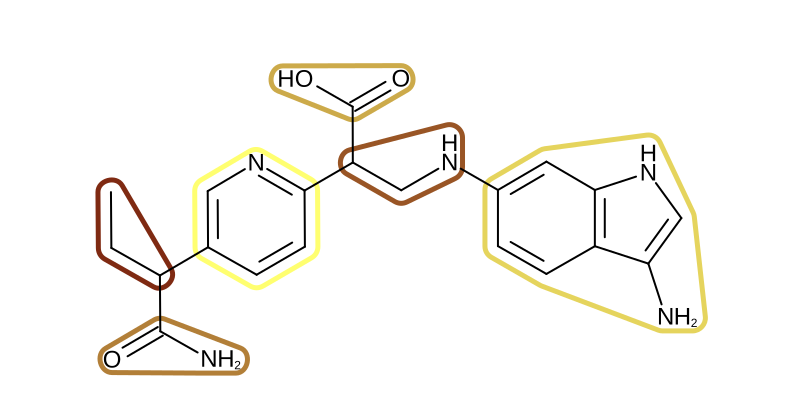
|
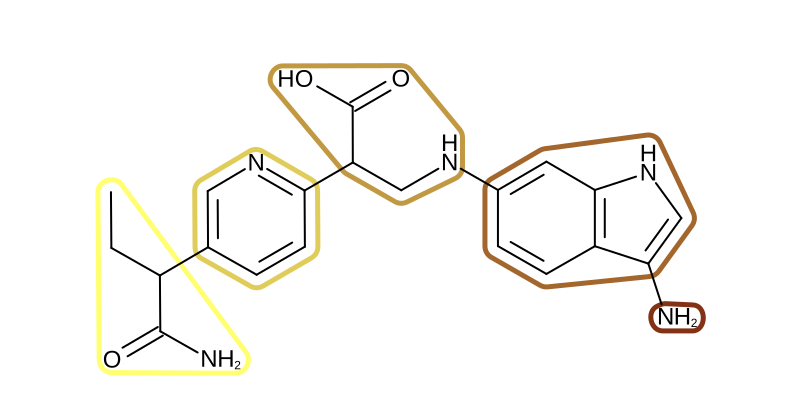
|
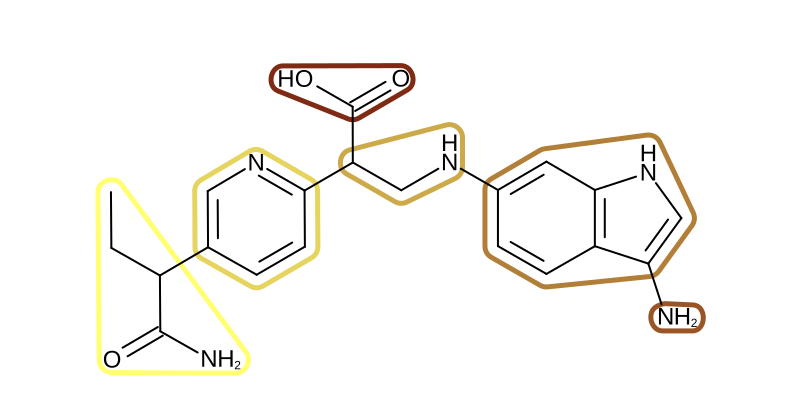
|
Ingredients
|
Difficulty Level
🌶️ 🌶️
Download
Source Code
frags2img
#!/usr/bin/env python3
# (C) 2026 Cadence Design Systems, Inc. (Cadence)
# All rights reserved.
# TERMS FOR USE OF SAMPLE CODE The software below ("Sample Code") is
# provided to current licensees or subscribers of Cadence products or
# SaaS offerings (each a "Customer").
# Customer is hereby permitted to use, copy, and modify the Sample Code,
# subject to these terms. Cadence claims no rights to Customer's
# modifications. Modification of Sample Code is at Customer's sole and
# exclusive risk. Sample Code may require Customer to have a then
# current license or subscription to the applicable Cadence offering.
# THE SAMPLE CODE IS PROVIDED "AS IS", WITHOUT WARRANTY OF ANY KIND,
# EXPRESS OR IMPLIED.  OPENEYE DISCLAIMS ALL WARRANTIES, INCLUDING, BUT
# NOT LIMITED TO, WARRANTIES OF MERCHANTABILITY, FITNESS FOR A
# PARTICULAR PURPOSE AND NONINFRINGEMENT. In no event shall Cadence be
# liable for any damages or liability in connection with the Sample Code
# or its use.

"""Depict molecule with fragment highlights."""

import argparse
import enum
import io
import os
import sys
from collections.abc import Callable, Iterator
from pathlib import Path

from openeye import oechem, oedepict, oemedchem
from PIL import Image
from rich_argparse import HelpPreviewAction, RichHelpFormatter

__SCRIPT_NAME__ = Path(__file__).absolute().stem
__SCRIPT_DESC__ = "Depict molecule with fragment highlights."
__SCRIPT_TOOLKITS__ = ["oechem", "oedepict", "oemedchem"]
__SCRIPT_CATEGORIES__ = ["depiction"]


def parse_args() -> argparse.Namespace:
    """Parse command-line arguments."""
    parser = argparse.ArgumentParser(
        add_help=True,
        formatter_class=RichHelpFormatter,
        description="[yellow]" + __SCRIPT_DESC__ + "[/yellow]",
    )

    input_group = parser.add_argument_group("Input options")
    exclusive_group = input_group.add_mutually_exclusive_group(required=True)
    exclusive_group.add_argument(
        "--mol",
        type=str,
        metavar="MOL-FILE",
        help="input molecule file",
    )
    exclusive_group.add_argument(
        "--smiles",
        type=str,
        metavar="SMILES",
        help="input molecule SMILES",
    )

    frag_group = parser.add_argument_group("Fragmentation options")
    frag_group.add_argument(
        "--frag-type",
        "--fragmentation-type",
        type=FragmentationType,
        default=FragmentationType.FunctionalGroup,
        choices=list(FragmentationType),
    )

    image_group = parser.add_argument_group("Image options")
    image_group.add_argument(
        "--image",
        type=str,
        required=False,
        metavar="IMAGE-FILE",
        help="output image file (PNG, SVG) (required: %(required)s) -- if no output is provided the image will be displayed on the  screen",
    )
    image_group.add_argument(
        "--width",
        type=int,
        default=800,
        help="width of output image (default: %(default)s)",
    )
    image_group.add_argument(
        "--height",
        type=int,
        default=400,
        help="height of output image (default: %(default)s)",
    )

    parser.add_argument("--help-image", action=HelpPreviewAction)
    return parser.parse_args()


def main() -> int:
    """Depict molecule with fragment highlights."""
    args = parse_args()
    _check_image_file(args)

    # initialize molecule
    mol: oechem.OEMolBase
    if args.mol:
        mol = _get_molecule(args)
    elif args.smiles:
        mol = oechem.OEGraphMol()
        if not oechem.OESmilesToMol(mol, args.smiles):
            oechem.OEThrow.Fatal("Cannot parse SMILES!")

    # initialize fragmentation function
    frag_func = _get_fragmentation_function(args.frag_type)

    # create image
    width, height = args.width, args.height
    image = oedepict.OEImage(width, height)

    # setup depiction options
    opts = oedepict.OE2DMolDisplayOptions(width, height, oedepict.OEScale_AutoScale)
    opts.SetAtomColorStyle(oedepict.OEAtomColorStyle_WhiteMonochrome)

    # depict molecule with fragment highlights
    oedepict.OEPrepareDepiction(mol)
    depict_molecule_with_fragment_highlights(image, mol, frag_func, opts)

    if args.image:
        oedepict.OEWriteImage(args.image, image)
    else:
        _img = Image.open(io.BytesIO(oedepict.OEWriteImageToBytes("png", image)))
        _img.show()

    return os.EX_OK


def depict_molecule_with_fragment_highlights(
    image: oedepict.OEImageBase,
    mol: oechem.OEMolBase,
    frag_func: Callable[[oechem.OEMolBase], Iterator[oechem.OEAtomBondSet]],
    opts: oedepict.OE2DMolDisplayOptions,
) -> None:
    """
    Depict a molecule with its fragments highlighted.

    Each fragment returned by the fragmentation function is highlighted
    using a color gradient from yellow to brown.
    """
    frag_list = list(frag_func(mol))
    num_frags = len(frag_list)

    color_gradient = oechem.OELinearColorGradient()
    color_gradient.AddStop(oechem.OEColorStop(0, oechem.OEMediumYellow))
    color_gradient.AddStop(oechem.OEColorStop(num_frags, oechem.OEDarkBrown))

    disp = oedepict.OE2DMolDisplay(mol, opts)

    highlight = oedepict.OEHighlightByLasso(oechem.OEWhite)
    highlight.SetConsiderAtomLabelBoundingBox(True)

    for frag_idx, frag in enumerate(frag_list):
        highlight.SetColor(color_gradient.GetColorAt(frag_idx))
        oedepict.OEAddHighlighting(disp, highlight, frag)

    oedepict.OERenderMolecule(image, disp)


def _check_image_file(args: argparse.Namespace) -> None:
    # script will terminate if there is some issues
    if not args.image:
        # image will be displayed on the screen
        return
    ext = Path(args.image).suffix[1:].upper()
    if not oedepict.OEIsRegisteredImageFile(ext):
        oechem.OEThrow.Fatal("Unknown image output type!")

    ofs = oechem.oeofstream()
    if not ofs.open(args.image):
        oechem.OEThrow.Fatal("Cannot open output image file!")


def _get_molecule(args: argparse.Namespace) -> oechem.OEMolBase:
    ifs = oechem.oemolistream()
    if not ifs.open(args.mol):
        oechem.OEThrow.Fatal(f"Cannot open {args.mol} input file!")

    mol = oechem.OEGraphMol()
    if not oechem.OEReadMolecule(ifs, mol):
        oechem.OEThrow.Fatal(f"Cannot read molecule from {args.mol} input file!")

    return mol


class FragmentationType(enum.Enum):
    """Molecule fragmentation type."""

    FunctionalGroup = "func-group"
    RingChain = "ring-chain"
    RingLinkerSideChain = "ring-linker-sidechain"

    def __str__(self) -> str:
        """Convert to string representation."""
        return self.value


def _get_fragmentation_function(
    frag_type: FragmentationType,
) -> Callable[[oechem.OEMolBase], Iterator[oechem.OEAtomBondSet]]:
    match frag_type:
        case FragmentationType.RingChain:
            return oemedchem.OEGetRingChainFragments
        case FragmentationType.RingLinkerSideChain:
            return oemedchem.OEGetRingLinkerSideChainFragments
    return oemedchem.OEGetFuncGroupFragments


setattr(main, "__SCRIPT_NAME__", __SCRIPT_NAME__)
setattr(main, "__SCRIPT_DESC__", __SCRIPT_DESC__)
setattr(main, "__SCRIPT_TOOLKITS__", __SCRIPT_TOOLKITS__)
setattr(main, "__SCRIPT_CATEGORIES__", __SCRIPT_CATEGORIES__)

if __name__ == "__main__":
    sys.exit(main())
frags2pdf
#!/usr/bin/env python3
# (C) 2026 Cadence Design Systems, Inc. (Cadence)
# All rights reserved.
# TERMS FOR USE OF SAMPLE CODE The software below ("Sample Code") is
# provided to current licensees or subscribers of Cadence products or
# SaaS offerings (each a "Customer").
# Customer is hereby permitted to use, copy, and modify the Sample Code,
# subject to these terms. Cadence claims no rights to Customer's
# modifications. Modification of Sample Code is at Customer's sole and
# exclusive risk. Sample Code may require Customer to have a then
# current license or subscription to the applicable Cadence offering.
# THE SAMPLE CODE IS PROVIDED "AS IS", WITHOUT WARRANTY OF ANY KIND,
# EXPRESS OR IMPLIED.  OPENEYE DISCLAIMS ALL WARRANTIES, INCLUDING, BUT
# NOT LIMITED TO, WARRANTIES OF MERCHANTABILITY, FITNESS FOR A
# PARTICULAR PURPOSE AND NONINFRINGEMENT. In no event shall Cadence be
# liable for any damages or liability in connection with the Sample Code
# or its use.

"""Depict molecules with fragment highlights in a multi-page report."""

import argparse
import enum
import math
import os
import sys
from collections.abc import Callable, Iterator
from pathlib import Path

from openeye import oechem, oedepict, oemedchem
from rich_argparse import HelpPreviewAction, RichHelpFormatter

__SCRIPT_NAME__ = Path(__file__).absolute().stem
__SCRIPT_DESC__ = "Depict molecules with fragment highlights in a multi-page report."
__SCRIPT_TOOLKITS__ = ["oechem", "oedepict", "oemedchem"]
__SCRIPT_CATEGORIES__ = ["depiction"]


def parse_args() -> argparse.Namespace:
    """Parse command-line arguments."""
    parser = argparse.ArgumentParser(
        add_help=True,
        formatter_class=RichHelpFormatter,
        description="[yellow]" + __SCRIPT_DESC__ + "[/yellow]",
    )

    input_group = parser.add_argument_group("Input options")
    input_group.add_argument(
        "--mol",
        type=str,
        required=True,
        metavar="MOL-FILE",
        help="input molecule file",
    )

    frag_group = parser.add_argument_group("Fragmentation options")
    frag_group.add_argument(
        "--frag-type",
        "--fragmentation-type",
        type=FragmentationType,
        default=FragmentationType.FunctionalGroup,
        choices=list(FragmentationType),
    )

    report_group = parser.add_argument_group("Report options")
    report_group.add_argument(
        "--report",
        type=str,
        required=True,
        metavar="REPORT-FILE",
        help="output report file (PDF)",
    )
    report_group.add_argument(
        "--rows",
        type=int,
        default=3,
        choices=range(2, 6),
        metavar="N",
        help="number of rows per page (default: %(default)s)",
    )
    report_group.add_argument(
        "--cols",
        type=int,
        default=2,
        choices=range(1, 3),
        metavar="N",
        help="number of columns per page (default: %(default)s)",
    )
    report_group.add_argument(
        "--page-by-page",
        action="store_true",
        help="write pages of report to separate numbered image files",
    )

    parser.add_argument("--help-image", action=HelpPreviewAction)
    return parser.parse_args()


def main() -> int:
    """Depict molecules with fragment highlights in a multi-page report."""
    args = parse_args()

    _check_report_file(args)

    # check input file
    ifs = oechem.oemolistream()
    if not ifs.open(args.mol):
        oechem.OEThrow.Fatal("Cannot open input file!")

    # initialize fragmentation function
    frag_func = _get_fragmentation_function(args.frag_type)

    # initialize multi-page report
    report_options = oedepict.OEReportOptions()
    report_options.SetFooterHeight(25.0)
    report_options.SetHeaderHeight(report_options.GetPageHeight() / 3.0)
    report = oedepict.OEReport(report_options)

    # setup depiction options
    mol_disp_opts = oedepict.OE2DMolDisplayOptions()
    cell_width, cell_height = report.GetHeaderWidth(), report.GetHeaderHeight()
    mol_disp_opts.SetDimensions(cell_width, cell_height, oedepict.OEScale_AutoScale)
    mol_disp_opts.SetAtomColorStyle(oedepict.OEAtomColorStyle_WhiteMonochrome)
    mol_disp_opts.SetAtomLabelFontScale(1.3)

    frag_disp_opts = oedepict.OE2DMolDisplayOptions()
    frag_disp_opts.SetTitleLocation(oedepict.OETitleLocation_Hidden)
    frag_disp_opts.SetAtomLabelFontScale(1.3)

    # read molecules
    mol_list = [oechem.OEGraphMol(mol) for mol in ifs.GetOEGraphMols()]

    # depict molecules with fragments
    depict_molecules_with_fragments(
        report, mol_list, frag_func, mol_disp_opts, frag_disp_opts
    )
    if args.page_by_page:
        oedepict.OEWriteReportPageByPage(args.report, report)
    else:
        oedepict.OEWriteReport(args.report, report)

    return os.EX_OK


def depict_molecules_with_fragments(
    report: oedepict.OEReport,
    mol_list: list[oechem.OEGraphMol],
    frag_func: Callable[[oechem.OEMolBase], Iterator[oechem.OEAtomBondSet]],
    mol_disp_opts: oedepict.OE2DMolDisplayOptions,
    frag_disp_opts: oedepict.OE2DMolDisplayOptions,
) -> None:
    """
    Depict each molecule with its fragment highlights in a report.

    For each molecule, a header page shows the full molecule with
    fragments highlighted, and the body contains a grid of individual
    fragment depictions.
    """
    for mol in mol_list:

        body = report.NewBody()
        oedepict.OEPrepareDepiction(mol)
        header = report.GetHeader(report.NumPages())

        # loop over input molecule and fragment

        frag_sets = list(frag_func(mol))
        frag_mols = []
        for fset in frag_sets:
            fragment = oechem.OEGraphMol()
            frag_pred = oechem.OEIsAtomMember(fset.GetAtoms())
            adjust_h_count = True
            oechem.OESubsetMol(fragment, mol, frag_pred, adjust_h_count)
            frag_mols.append(oechem.OEGraphMol(fragment))

        num_frags = len(frag_mols)
        color_gradient = oechem.OELinearColorGradient(
            oechem.OEColorStop(0, oechem.OEYellowTint),
            oechem.OEColorStop(num_frags - 1, oechem.OEDarkOrange),
        )

        # render molecule with fragment highlights

        cell_width, cell_height = report.GetHeaderWidth(), report.GetHeaderHeight()
        mol_disp_opts.SetDimensions(cell_width, cell_height, oedepict.OEScale_AutoScale)

        disp = oedepict.OE2DMolDisplay(mol, mol_disp_opts)
        for frag_idx, fset in enumerate(frag_sets):
            color = color_gradient.GetColorAt(frag_idx)
            oedepict.OEAddHighlighting(
                disp, color, oedepict.OEHighlightStyle_BallAndStick, fset
            )

        oedepict.OERenderMolecule(header, disp)

        # create fragment grid

        rows = max(2, int(math.sqrt(num_frags + 1)))
        cols = max(2, int(num_frags / rows) + 1)
        grid = oedepict.OEImageGrid(body, rows, cols)
        grid.SetCellGap(8.0)

        cell_width, cell_height = grid.GetCellWidth(), grid.GetCellHeight()
        frag_disp_opts.SetDimensions(
            cell_width, cell_height, oedepict.OEScale_AutoScale
        )
        frag_disp_opts.SetTitleLocation(oedepict.OETitleLocation_Hidden)

        # determine the scale factor to depict fragments with equal size

        min_scale = oedepict.OEGetMoleculeScale(mol, frag_disp_opts) * 1.25
        for frag in frag_mols:
            min_scale = min(
                min_scale, oedepict.OEGetMoleculeScale(frag, frag_disp_opts)
            )
        frag_disp_opts.SetScale(min_scale)

        # render each fragment

        for frag_idx, (cell, frag_mol) in enumerate(
            zip(grid.GetCells(), frag_mols, strict=False)
        ):
            oedepict.OEPrepareDepiction(frag_mol)
            disp = oedepict.OE2DMolDisplay(frag_mol, frag_disp_opts)
            oedepict.OERenderMolecule(cell, disp)

            color = color_gradient.GetColorAt(frag_idx)
            pen = oedepict.OEPen(oechem.OEWhite, color, oedepict.OEFill_Off, 3.0)
            oedepict.OEDrawBorder(cell, pen)


class FragmentationType(enum.Enum):
    """Molecule fragmentation type."""

    FunctionalGroup = "func-group"
    RingChain = "ring-chain"
    RingLinkerSideChain = "ring-linker-sidechain"

    def __str__(self) -> str:
        """Convert to string representation."""
        return self.value


def _get_fragmentation_function(
    frag_type: FragmentationType,
) -> Callable[[oechem.OEMolBase], Iterator[oechem.OEAtomBondSet]]:
    """Return the fragmentation function for the given type."""
    match frag_type:
        case FragmentationType.RingChain:
            return oemedchem.OEGetRingChainFragments
        case FragmentationType.RingLinkerSideChain:
            return oemedchem.OEGetRingLinkerSideChainFragments
    return oemedchem.OEGetFuncGroupFragments


def _check_report_file(args: argparse.Namespace) -> bool:
    ext = Path(args.report).suffix[1:]
    if not oedepict.OEIsRegisteredImageFile(ext):
        oechem.OEThrow.Fatal("Unknown image output type!")

    if not args.page_by_page and not oedepict.OEIsRegisteredMultiPageImageFile(ext):
        oechem.OEThrow.Warning("Report will be generated into separate pages!")
        args.page_by_page = True

    return True


setattr(main, "__SCRIPT_NAME__", __SCRIPT_NAME__)
setattr(main, "__SCRIPT_DESC__", __SCRIPT_DESC__)
setattr(main, "__SCRIPT_TOOLKITS__", __SCRIPT_TOOLKITS__)
setattr(main, "__SCRIPT_CATEGORIES__", __SCRIPT_CATEGORIES__)

if __name__ == "__main__":
    sys.exit(main())
Solution
The OEMedChem TK currently provides three ways to partition a molecule into fragments:
OEGetRingChainFragments - fragments a molecule into ring and chain components.
OEGetRingLinkerSideChainFragments - fragments a molecule into ring, linker and side-chain components as defined in [Bemis-1996] .
OEGetFuncGroupFragments - fragments a molecule into ring and functional group components.
The depict_molecule_with_fragment_highlights function shows how to depict a molecule with its fragments highlighted. The molecule is first fragmented by invoking the given fragmentation function, which partitions it and returns an iterator over OEAtomBondSet objects, each storing the atoms and bonds of a fragment. An OELinearColorGradient object is then created from yellow to brown based on the number of returned fragments. After constructing the molecule display, each fragment is highlighted using OEHighlightByLasso with a distinct color from the gradient, and the molecule is rendered with OERenderMolecule.
def depict_molecule_with_fragment_highlights(
    image: oedepict.OEImageBase,
    mol: oechem.OEMolBase,
    frag_func: Callable[[oechem.OEMolBase], Iterator[oechem.OEAtomBondSet]],
    opts: oedepict.OE2DMolDisplayOptions,
) -> None:
    """
    Depict a molecule with its fragments highlighted.

    Each fragment returned by the fragmentation function is highlighted
    using a color gradient from yellow to brown.
    """
    frag_list = list(frag_func(mol))
    num_frags = len(frag_list)

    color_gradient = oechem.OELinearColorGradient()
    color_gradient.AddStop(oechem.OEColorStop(0, oechem.OEMediumYellow))
    color_gradient.AddStop(oechem.OEColorStop(num_frags, oechem.OEDarkBrown))

    disp = oedepict.OE2DMolDisplay(mol, opts)

    highlight = oedepict.OEHighlightByLasso(oechem.OEWhite)
    highlight.SetConsiderAtomLabelBoundingBox(True)

    for frag_idx, frag in enumerate(frag_list):
        highlight.SetColor(color_gradient.GetColorAt(frag_idx))
        oedepict.OEAddHighlighting(disp, highlight, frag)

    oedepict.OERenderMolecule(image, disp)
Discussion
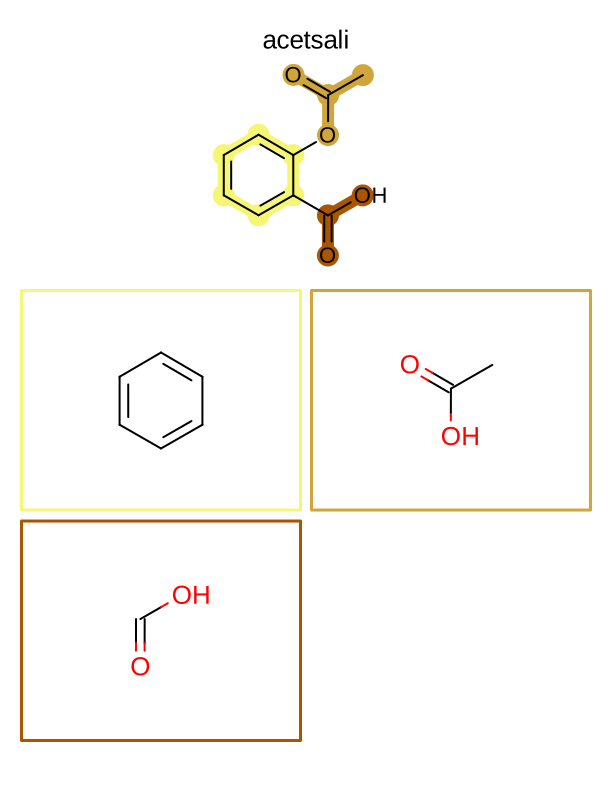
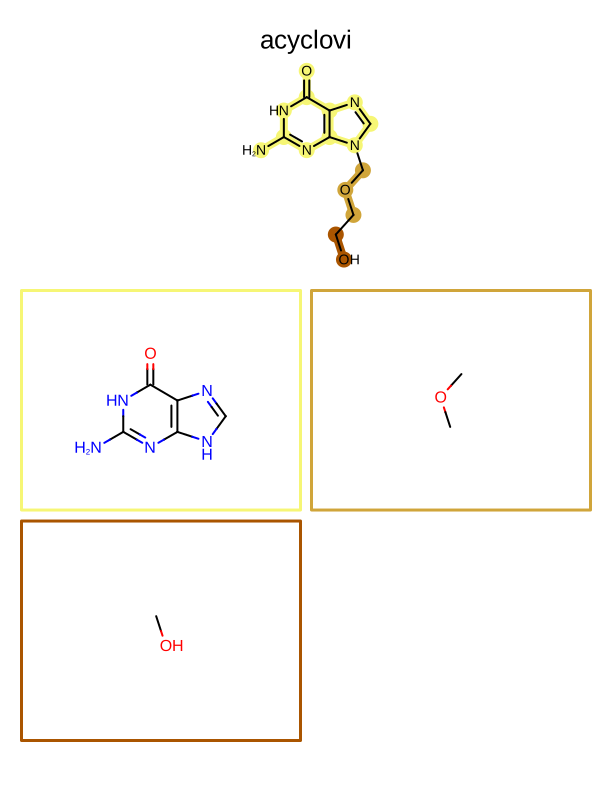
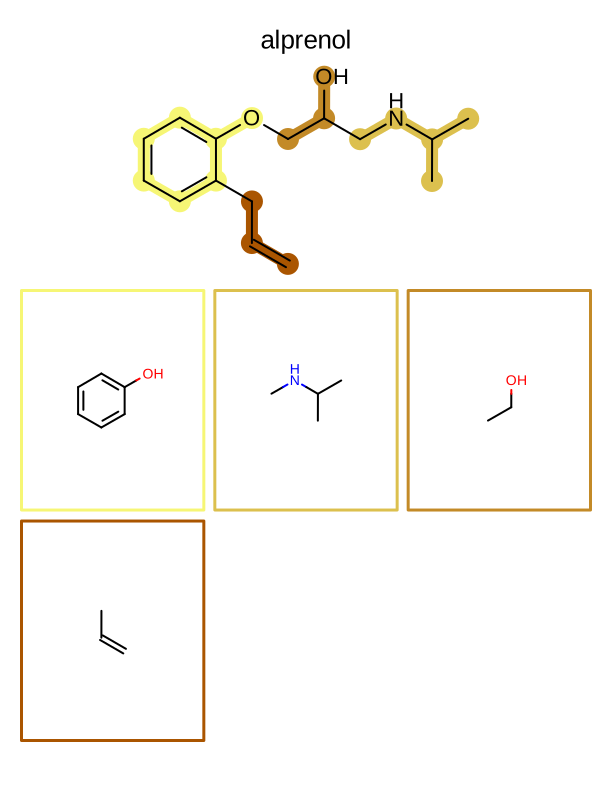
The frags2pdf script generates a multi-page PDF document.
At the top of each page, an input molecule is rendered with its fragments highlighted.
These fragments are then depicted one by one on the page.
See example in
Figure: Example of depiction of molecules with their fragments.
def depict_molecules_with_fragments(
    report: oedepict.OEReport,
    mol_list: list[oechem.OEGraphMol],
    frag_func: Callable[[oechem.OEMolBase], Iterator[oechem.OEAtomBondSet]],
    mol_disp_opts: oedepict.OE2DMolDisplayOptions,
    frag_disp_opts: oedepict.OE2DMolDisplayOptions,
) -> None:
    """
    Depict each molecule with its fragment highlights in a report.

    For each molecule, a header page shows the full molecule with
    fragments highlighted, and the body contains a grid of individual
    fragment depictions.
    """
    for mol in mol_list:

        body = report.NewBody()
        oedepict.OEPrepareDepiction(mol)
        header = report.GetHeader(report.NumPages())

        # loop over input molecule and fragment

        frag_sets = list(frag_func(mol))
        frag_mols = []
        for fset in frag_sets:
            fragment = oechem.OEGraphMol()
            frag_pred = oechem.OEIsAtomMember(fset.GetAtoms())
            adjust_h_count = True
            oechem.OESubsetMol(fragment, mol, frag_pred, adjust_h_count)
            frag_mols.append(oechem.OEGraphMol(fragment))

        num_frags = len(frag_mols)
        color_gradient = oechem.OELinearColorGradient(
            oechem.OEColorStop(0, oechem.OEYellowTint),
            oechem.OEColorStop(num_frags - 1, oechem.OEDarkOrange),
        )

        # render molecule with fragment highlights

        cell_width, cell_height = report.GetHeaderWidth(), report.GetHeaderHeight()
        mol_disp_opts.SetDimensions(cell_width, cell_height, oedepict.OEScale_AutoScale)

        disp = oedepict.OE2DMolDisplay(mol, mol_disp_opts)
        for frag_idx, fset in enumerate(frag_sets):
            color = color_gradient.GetColorAt(frag_idx)
            oedepict.OEAddHighlighting(
                disp, color, oedepict.OEHighlightStyle_BallAndStick, fset
            )

        oedepict.OERenderMolecule(header, disp)

        # create fragment grid

        rows = max(2, int(math.sqrt(num_frags + 1)))
        cols = max(2, int(num_frags / rows) + 1)
        grid = oedepict.OEImageGrid(body, rows, cols)
        grid.SetCellGap(8.0)

        cell_width, cell_height = grid.GetCellWidth(), grid.GetCellHeight()
        frag_disp_opts.SetDimensions(
            cell_width, cell_height, oedepict.OEScale_AutoScale
        )
        frag_disp_opts.SetTitleLocation(oedepict.OETitleLocation_Hidden)

        # determine the scale factor to depict fragments with equal size

        min_scale = oedepict.OEGetMoleculeScale(mol, frag_disp_opts) * 1.25
        for frag in frag_mols:
            min_scale = min(
                min_scale, oedepict.OEGetMoleculeScale(frag, frag_disp_opts)
            )
        frag_disp_opts.SetScale(min_scale)

        # render each fragment

        for frag_idx, (cell, frag_mol) in enumerate(
            zip(grid.GetCells(), frag_mols, strict=False)
        ):
            oedepict.OEPrepareDepiction(frag_mol)
            disp = oedepict.OE2DMolDisplay(frag_mol, frag_disp_opts)
            oedepict.OERenderMolecule(cell, disp)

            color = color_gradient.GetColorAt(frag_idx)
            pen = oedepict.OEPen(oechem.OEWhite, color, oedepict.OEFill_Off, 3.0)
            oedepict.OEDrawBorder(cell, pen)
page 1 |
page 2 |
page 3 |
.. |
|---|---|---|---|
|
|
|
.. |
Usage (frags2img)
> frags2img --help
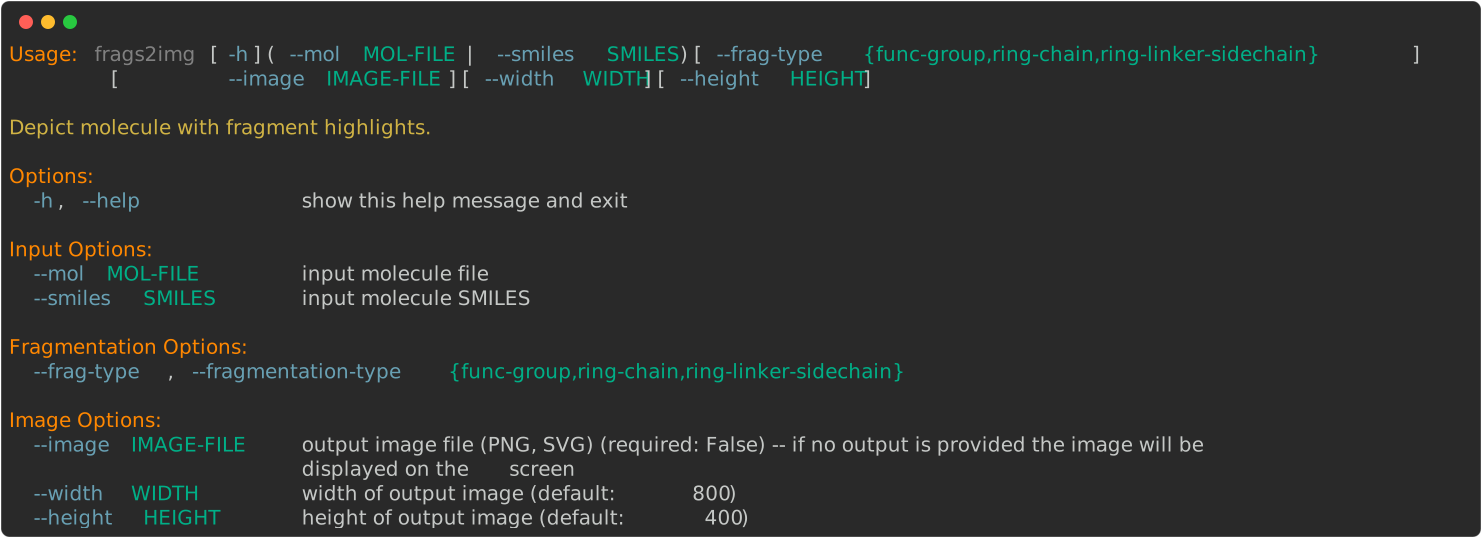
The following commands will generate the images shown in Table 1.
> frags2img --smiles 'CCC(c1ccc(nc1)C(CNc2ccc3c(c2)[nH]cc3N)C(=O)O)C(=O)N' --frag-type func-group --image image.svg
> frags2img --smiles 'CCC(c1ccc(nc1)C(CNc2ccc3c(c2)[nH]cc3N)C(=O)O)C(=O)N' --frag-type ring-chain --image image.svg
> frags2img --smiles 'CCC(c1ccc(nc1)C(CNc2ccc3c(c2)[nH]cc3N)C(=O)O)C(=O)N' --frag-type ring-linker-sidechain --image image.svg
Usage (frags2pdf)
> frags2pdf --help
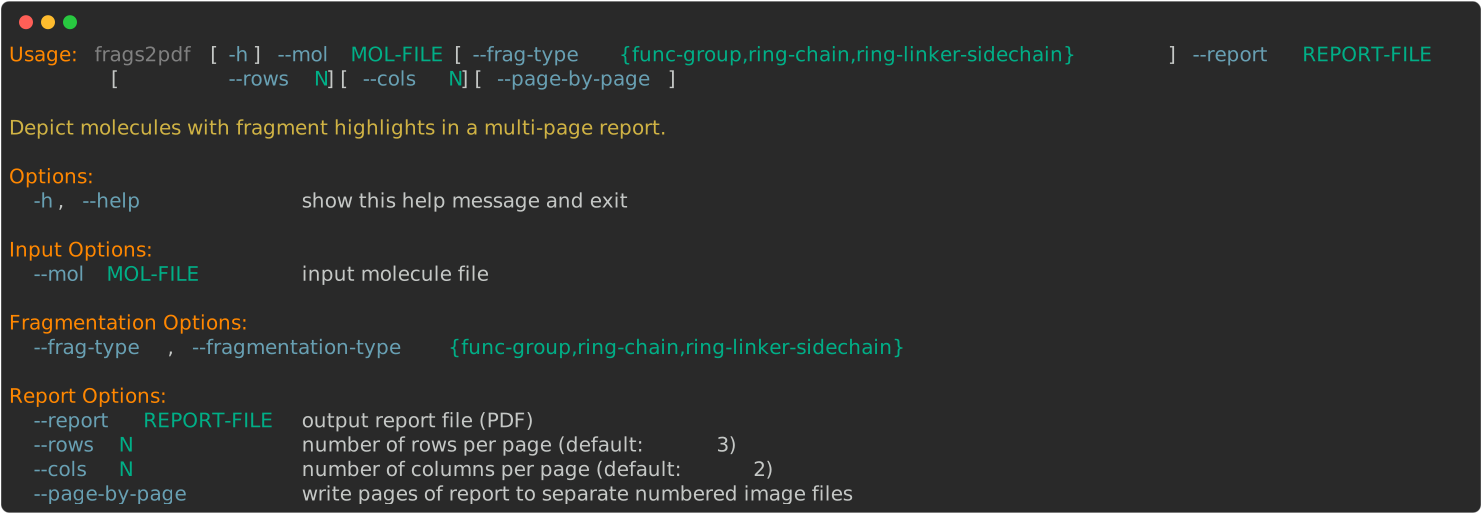
The following command will generate the report shown in Figure: Example of depiction of molecules with their fragments.
> frags2pdf --frag-type func-group --mol examples.ism --report report.pdf
See also in OEChem TK manual
Theory
Predicates Functors chapter
API
OEAtomBondSet class
OEColorStop class
OEIsAtomMember predicate
OELinearColorGradient class
OESubsetMol function
See also in OEMedChem TK manual
Theory
Molecule Fragmentation chapter
API
OEGetFuncGroupFragments function
OEGetRingChainFragments function
OEGetRingLinkerSideChainFragments function
See also in OEDepict TK manual
Theory
Molecule Depiction chapter
Highlighting chapter
API
OE2DMolDisplay class
OE2DMolDisplayOptions class
OEAddHighlighting function
OEGetMoleculeScale function
OEImage class
OEImageGrid class
OEPrepareDepiction function
OERenderMolecule function