🔄 Visualizing Protein-Ligand Interactions
Problem
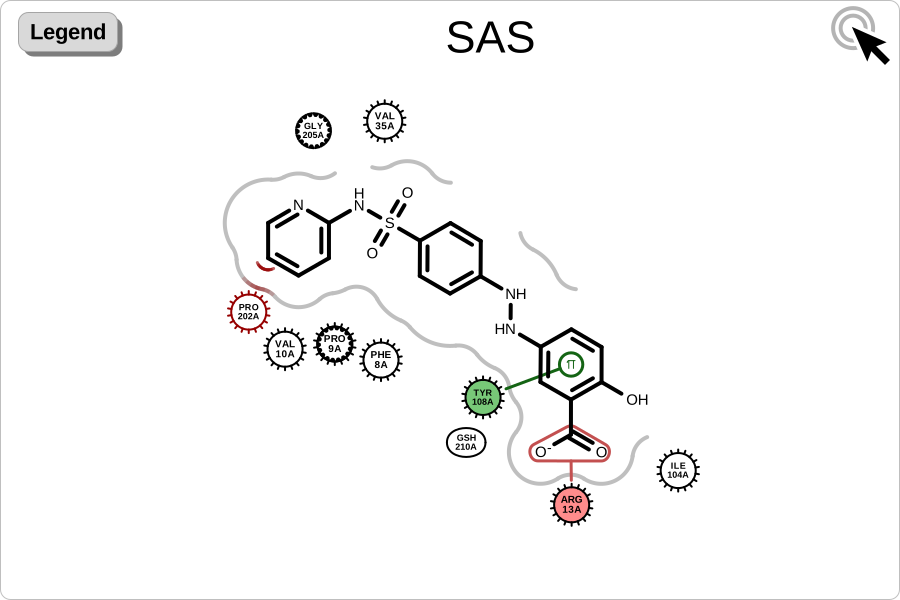
You want to visualize protein-ligand interactions. See example in Figure 1.
Figure 1. Example of visualizing protein-ligand interactions (PDB: 13GS)
Ingredients
|
Difficulty level
🌶️ 🌶️
Download
Source Code
complex2img
#!/usr/bin/env python3
# (C) 2023 Cadence Design Systems, Inc. (Cadence)
# All rights reserved.
# TERMS FOR USE OF SAMPLE CODE The software below ("Sample Code") is
# provided to current licensees or subscribers of Cadence products or
# SaaS offerings (each a "Customer").
# Customer is hereby permitted to use, copy, and modify the Sample Code,
# subject to these terms. Cadence claims no rights to Customer's
# modifications. Modification of Sample Code is at Customer's sole and
# exclusive risk. Sample Code may require Customer to have a then
# current license or subscription to the applicable Cadence offering.
# THE SAMPLE CODE IS PROVIDED "AS IS", WITHOUT WARRANTY OF ANY KIND,
# EXPRESS OR IMPLIED.  OPENEYE DISCLAIMS ALL WARRANTIES, INCLUDING, BUT
# NOT LIMITED TO, WARRANTIES OF MERCHANTABILITY, FITNESS FOR A
# PARTICULAR PURPOSE AND NONINFRINGEMENT. In no event shall Cadence be
# liable for any damages or liability in connection with the Sample Code
# or its use.

"""Depict the protein-ligand interactions of an active site."""

import argparse
import io
import os
import sys
from pathlib import Path

from openeye import oechem, oedepict, oegrapheme
from PIL import Image
from rich_argparse import HelpPreviewAction, RichHelpFormatter

__SCRIPT_NAME__ = Path(__file__).absolute().stem
__SCRIPT_DESC__ = "Depict interactions of an active site."
__SCRIPT_TOOLKITS__ = ["oechem", "oedepict", "oegrapheme"]
__SCRIPT_CATEGORIES__ = ["visualization", "protein-ligand interactions"]


def parse_options() -> argparse.Namespace:
    """Set up command line options."""
    parser = argparse.ArgumentParser(
        add_help=True,
        formatter_class=RichHelpFormatter,
        description="[yellow]" + __SCRIPT_DESC__ + "[/yellow]",
    )
    parser.add_argument("--help-image", action=HelpPreviewAction)

    # input options
    input_group = parser.add_argument_group("Input ligand-protein complex")
    exclusive_input_group = input_group.add_mutually_exclusive_group(required=True)
    exclusive_input_group.add_argument(
        "--complex",
        type=str,
        required=False,
        metavar="PDB-FILE",
        help="input PDB file of the ligand-protein complex",
    )
    exclusive_input_group.add_argument(
        "--design-unit",
        "--du",
        type=str,
        metavar="DU-FILE",
        help="input design unit file",
    )
    exclusive_input_group.add_argument(
        "--protein",
        type=str,
        metavar="PDB-FILE",
        help="input protein file",
    )
    input_group.add_argument(
        "--ligand",
        type=str,
        metavar="MOL-FILE",
        help="input ligand file (required if --protein is provided)",
    )

    image_group = parser.add_argument_group("Image options")
    image_group.add_argument(
        "--image",
        type=str,
        required=False,
        metavar="IMAGE-FILE",
        help="output image file (PNG, SVG) (required: %(required)s) -- if no output is provided the image will be displayed on the  screen",
    )
    image_group.add_argument(
        "--width",
        type=int,
        default=900,
        help="width of output image (default: %(default)s)",
    )
    image_group.add_argument(
        "--height",
        type=int,
        default=600,
        help="height of output image (default: %(default)s)",
    )
    image_group.add_argument(
        "--interactive-legend",
        default=False,
        action="store_true",
        help="visualize legend on mouse hover (SVG-only feature) (default: %(default)s)",
    )
    return parser.parse_args()


def main() -> int:
    """Depict the interactions of an active site."""
    args = parse_options()

    _check_image_file(args)

    if args.complex:
        protein, ligand = get_protein_and_ligand_from_pdb(args.complex)
    elif args.design_unit:
        protein, ligand = get_protein_and_ligand_from_design_unit(args.design_unit)
    elif args.protein:
        if not args.ligand:
            oechem.OEThrow.Fatal(
                "Please provide a ligand file (--ligand) when a protein file is provided!"
            )
        protein, ligand = get_protein_and_ligand_from_separate_files(
            args.protein, args.ligand
        )
    else:
        oechem.OEThrow.Fatal("Invalid input option!")

    # depict active site with interactions
    image = oedepict.OEImage(args.width, args.height)

    cell_width, cell_height = args.width, args.height
    if not args.interactive_legend:
        cell_width = cell_width * 0.8

    opts = oegrapheme.OE2DActiveSiteDisplayOptions(cell_width, cell_height)
    opts.SetRenderInteractiveLegend(args.interactive_legend)

    if args.interactive_legend:
        depict_complex(image, protein, ligand, opts)
    else:
        main_frame = oedepict.OEImageFrame(
            image,
            args.width * 0.80,
            args.height,
            oedepict.OE2DPoint(args.width * 0.2, 0.0),
        )
        legend_frame = oedepict.OEImageFrame(
            image,
            args.width * 0.20,
            args.height,
            oedepict.OE2DPoint(args.width * 0.0, 0.0),
        )
        depict_complex(main_frame, protein, ligand, opts, legend_frame)

    if (
        args.image
        and Path(args.image).suffix[1:].lower() == "svg"
        and args.interactive_legend
    ):
        icon_scale = 0.5
        oedepict.OEAddInteractiveIcon(
            image, oedepict.OEIconLocation_TopRight, icon_scale
        )
    oedepict.OEDrawCurvedBorder(image, oedepict.OELightGreyPen, 10.0)

    if args.image:
        oedepict.OEWriteImage(args.image, image)
    else:
        _img = Image.open(io.BytesIO(oedepict.OEWriteImageToBytes("png", image)))
        _img.show()

    return os.EX_OK


def depict_complex(
    image: oedepict.OEImageBase,
    protein: oechem.OEMolBase,
    ligand: oechem.OEMolBase,
    depict_options: oegrapheme.OE2DActiveSiteDisplayOptions,
    legend_frame: oedepict.OEImageBase | None = None,
) -> None:
    """
    Depict protein-ligand interactions on a given image.

    Perceives interaction hints between a protein and a ligand, prepares the
    active site depiction, and renders the interactions onto the provided image.
    Optionally, renders a legend frame describing the interactions.
    """
    # perceive interactions
    active_site = oechem.OEInteractionHintContainer(protein, ligand)
    if not active_site.IsValid():
        oechem.OEThrow.Fatal("Cannot initialize active site!")
    active_site.SetTitle(ligand.GetTitle())

    oechem.OEPerceiveInteractionHints(active_site)

    # depiction
    oegrapheme.OEPrepareActiveSiteDepiction(active_site)
    active_site_disp = oegrapheme.OE2DActiveSiteDisplay(active_site, depict_options)
    oegrapheme.OERenderActiveSite(image, active_site_disp)

    if legend_frame is not None:
        legend_opts = oegrapheme.OE2DActiveSiteLegendDisplayOptions(12, 1)
        oegrapheme.OEDrawActiveSiteLegend(legend_frame, active_site_disp, legend_opts)


def get_protein_and_ligand_from_pdb(
    pdb_filename: str,
) -> tuple[oechem.OEMolBase, oechem.OEMolBase]:
    """Read protein and ligand from pdb/cif file."""
    ifs = oechem.oemolistream()
    if not ifs.open(pdb_filename):
        oechem.OEThrow.Fatal(f"Unable to open {pdb_filename} for reading")

    complex_mol = oechem.OEGraphMol()
    if not oechem.OEReadMolecule(ifs, complex_mol):
        oechem.OEThrow.Fatal(f"Unable to read complex from {pdb_filename}")

    if not oechem.OEHasResidues(complex_mol):
        oechem.OEPerceiveResidues(complex_mol, oechem.OEPreserveResInfo_All)

    # separate ligand and protein
    split_opts = oechem.OESplitMolComplexOptions()
    ligand = oechem.OEGraphMol()
    protein = oechem.OEGraphMol()
    water = oechem.OEGraphMol()
    other = oechem.OEGraphMol()

    split_opts.SetProteinFilter(
        oechem.OEOrRoleSet(split_opts.GetProteinFilter(), split_opts.GetWaterFilter())
    )
    split_opts.SetWaterFilter(
        oechem.OEMolComplexFilterFactory(oechem.OEMolComplexFilterCategory_Nothing)
    )

    oechem.OESplitMolComplex(ligand, protein, water, other, complex_mol, split_opts)

    if ligand.NumAtoms() == 0:
        oechem.OEThrow.Fatal("Cannot separate complex!")

    return protein, ligand


def get_protein_and_ligand_from_design_unit(
    filename: str,
) -> tuple[oechem.OEMolBase, oechem.OEMolBase]:
    """Read protein and ligand from design unit file."""
    du = oechem.OEDesignUnit()
    if not oechem.OEIsReadableDesignUnit(filename) or not oechem.OEReadDesignUnit(
        filename, du
    ):
        oechem.OEThrow.Fatal("Cannot read design unit.")

    protein = oechem.OEGraphMol()
    if not du.GetComponents(protein, oechem.OEDesignUnitComponents_TargetComplex):
        oechem.OEThrow.Fatal("Could not extract protein from the design unit.")

    ligand = oechem.OEGraphMol()
    if not du.GetLigand(ligand):
        oechem.OEThrow.Fatal("Could not extract ligand from the design unit.")

    return (protein, ligand)


def get_protein_and_ligand_from_separate_files(
    pro_filename: str, lig_filename: str
) -> tuple[oechem.OEMolBase, oechem.OEMolBase]:
    """Read protein and ligand from separate PDB and MOL files."""
    protein = oechem.OEGraphMol()
    ligand = oechem.OEGraphMol()

    for filename, mol in [(pro_filename, protein), (lig_filename, ligand)]:
        ifs = oechem.oemolistream()
        if not ifs.open(filename):
            oechem.OEThrow.Fatal(f"Unable to open {filename} for reading")
        if not oechem.OEReadMolecule(ifs, mol):
            oechem.OEThrow.Fatal(f"Unable to read molecule from {filename}")
        oechem.OESetDimensionFromCoords(mol)

    return protein, ligand


def _check_image_file(args: argparse.Namespace) -> None:
    # script will terminate if there are some issues
    if not args.image:
        # image will be displayed on the screen
        return
    ext = Path(args.image).suffix[1:].upper()
    if not oedepict.OEIsRegisteredImageFile(ext):
        oechem.OEThrow.Fatal("Unknown image output type!")

    ofs = oechem.oeofstream()
    if not ofs.open(args.image):
        oechem.OEThrow.Fatal("Cannot open output image file!")


setattr(main, "__SCRIPT_NAME__", __SCRIPT_NAME__)
setattr(main, "__SCRIPT_DESC__", __SCRIPT_DESC__)
setattr(main, "__SCRIPT_TOOLKITS__", __SCRIPT_TOOLKITS__)
setattr(main, "__SCRIPT_CATEGORIES__", __SCRIPT_CATEGORIES__)

if __name__ == "__main__":
    sys.exit(main())
complexes2pdf
#!/usr/bin/env python3
# (C) 2023 Cadence Design Systems, Inc. (Cadence)
# All rights reserved.
# TERMS FOR USE OF SAMPLE CODE The software below ("Sample Code") is
# provided to current licensees or subscribers of Cadence products or
# SaaS offerings (each a "Customer").
# Customer is hereby permitted to use, copy, and modify the Sample Code,
# subject to these terms. Cadence claims no rights to Customer's
# modifications. Modification of Sample Code is at Customer's sole and
# exclusive risk. Sample Code may require Customer to have a then
# current license or subscription to the applicable Cadence offering.
# THE SAMPLE CODE IS PROVIDED "AS IS", WITHOUT WARRANTY OF ANY KIND,
# EXPRESS OR IMPLIED.  OPENEYE DISCLAIMS ALL WARRANTIES, INCLUDING, BUT
# NOT LIMITED TO, WARRANTIES OF MERCHANTABILITY, FITNESS FOR A
# PARTICULAR PURPOSE AND NONINFRINGEMENT. In no event shall Cadence be
# liable for any damages or liability in connection with the Sample Code
# or its use.

"""Depict the protein-ligand interactions of a list of complexes."""

import argparse
import os
import sys
import typing
from pathlib import Path

import rich.console
from openeye import oechem, oedepict, oegrapheme
from rich_argparse import HelpPreviewAction, RichHelpFormatter

__SCRIPT_NAME__ = Path(__file__).absolute().stem
__SCRIPT_DESC__ = "Depict the protein-ligand interactions of a list of complexes."
__SCRIPT_TOOLKITS__ = ["oechem", "oedepict", "oegrapheme"]
__SCRIPT_CATEGORIES__ = ["visualization", "protein-ligand interactions"]


def parse_options() -> argparse.Namespace:
    """Set up command line options."""
    parser = argparse.ArgumentParser(
        add_help=True,
        formatter_class=RichHelpFormatter,
        description="[yellow]" + __SCRIPT_DESC__ + "[/yellow]",
    )
    parser.add_argument("--help-image", action=HelpPreviewAction)

    # input options
    input_group = parser.add_argument_group("Input ligand-protein complexes")
    exclusive_input_group = input_group.add_mutually_exclusive_group(required=True)
    exclusive_input_group.add_argument(
        "--complexes",
        type=str,
        nargs="+",
        required=False,
        metavar="PDB-FILE(S)",
        help="list of input PDB/CIF file of the ligand-protein complexes",
    )

    exclusive_input_group.add_argument(
        "--design-units",
        type=str,
        nargs="+",
        required=False,
        metavar="DU-FILE(S)",
        help="list of input design unit files",
    )
    input_group.add_argument(
        "--reference",
        type=str,
        required=False,
        metavar="MOL-FILE",
        help="input file of reference molecule used for ligand alignment",
    )

    report_group = parser.add_argument_group("Report options")
    report_group.add_argument(
        "--report",
        type=str,
        required=True,
        metavar="REPORT-FILE",
        help="output report file (PDF)",
    )
    report_group.add_argument(
        "--rows",
        type=int,
        default=2,
        choices=range(1, 3),
        metavar="N",
        help="number of complexes per page (default: %(default)s)",
    )
    report_group.add_argument(
        "--highlight-reference",
        action="store_true",
        help="if reference specified highlight match in ligand",
    )
    report_group.add_argument(
        "--page-by-page",
        action="store_true",
        help="write pages of report to separate numbered image files (default: %(default)s)",
    )
    return parser.parse_args()


def main() -> int:
    """Depict list  interactions of an active site."""
    args = parse_options()

    _check_report_file(args)

    console = rich.console.Console()

    report_opts = oedepict.OEReportOptions(args.rows, 1)
    report_opts.SetPageMargins(10)
    report_opts.SetCellGap(5)
    report = oedepict.OEReport(report_opts)

    reference_sub_search: oechem.OESubSearch | None = None
    if args.reference:
        ifs = oechem.oemolistream()
        if not ifs.open(args.reference):
            console.print(f"[red]Unable to open {args.reference} for reading[/red]")
            return os.EX_DATAERR
        reference_mol = oechem.OEGraphMol()
        if not oechem.OEReadMolecule(ifs, reference_mol):
            console.print(
                f"[red]Unable to read reference molecule from {args.reference}[/red]"
            )
            return os.EX_DATAERR
        if reference_mol.GetDimension() != 2:  # noqa: PLR2004
            console.print("[red]Reference molecule has to have 2D coordinates.[/red]")
            return os.EX_DATAERR
        reference_sub_search = oechem.OESubSearch(
            reference_mol,
            oechem.OEExprOpts_DefaultAtoms,
            oechem.OEExprOpts_DefaultBonds,
        )
        if not reference_sub_search.IsValid():
            console.print(
                f"[red]Invalid reference substructure search for {args.reference}[/red]"
            )
            return os.EX_DATAERR

    depict_options = oegrapheme.OE2DActiveSiteDisplayOptions(
        report.GetCellWidth(), report.GetCellHeight() * 0.8
    )
    if reference_sub_search is not None:
        depict_options.SetLigandAlignerFunctor(
            LigandSubSearchAligner(reference_sub_search)
        )
        depict_options.SetOptimizeLigandOrientation(False)

    highlight = oedepict.OEHighlightByCogwheel(oechem.OELightBlue)
    highlight.SetInnerContour(False)

    for active_site in get_active_sites(args, console):
        # depict each active site
        cell = report.NewCell()
        active_site_frame = oedepict.OEImageFrame(
            cell, cell.GetWidth(), cell.GetHeight() * 0.80, oedepict.OE2DPoint(0, 0)
        )
        legend_frame = oedepict.OEImageFrame(
            cell,
            cell.GetWidth(),
            cell.GetHeight() * 0.20,
            oedepict.OE2DPoint(0, cell.GetHeight() * 0.80),
        )

        oegrapheme.OEPrepareActiveSiteDepiction(active_site)
        active_site_disp = oegrapheme.OE2DActiveSiteDisplay(active_site, depict_options)
        if reference_sub_search is not None and args.highlight_reference:
            ligand = active_site_disp.GetDisplayedLigand()
            for match in reference_sub_search.Match(ligand):
                oegrapheme.OEAddLigandHighlighting(active_site_disp, highlight, match)
                break
        oegrapheme.OERenderActiveSite(active_site_frame, active_site_disp)

        rows, cols = 2, 5
        legend_options = oegrapheme.OE2DActiveSiteLegendDisplayOptions(rows, cols)
        oegrapheme.OEDrawActiveSiteLegend(
            legend_frame, active_site_disp, legend_options
        )

    if args.page_by_page:
        oedepict.OEWriteReportPageByPage(args.report, report)
    else:
        oedepict.OEWriteReport(args.report, report)

    return os.EX_OK


class LigandSubSearchAligner(oegrapheme.OELigandAlignerBase):
    """Align ligand based on substructure."""

    def __init__(self, sub_search: oechem.OESubSearch) -> None:
        """Initialize functor."""
        oegrapheme.OELigandAlignerBase.__init__(self)
        self._sub_search = oechem.OESubSearch(sub_search)
        # Configure options so we keep the ligand's existing coordinates,
        # only reorienting it to match the core's orientation.
        self._alignment_options = oedepict.OEAlignmentOptions()
        self._alignment_options.SetClearCoords(False)
        self._alignment_options.SetAddDepictionHydrogens(False)
        self._alignment_options.SetRotateAroundBonds(False)

    def __call__(self, ligand: oechem.OEMolBase) -> bool:
        """Align ligand based on substructure."""
        # This method must not modify the ligand except for changing its coordinates.
        # Adding or removing atoms would invalidate the ligand's active site.
        if not self._sub_search.SingleMatch(ligand):
            # ligand does not match core
            return False
        align_result = oedepict.OEPrepareAlignedDepiction(
            ligand, self._sub_search, self._alignment_options
        )
        return align_result.IsValid()

    def CreateCopy(self):  # noqa: ANN201, N802
        """Copy constructor."""
        return LigandSubSearchAligner(self._sub_search).__disown__()


def get_active_sites(
    args: argparse.Namespace, console: rich.console.Console
) -> typing.Iterator[oechem.OEInteractionHintContainer]:
    """Yield valid active sites."""
    file_names: list[str]
    if args.complexes:
        file_names = args.complexes
        process_func = get_protein_and_ligand_from_pdb
    if args.design_units:
        file_names = args.design_units
        process_func = get_protein_and_ligand_from_design_unit

    for filename in file_names:
        result = process_func(filename, console)
        if result is not None:
            protein, ligand = result
            active_site = oechem.OEInteractionHintContainer(protein, ligand)
            if not active_site.IsValid():
                console.print(
                    f"[red]Cannot initialize active site for {filename}![/red]"
                )
                continue
            active_site.SetTitle(ligand.GetTitle())
            oechem.OEPerceiveInteractionHints(active_site)
            if active_site.NumInteractions() == 0:
                console.print(f"[red]No interaction detected for {filename}![/red]")
                continue
            yield active_site


def get_protein_and_ligand_from_pdb(
    filename: str, console: rich.console.Console
) -> tuple[oechem.OEMolBase, oechem.OEMolBase] | None:
    """Read protein and ligand from pdb/cif file."""
    ifs = oechem.oemolistream()
    if not ifs.open(filename):
        console.print(f"[red]Unable to open {filename} for reading[/red]")
        return None

    complex_mol = oechem.OEGraphMol()
    if not oechem.OEReadMolecule(ifs, complex_mol):
        console.print(f"[red]Unable to read complex from {filename}[/red]")
        return None

    if not oechem.OEHasResidues(complex_mol):
        oechem.OEPerceiveResidues(complex_mol, oechem.OEPreserveResInfo_All)

    # separate ligand and protein
    split_opts = oechem.OESplitMolComplexOptions()
    ligand = oechem.OEGraphMol()
    protein = oechem.OEGraphMol()
    water = oechem.OEGraphMol()
    other = oechem.OEGraphMol()

    split_opts.SetProteinFilter(
        oechem.OEOrRoleSet(split_opts.GetProteinFilter(), split_opts.GetWaterFilter())
    )
    split_opts.SetWaterFilter(
        oechem.OEMolComplexFilterFactory(oechem.OEMolComplexFilterCategory_Nothing)
    )

    oechem.OESplitMolComplex(ligand, protein, water, other, complex_mol, split_opts)

    if ligand.NumAtoms() == 0:
        console.print("Cannot separate complex!")
        return None

    return protein, ligand


def get_protein_and_ligand_from_design_unit(
    filename: str, console: rich.console.Console
) -> tuple[oechem.OEMolBase, oechem.OEMolBase] | None:
    """Read protein and ligand from design unit file."""
    du = oechem.OEDesignUnit()
    if not oechem.OEIsReadableDesignUnit(filename) or not oechem.OEReadDesignUnit(
        filename, du
    ):
        console.print(f"Cannot read design unit {filename}.")
        return None

    protein = oechem.OEGraphMol()
    if not du.GetComponents(protein, oechem.OEDesignUnitComponents_TargetComplex):
        console.print(f"Could not extract protein from the design unit {filename}.")
        return None

    ligand = oechem.OEGraphMol()
    if not du.GetLigand(ligand):
        console.print(f"Could not extract ligand from the design unit {filename}.")
        return None

    return (protein, ligand)


def _check_report_file(args: argparse.Namespace) -> bool:
    ext = Path(args.report).suffix[1:]
    if not oedepict.OEIsRegisteredImageFile(ext):
        oechem.OEThrow.Fatal("Unknown image output type!")

    if not args.page_by_page and not oedepict.OEIsRegisteredMultiPageImageFile(ext):
        oechem.OEThrow.Warning("Report will be generated into separate pages!")
        args.page_by_page = True

    return True


setattr(main, "__SCRIPT_NAME__", __SCRIPT_NAME__)
setattr(main, "__SCRIPT_DESC__", __SCRIPT_DESC__)
setattr(main, "__SCRIPT_TOOLKITS__", __SCRIPT_TOOLKITS__)
setattr(main, "__SCRIPT_CATEGORIES__", __SCRIPT_CATEGORIES__)

if __name__ == "__main__":
    sys.exit(main())
Solution
The depict_complex function of complex2img illustrates how to generate protein-ligand interaction images.
OEInteractionHintContainer object is constructed that stores information about possible interactions between the ligand and the protein.
The interactions are perceived by calling the OEPerceiveInteractionHints function.
The image is then separated into two frames: the ligand and the residues around it are going to be rendered into one frame, while the corresponding legend into the other frame.
The active site is then prepared for 2D depiction by invoking the OEPrepareActiveSiteDepiction function.
When the OE2DActiveSiteDisplay object is constructed, residues are positioned around the ligand close to those atoms which they are interacting with. The OERenderActiveSite function generates an image in which each residue cycle is colored based on the types in which they interact with the ligand. The interactions between the residues and the ligand atoms are marked by using different style of lines. See more details in the Discussion section below.
The legend associated with the active site is rendered by invoking the OEDrawActiveSiteLegend function.
def depict_complex(
    image: oedepict.OEImageBase,
    protein: oechem.OEMolBase,
    ligand: oechem.OEMolBase,
    depict_options: oegrapheme.OE2DActiveSiteDisplayOptions,
    legend_frame: oedepict.OEImageBase | None = None,
) -> None:
    """
    Depict protein-ligand interactions on a given image.

    Perceives interaction hints between a protein and a ligand, prepares the
    active site depiction, and renders the interactions onto the provided image.
    Optionally, renders a legend frame describing the interactions.
    """
    # perceive interactions
    active_site = oechem.OEInteractionHintContainer(protein, ligand)
    if not active_site.IsValid():
        oechem.OEThrow.Fatal("Cannot initialize active site!")
    active_site.SetTitle(ligand.GetTitle())

    oechem.OEPerceiveInteractionHints(active_site)

    # depiction
    oegrapheme.OEPrepareActiveSiteDepiction(active_site)
    active_site_disp = oegrapheme.OE2DActiveSiteDisplay(active_site, depict_options)
    oegrapheme.OERenderActiveSite(image, active_site_disp)

    if legend_frame is not None:
        legend_opts = oegrapheme.OE2DActiveSiteLegendDisplayOptions(12, 1)
        oegrapheme.OEDrawActiveSiteLegend(legend_frame, active_site_disp, legend_opts)
Usage
See Download section to download the script.
complex2img
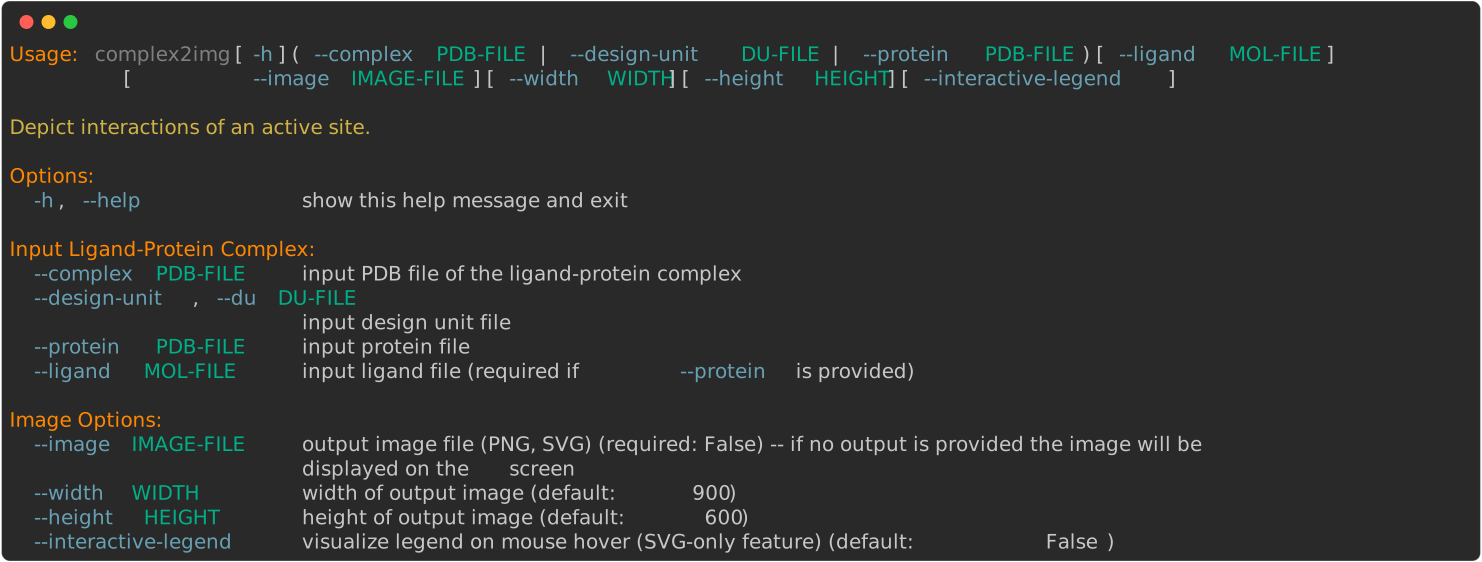
> complex2img --help
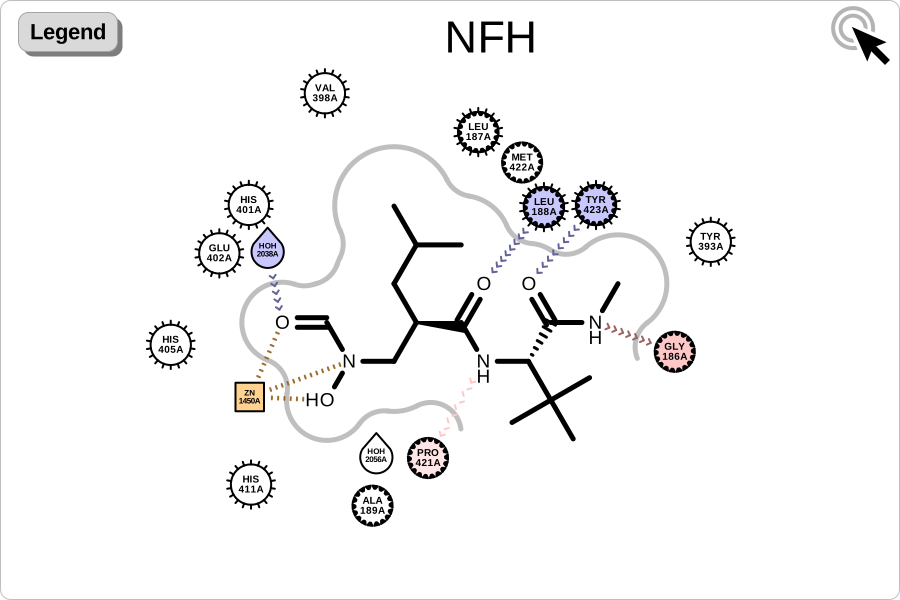
> complex2img --complex 1GKC.pdb --interactive-legend --image image.svg
will generate the following image for 1GKC.pdb:
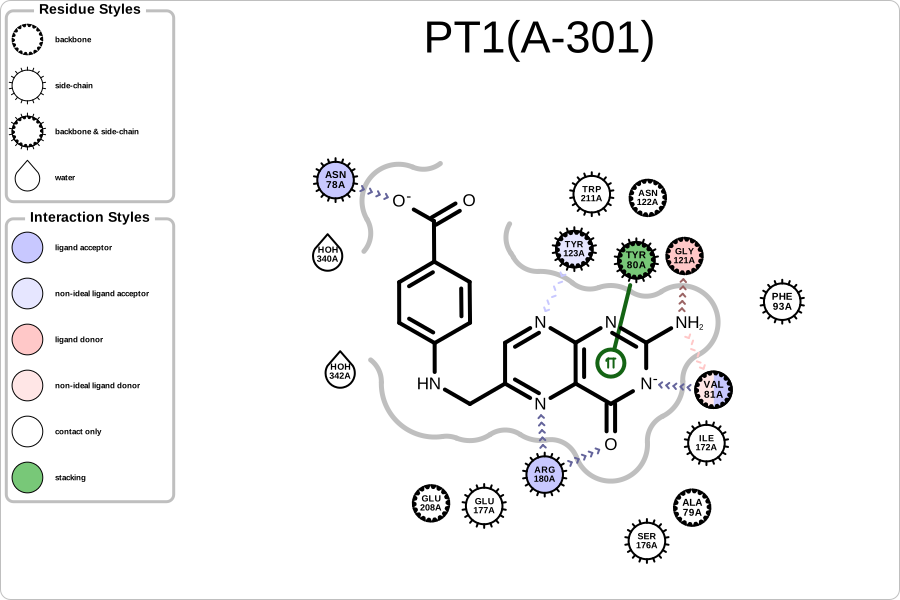
> complex2img --design-unit 1BR6_DU_0.oedu --image image.svg
will generate the following image for 1GKC.pdb:
complexes2pdf
> complexes2pdf --help
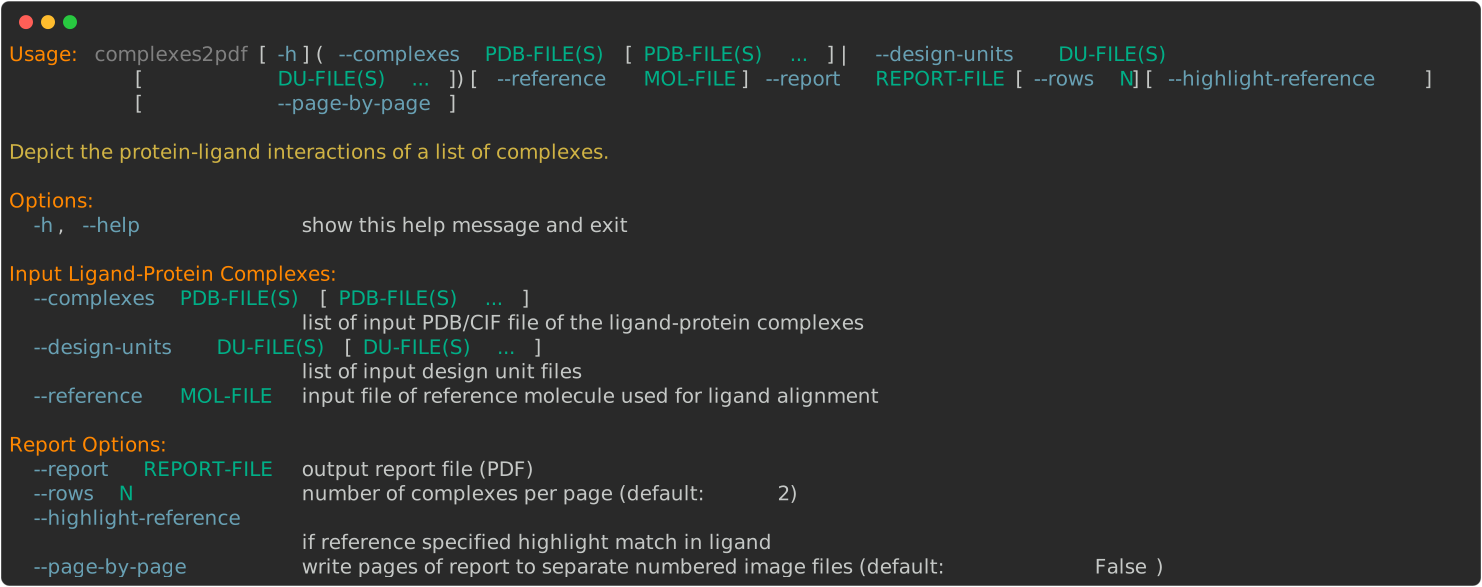
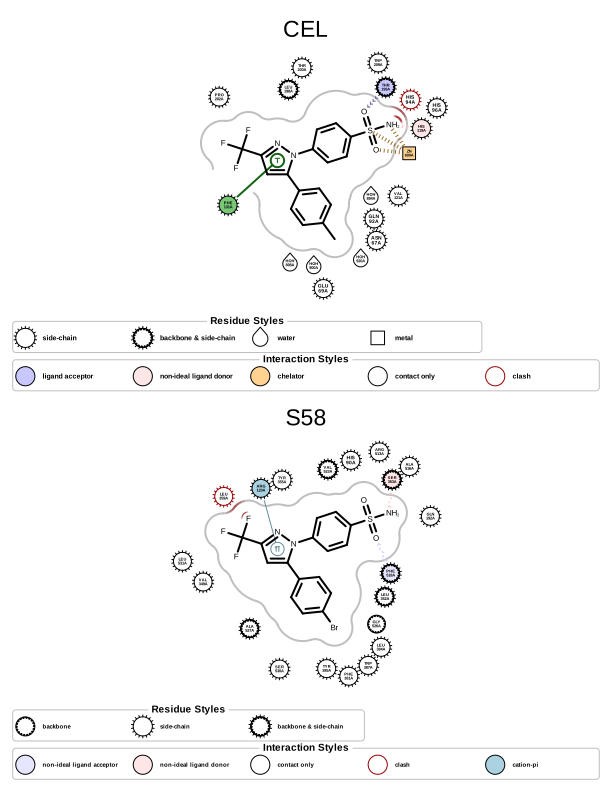
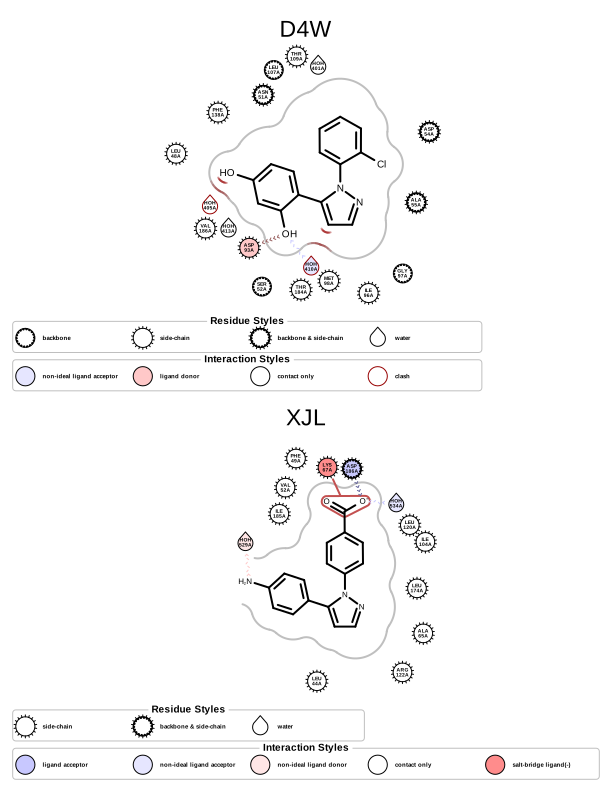
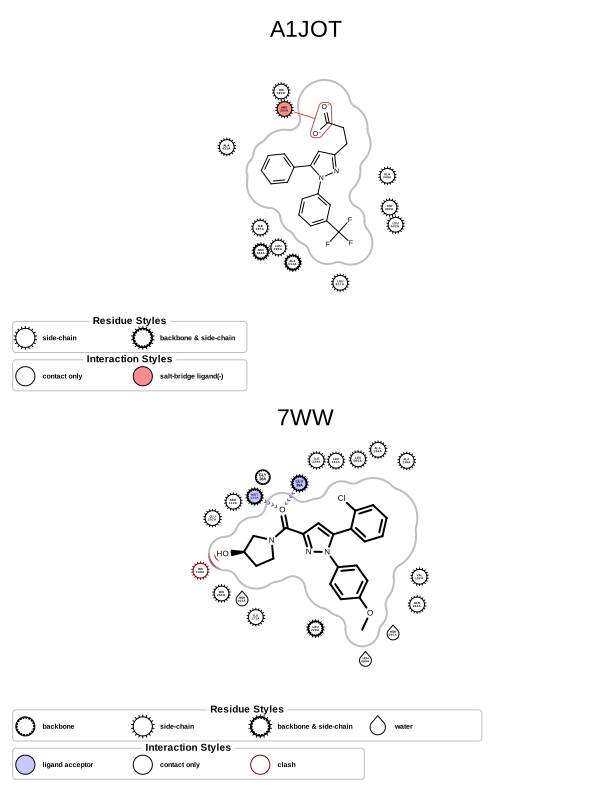
> complexes2pdf --complexes 1OQ5.cif 6COX.cif 6FCJ.cif 8R25.cif 9SMQ.cif 9RHW.cif --report report.pdf
page 1 |
page 2 |
page 3 |
|
|
|
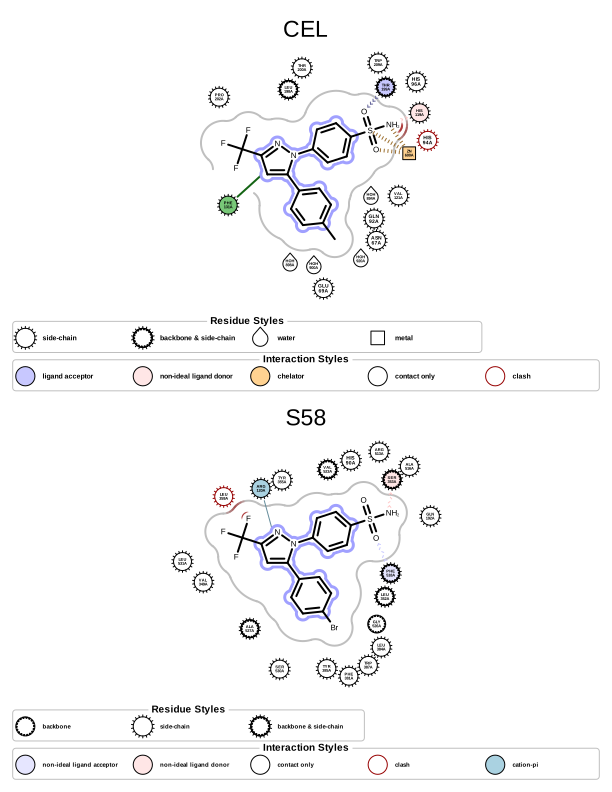
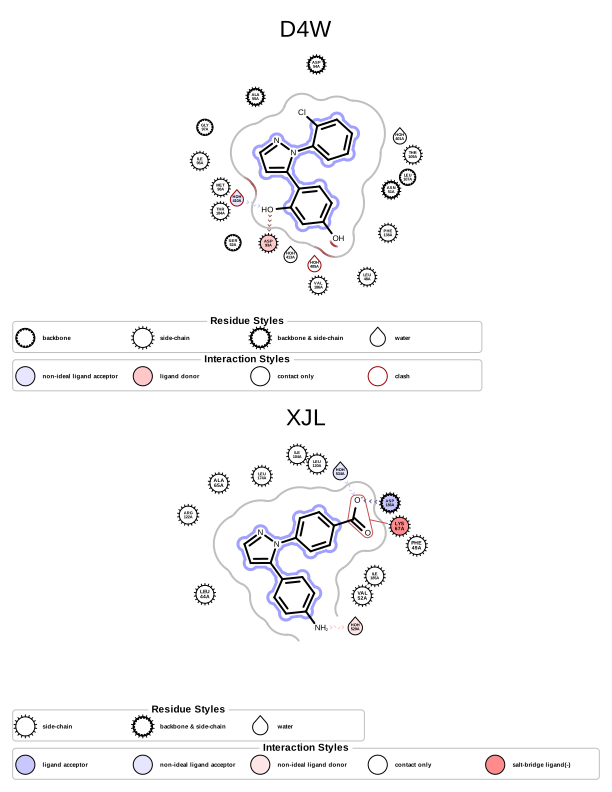
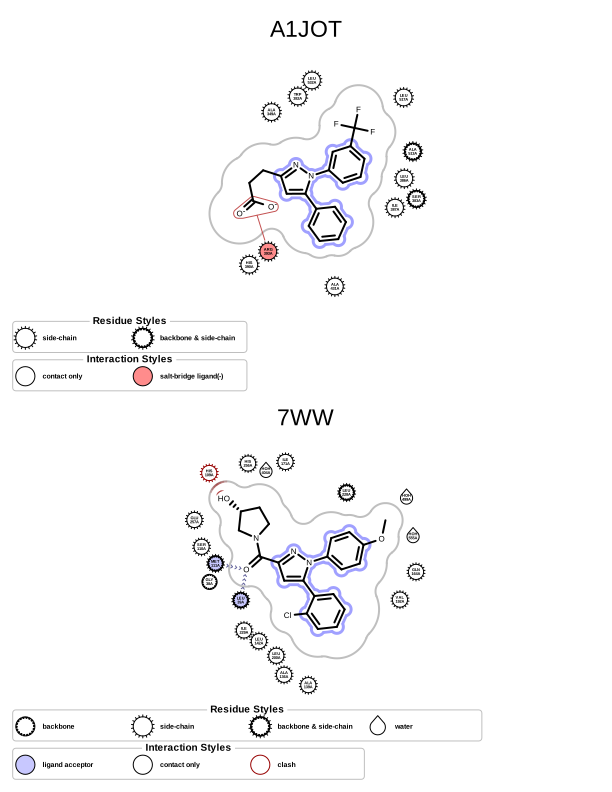
The following example shows how to use the complexes2pdf script to generate a report containing multiple complexes aligned to a reference substructure.
> complexes2pdf --complexes 1OQ5.cif 6COX.cif 6FCJ.cif 8R25.cif 9SMQ.cif 9RHW.cif --reference reference.mdl --highlight-reference --report report.pdf
page 1 |
page 2 |
page 3 |
|
|
|
Discussion
Interaction perception
Currently the OEPerceiveInteractionHints function perceives the following interaction types:
Table 3. Interaction types currently available in OEChem TK name
corresponding interaction class
corresponding interaction type namespace
cation-pi
chelator
clash
None
contact
None
covalent
None
halogen bond
hydrogen bond
salt-bridge
stacking (T and Pi)
The default geometric parameters used by the OEPerceiveInteractionHints function have been set based on literature data ([Kumar-2002], [Cavallo-2016], [Bissantz-2010], and [Marcou-2007] ). The interaction parameters can be customized by using the OEPerceiveInteractionOptions class.
Interaction depiction
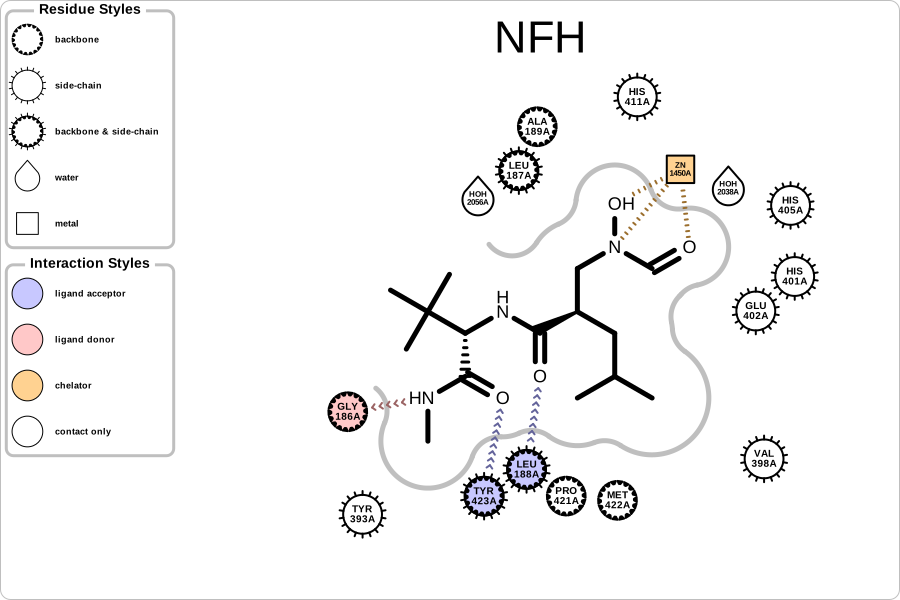
Figure 2. Example of visualizing protein-ligand interactions (PDB: 1GKC)
Protein-ligand interaction images (such as Figure 2) are generated in the following steps:
Determining the 2D layout of the ligand
The 2D coordinates of the ligand are generated using the OEPrepareDepictionFrom3D function. The 2D layout is driven by the 3D coordinates of the bound ligand.
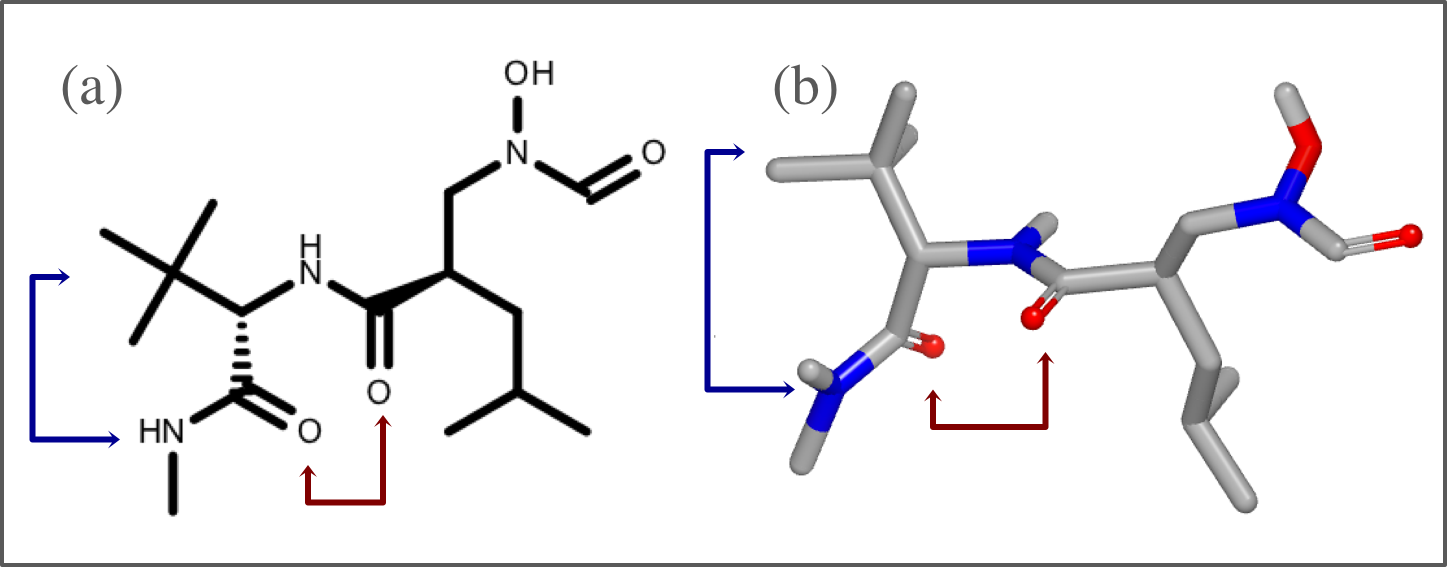
Step 1. Determining the 2D layout of the ligand
See also
Custom Ligand Alignment section
Visualizing the shape of the active site
The shape of active site is represented with a continuous gray line around the ligand. First, 2D molecule surface is constructed from adjoining arcs. The radius of each arc reflects the distance between the molecule surface of the ligand and the protein in 3D. The absence of an arc indicates regions where the ligand is exposed to the solvent. This 2D molecule surface is then smoothed to get the final aesthetic pleasing representation.
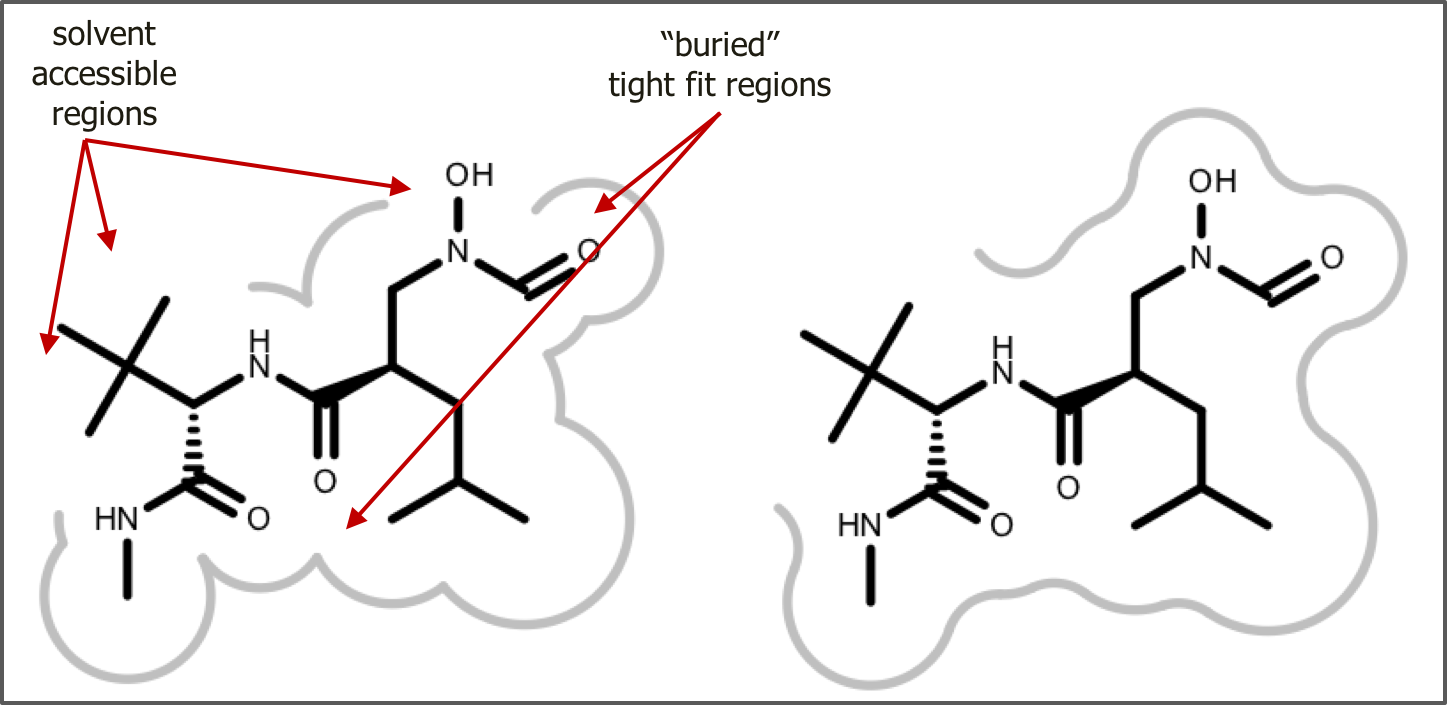
Step 2. Visualizing the shape of the active site
Positioning the residues
The residues are positioned close to the ligand atoms they interact with. The distances of residue glyphs from the 2D ligand do not indicate distances in the 3D complex. Residues that only have contact interaction with the ligand are positioned further away, while those that have other type of interactions such as hydrogen bonding, salt bridge etc. are positioned closer to the atoms they are interacting with
Step 3. Positioning the residues (click on any residues in the image above)
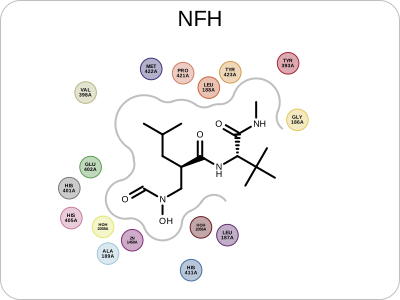
Visualizing the residues and interactions
The type of the residues and other components around the ligand are represented by different shapes. For example, nearby water is depicted with a glyph resembling a water drop. Basic amino acid residues are represented with a circle and further annotated whether their atoms that are interact with ligand are in the backbone, side-chain or in both.

Legend of residue and interaction styles
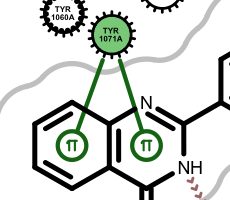
Apart from the color, each interaction type is also associated with a linker type. These linkers indicate which ligand atom(s) are interacting with which residue(s). Some of these linkers also imply the direction of the interactions. For example in case of the hydrogen bond interaction (see the first image in the table below), the chevron arrow shows the direction of the proton.
Examples of various interaction types 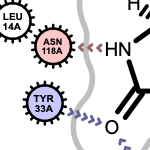
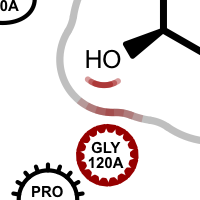
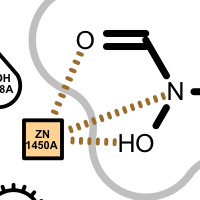
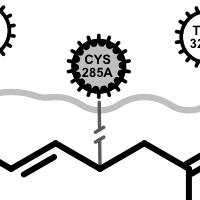
hydrogen bond
clash
chelator
covalent
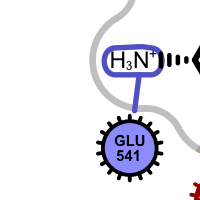
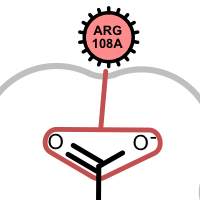
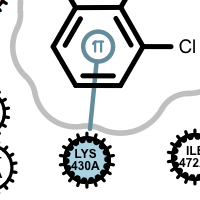
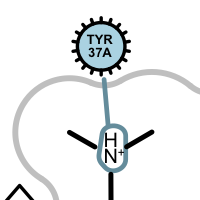
salt-bridge ligand (+)
salt-bridge ligand (-)
cation-pi (ligand aromatic ring)
cation-pi (protein aromatic ring)
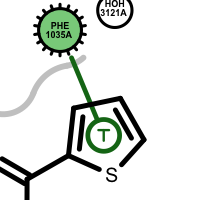
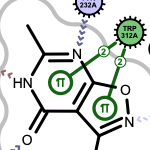
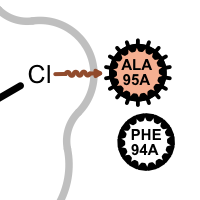
pi-stacking
t-stacking
multiple stacking
halogen bond
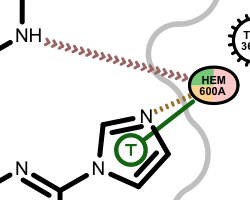
If a residue participates in more than one type of interaction, then the residue glyph has multiple colors (see examples below).
Example of residues contributing to more than one type of interaction 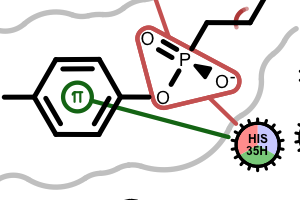
Hydrogen position optimization
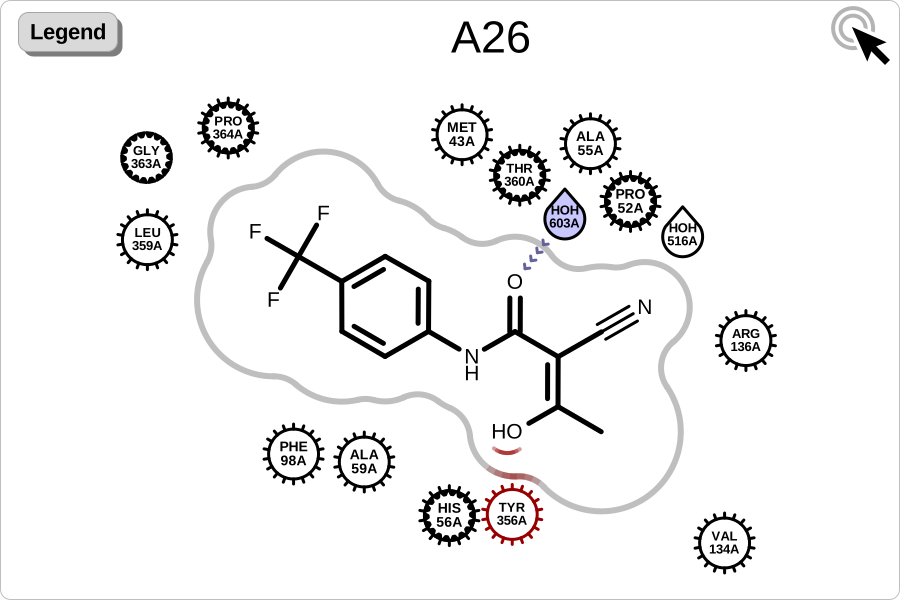
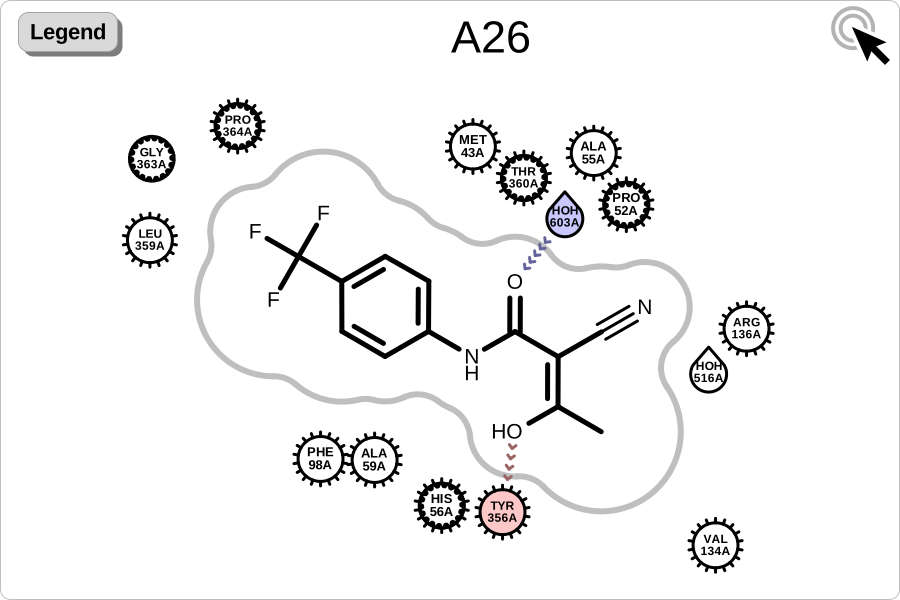
Since interaction perception depends on the position of hydrogens, it is highly recommended to optimize those positions prior to perceiving the interactions. The two images below reveal the effect of optimizing the hydrogen bond network in a protein-ligand complex: fewer atom clashes and more hydrogen bond interactions.
|
|
original complex downloaded from PDB Database (PDB 1D3H) |
complex after optimizing hydrogen positions |
See also
OEPlaceHydrogens function in the OEChem TK manual
Protein Preparation chapter in the OEChem TK manual
Custom Ligand Alignment
By default, the 2D coordinates of the ligand are derived from the 3D structure using the OEPrepareDepictionFrom3D function. The following class demonstrates how to implement custom ligand alignment that depicts the ligands aligned to a common reference substructure:
class LigandSubSearchAligner(oegrapheme.OELigandAlignerBase):
    """Align ligand based on substructure."""

    def __init__(self, sub_search: oechem.OESubSearch) -> None:
        """Initialize functor."""
        oegrapheme.OELigandAlignerBase.__init__(self)
        self._sub_search = oechem.OESubSearch(sub_search)
        # Configure options so we keep the ligand's existing coordinates,
        # only reorienting it to match the core's orientation.
        self._alignment_options = oedepict.OEAlignmentOptions()
        self._alignment_options.SetClearCoords(False)
        self._alignment_options.SetAddDepictionHydrogens(False)
        self._alignment_options.SetRotateAroundBonds(False)

    def __call__(self, ligand: oechem.OEMolBase) -> bool:
        """Align ligand based on substructure."""
        # This method must not modify the ligand except for changing its coordinates.
        # Adding or removing atoms would invalidate the ligand's active site.
        if not self._sub_search.SingleMatch(ligand):
            # ligand does not match core
            return False
        align_result = oedepict.OEPrepareAlignedDepiction(
            ligand, self._sub_search, self._alignment_options
        )
        return align_result.IsValid()

    def CreateCopy(self):  # noqa: ANN201, N802
        """Copy constructor."""
        return LigandSubSearchAligner(self._sub_search).__disown__()
    depict_options = oegrapheme.OE2DActiveSiteDisplayOptions(
        report.GetCellWidth(), report.GetCellHeight() * 0.8
    )
    if reference_sub_search is not None:
        depict_options.SetLigandAlignerFunctor(
            LigandSubSearchAligner(reference_sub_search)
        )
        depict_options.SetOptimizeLigandOrientation(False)
See the difference between protein-ligand interaction images generated by default in Table 1 and custom alignment in Table 2.
See also in OEChem TK manual
Theory
Biopolymers chapter
Protein Preparation chapter
API
OEDesignUnit class
OEPerceiveInteractionHints function
See also in Spruce TK manual
See also in OEDepict TK manual
Theory
Molecule Depiction chapter
API
OEImage class
OEImageFrame class
See also in GraphemeTM TK manual
Theory
Drawing a Molecule Surface chapter
API
OE2DActiveSiteDisplay class
OEDrawActiveSiteLegend function
OEPrepareActiveSiteDepiction function
OERenderActiveSite function