Depicting CSV or SDF in XLSX (Excel)
Problem
You want to depict molecules along with their associated data read from a
CSV file in an xlsx Excel file.
See example in drugs.xlsx
and in Figure 1.
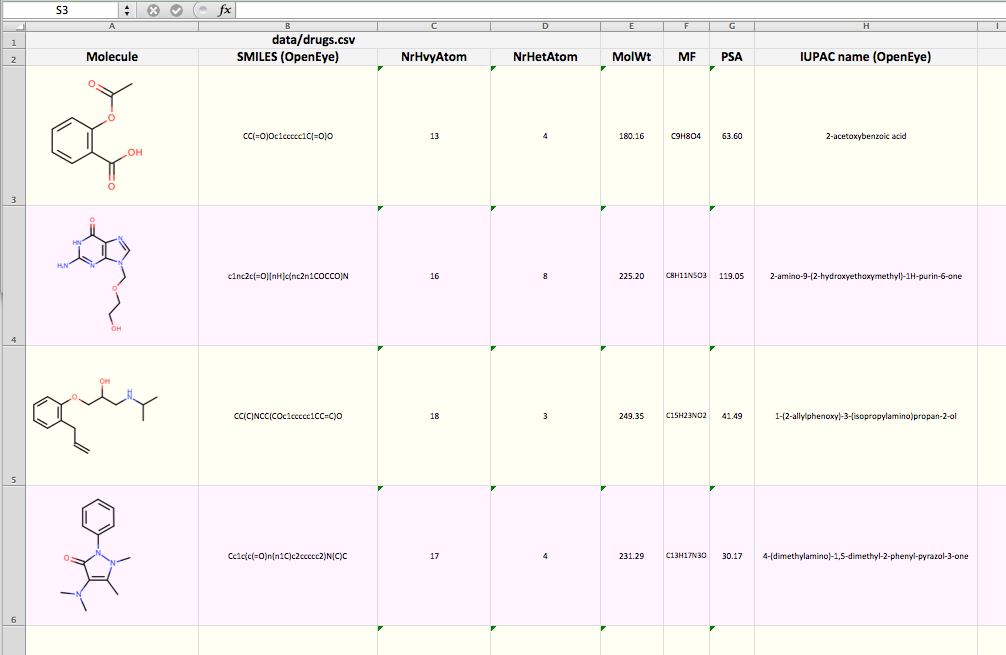
Figure 1. Example of XLSX generated with csv2xlsx
Ingredients
|
Difficulty Level
🌶️🌶️
Download
Source Code
csv2xlsx
#!/usr/bin/env python3
# (C) 2026 Cadence Design Systems, Inc. (Cadence)
# All rights reserved.
# TERMS FOR USE OF SAMPLE CODE The software below ("Sample Code") is
# provided to current licensees or subscribers of Cadence products or
# SaaS offerings (each a "Customer").
# Customer is hereby permitted to use, copy, and modify the Sample Code,
# subject to these terms. Cadence claims no rights to Customer's
# modifications. Modification of Sample Code is at Customer's sole and
# exclusive risk. Sample Code may require Customer to have a then
# current license or subscription to the applicable Cadence offering.
# THE SAMPLE CODE IS PROVIDED "AS IS", WITHOUT WARRANTY OF ANY KIND,
# EXPRESS OR IMPLIED.  OPENEYE DISCLAIMS ALL WARRANTIES, INCLUDING, BUT
# NOT LIMITED TO, WARRANTIES OF MERCHANTABILITY, FITNESS FOR A
# PARTICULAR PURPOSE AND NONINFRINGEMENT. In no event shall Cadence be
# liable for any damages or liability in connection with the Sample Code
# or its use.

"""Convert a CSV or an SDF file into EXCEL XLSX file."""

import argparse
import io
import os
import pathlib
import sys
from pathlib import Path

import xlsxwriter
from openeye import oechem, oedepict
from rich_argparse import HelpPreviewAction, RichHelpFormatter

__SCRIPT_NAME__ = Path(__file__).absolute().stem
__SCRIPT_DESC__ = "Convert an CSV or an SDF file into EXCEL XLSX file."
__SCRIPT_TOOLKITS__ = ["oechem", "oedepict"]
__SCRIPT_KEYWORDS__ = ["depiction", "XLSX", "chem-informatics"]
__SCRIPT_CATEGORIES__ = ["depiction"]


def parse_options() -> argparse.Namespace:
    """Set up command line options."""
    parser = argparse.ArgumentParser(
        add_help=True,
        formatter_class=RichHelpFormatter,
        description="[yellow]" + __SCRIPT_DESC__ + "[/yellow]",
    )

    # input options
    io_group = parser.add_argument_group("Input/Output options")
    io_group.add_argument(
        "--mol",
        type=str,
        required=True,
        metavar="MOL-FILE",
        help="input MOL file (.sdf, .csv)",
    )
    io_group.add_argument(
        "--xlsx",
        type=str,
        required=True,
        metavar="CVS-FILE",
        help="output XLSX file (.xlsx)",
    )

    parser.add_argument("--help-image", action=HelpPreviewAction)
    return parser.parse_args()


def main() -> int:
    """Convert an CSV or an SDF file into EXCEL XLSX file."""
    args = parse_options()

    xlsx_file = pathlib.Path(args.xlsx)
    if xlsx_file.suffix.lower() != ".xlsx":
        oechem.OEThrow.Fatal("Invalid file extension expected .xlsx!")

    mol_list: list[oechem.OEMolBase] = read_molecules(args.mol)
    data_tags = collect_data_tags(mol_list)

    width, height = 250, 250
    opts = oedepict.OE2DMolDisplayOptions(width, height, oedepict.OEScale_AutoScale)
    opts.SetBackgroundColor(oechem.OETransparentColor)
    opts.SetTitleLocation(oedepict.OETitleLocation_Hidden)

    write_xlsx_file(args.xlsx, mol_list, pathlib.Path(args.mol).name, data_tags, opts)

    return os.EX_OK


def read_molecules(mol_filename: str) -> list[oechem.OEMolBase]:
    """Read molecules from a CSV or SDF file and return a list of OEMolBase objects."""
    mol_path = pathlib.Path(mol_filename)
    if not mol_path.exists():
        oechem.OEThrow.Fatal(f"Cannot open input file '{mol_path.name}'!")

    ifs = oechem.oemolistream()
    if not ifs.open(str(mol_path)):
        oechem.OEThrow.Fatal(f"Cannot open input file '{mol_path.name}'!")

    if ifs.GetFormat() not in [oechem.OEFormat_CSV, oechem.OEFormat_SDF]:
        oechem.OEThrow.Fatal("Input must be a CSV or SDF file!")
    mol_list: list[oechem.OEMolBase] = [
        oechem.OEGraphMol(m) for m in ifs.GetOEGraphMols()
    ]
    return mol_list


def collect_data_tags(mol_list: list[oechem.OEMolBase]) -> list[str]:
    """Collect unique data tags from a list of molecules."""
    tags: list[str] = []
    for mol in mol_list:
        for dp in oechem.OEGetSDDataIter(mol):
            if dp.GetTag() not in tags:
                tags.append(dp.GetTag())
    return tags


def write_xlsx_file(
    output_filename: str,
    mol_list: list[oechem.OEMolBase],
    input_filename: str,
    data_tags: list[str],
    opts: oedepict.OE2DMolDisplayOptions,
) -> None:
    """Write the collected data to an XLSX file."""
    workbook = xlsxwriter.Workbook(output_filename)
    worksheet = workbook.add_worksheet()

    head_font, head_format = add_head_format(workbook)
    data_font, data_format_even, data_format_odd = add_data_formats(workbook)

    # estimate width of columns
    max_widths = []
    max_widths.append(opts.GetWidth() * 0.15)

    for tag in data_tags:
        maxwidth = oedepict.OEEstimateTextWidth(tag, head_font) * 2.0
        for mol in mol_list:
            if oechem.OEHasSDData(mol, tag):
                value = oechem.OEGetSDData(mol, tag)
                estimated_width = oedepict.OEEstimateTextWidth(value, data_font)
                maxwidth = max(maxwidth, estimated_width)
        max_widths.append(maxwidth * 0.12)

    # generate header
    row, col = 0, 0
    worksheet.set_row(row, None, head_format)
    worksheet.merge_range("A1:D1", input_filename)

    row, col = 1, 0
    worksheet.set_row(row, None, head_format)
    worksheet.set_column(col, col, max_widths[col])
    worksheet.write(row, col, "Molecule")

    for tag in data_tags:
        col += 1
        worksheet.set_column(col, col, max_widths[col])
        worksheet.write(row, col, tag)

    for mol in mol_list:
        row += 1
        data_format = data_format_even if row % 2 == 0 else data_format_odd
        worksheet.set_row(row, opts.GetHeight() * 0.75, data_format)

        col = 0
        image_data = get_molecule_image(mol, opts)
        image_options = {
            "object_position": 1,
            "image_data": image_data,
            "x_scale": 1.0,
            "y_scale": 1.0,
        }
        worksheet.insert_image(row, col, "python.png", options=image_options)

        for tag in data_tags:
            col += 1
            value = "N/A"
            if oechem.OEHasSDData(mol, tag):
                value = oechem.OEGetSDData(mol, tag)
            worksheet.write(row, col, value)

    workbook.close()


def get_molecule_image(
    mol: oechem.OEMolBase, opts: oedepict.OE2DMolDisplayOptions
) -> io.BytesIO:
    """Get a molecule image as a byte stream."""
    image = oedepict.OEImage(
        opts.GetWidth(), opts.GetHeight(), oechem.OETransparentColor
    )
    oedepict.OEPrepareDepiction(mol)
    disp = oedepict.OE2DMolDisplay(mol, opts)
    oedepict.OERenderMolecule(image, disp, False)
    return io.BytesIO(oedepict.OEWriteImageToString("png", image))


def add_head_format(
    workbook: xlsxwriter.Workbook,
) -> tuple[oedepict.OEFont, xlsxwriter.format]:
    """Add header format to the workbook."""
    font = oedepict.OEFont(
        oedepict.OEFontFamily_Default,
        oedepict.OEFontStyle_Bold,
        18,
        oedepict.OEAlignment_Center,
        oechem.OEBlack,
    )
    head_format = workbook.add_format(
        {"bold": True, "align": "center", "valign": "vcenter", "size": 18}
    )
    head_format.set_bg_color("#F4F4F4")
    head_format.set_border_color("#DDDDDD")
    head_format.set_border()

    return font, head_format


def add_data_formats(
    workbook: xlsxwriter.Workbook,
) -> tuple[oedepict.OEFont, xlsxwriter.format, xlsxwriter.format]:
    """Add data formats to the workbook."""
    font = oedepict.OEFont(
        oedepict.OEFontFamily_Default,
        oedepict.OEFontStyle_Default,
        12,
        oedepict.OEAlignment_Center,
        oechem.OEBlack,
    )

    format_even = workbook.add_format(
        {"bold": False, "align": "center", "valign": "vcenter", "size": 12}
    )
    format_even.set_shrink()
    format_even.set_bg_color("#FFFFF4")
    format_even.set_border_color("#DDDDDD")
    format_even.set_border()

    format_odd = workbook.add_format(
        {"bold": False, "align": "center", "valign": "vcenter", "size": 12}
    )
    format_odd.set_shrink()
    format_odd.set_bg_color("#FFF4FF")
    format_odd.set_border_color("#DDDDDD")
    format_odd.set_border()

    return font, format_even, format_odd


setattr(main, "__SCRIPT_NAME__", __SCRIPT_NAME__)
setattr(main, "__SCRIPT_DESC__", __SCRIPT_DESC__)
setattr(main, "__SCRIPT_TOOLKITS__", __SCRIPT_TOOLKITS__)
setattr(main, "__SCRIPT_KEYWORDS__", __SCRIPT_KEYWORDS__)
setattr(main, "__SCRIPT_CATEGORIES__", __SCRIPT_CATEGORIES__)

if __name__ == "__main__":
    sys.exit(main())
Solution
The CSV file format is a text file format containing comma-separated values. In OEChem TK this file format is implemented to enable data exchange with a wide variety of other software. Each line of a CSV file stores data for a molecule that is represented by a SMILES string.
See also
CSV File Format section of the OEChem TK documentation about the layout of the CSV file format.
When reading a CSV file, the fields of the file are attached to each molecule as SD data. This data can be accessed by the OEGetSDDataIter function that returns an iterator over all the SD data (tag - value) pairs of a molecule. The collect_data_tags function iterates over a list of molecules and returns the unique tags of the data attached to the molecules.
1def collect_data_tags(mol_list: list[oechem.OEMolBase]) -> list[str]:
2    """Collect unique data tags from a list of molecules."""
3    tags: list[str] = []
4    for mol in mol_list:
5        for dp in oechem.OEGetSDDataIter(mol):
6            if dp.GetTag() not in tags:
7                tags.append(dp.GetTag())
8    return tags
The write_xlsx_file function takes a list of molecules read from a CSV file along with the data tags returned by the collect_data_tags function.
First, a worksheet is created and the cell styles to be used throughout the spreadsheet are defined. Next, the width of each column is estimated using the OEEstimateTextWidth function. The table header is then generated by writing the input filename into the first row and each of the data tags into the second row. As the function iterates over the molecules, each molecule is depicted in a new row together with its associated data, using alternating row styles.
 1def write_xlsx_file(
 2    output_filename: str,
 3    mol_list: list[oechem.OEMolBase],
 4    input_filename: str,
 5    data_tags: list[str],
 6    opts: oedepict.OE2DMolDisplayOptions,
 7) -> None:
 8    """Write the collected data to an XLSX file."""
 9    workbook = xlsxwriter.Workbook(output_filename)
10    worksheet = workbook.add_worksheet()
11
12    head_font, head_format = add_head_format(workbook)
13    data_font, data_format_even, data_format_odd = add_data_formats(workbook)
14
15    # estimate width of columns
16    max_widths = []
17    max_widths.append(opts.GetWidth() * 0.15)
18
19    for tag in data_tags:
20        maxwidth = oedepict.OEEstimateTextWidth(tag, head_font) * 2.0
21        for mol in mol_list:
22            if oechem.OEHasSDData(mol, tag):
23                value = oechem.OEGetSDData(mol, tag)
24                estimated_width = oedepict.OEEstimateTextWidth(value, data_font)
25                maxwidth = max(maxwidth, estimated_width)
26        max_widths.append(maxwidth * 0.12)
27
28    # generate header
29    row, col = 0, 0
30    worksheet.set_row(row, None, head_format)
31    worksheet.merge_range("A1:D1", input_filename)
32
33    row, col = 1, 0
34    worksheet.set_row(row, None, head_format)
35    worksheet.set_column(col, col, max_widths[col])
36    worksheet.write(row, col, "Molecule")
37
38    for tag in data_tags:
39        col += 1
40        worksheet.set_column(col, col, max_widths[col])
41        worksheet.write(row, col, tag)
42
43    for mol in mol_list:
44        row += 1
45        data_format = data_format_even if row % 2 == 0 else data_format_odd
46        worksheet.set_row(row, opts.GetHeight() * 0.75, data_format)
47
48        col = 0
49        image_data = get_molecule_image(mol, opts)
50        image_options = {
51            "object_position": 1,
52            "image_data": image_data,
53            "x_scale": 1.0,
54            "y_scale": 1.0,
55        }
56        worksheet.insert_image(row, col, "python.png", options=image_options)
57
58        for tag in data_tags:
59            col += 1
60            value = "N/A"
61            if oechem.OEHasSDData(mol, tag):
62                value = oechem.OEGetSDData(mol, tag)
63            worksheet.write(row, col, value)
64
65    workbook.close()
The write_image_to_file function generates a molecule depiction to a binary stream.
 1def get_molecule_image(
 2    mol: oechem.OEMolBase, opts: oedepict.OE2DMolDisplayOptions
 3) -> io.BytesIO:
 4    """Get a molecule image as a byte stream."""
 5    image = oedepict.OEImage(
 6        opts.GetWidth(), opts.GetHeight(), oechem.OETransparentColor
 7    )
 8    oedepict.OEPrepareDepiction(mol)
 9    disp = oedepict.OE2DMolDisplay(mol, opts)
10    oedepict.OERenderMolecule(image, disp, False)
11    return io.BytesIO(oedepict.OEWriteImageToString("png", image))
Usage
See Download section to download the script.
> csv2xlsx --help

The following command converts (drugs.csv) to
(drugs.xlsx)
> csv2xlsx --mol drugs.csv --xlsx drugs.xlsx
Reading the columns of a CSV file into SD data fields means
that the OEChem TK provides a meta-data interchange between sdf files and
CSV files.
Consequently, the same Python script can be used to generate a xlsx file
reading an sdf file.
The following command converts (drugs.csv) to
(drugs.xlsx)
> csv2xlsx --mol drugs.sdf --xlsx drugs.xlsx
See also
See also in OEChem TK manual
Theory
SD Tagged Data Manipulation section
CSV File Format section
API
OEGetSDDataPairs function
See also in OEDepict TK manual
Theory
Molecule Depiction chapter
API
OE2DMolDisplay class
OE2DMolDisplayOptions class
OEPrepareDepiction function