OEImageGrid
class OEImageGrid
This class represents OEImageGrid which is a layout manager that aligns cells into rows and columns. The cells of the grid are equal-sized and evenly spaced. See Figure: Schematic representation of an OEImageGrid object.
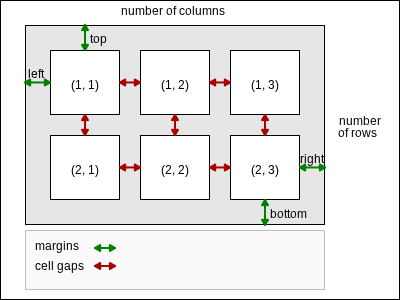
Schematic representation of an OEImageGrid object
Note
In the image grid, each cell has the same width and height. The width and height of the cells are calculated based on the height and width of the OEImageGrid, its margins and gap set between the cells.
See also
Depicting Molecules in a Grid section
OEImageTable class
Constructors
OEImageGrid(image: OEImageBase, rows: int, cols: int) -> OEImageGrid
Creates an OEImageGrid object with the specified number of rows and columns.
- parent
The OEImageBase object on which the OEImageGrid object is placed.
- rows
The number of rows in the OEImageGrid object.
- cols
The number of columns in the OEImageGrid object.
Note
The width and the height of the OEImageGrid object are identical to the width and height of the parent OEImageBase, respectively.
See also
OEImageGrid.NumColsmethodOEImageGrid.NumRowsmethod
GetCell
GetCell(row: int, col: int) -> OEImageBase
Returns the OEImageBase pointer for the cell positioned in the \(r^{th}\) row and \(c^{th}\) columns.
- r
This value has to be in the range from 1 to
OEImageGrid.NumRows().- c
This value has to be in the range from 1 to
OEImageGrid.NumCols().
GetCellGap
GetCellGap() -> float
Returns the space between the cells of the OEImageGrid object.
See also
OEImageGrid.SetCellGapmethod
GetCellHeight
GetCellHeight() -> float
Returns the height of the cells of the OEImageGrid object.
GetCellWidth
GetCellWidth() -> float
Returns the width of the cells of the OEImageGrid object.
GetCells
GetCells(row: int = 0, col: int = 0) -> Iterable[OEImageBase]
Returns an iterator over the cells of the OEImageGrid object. The cells are returned from left to right and top to bottom order.
- row
This value has to be in the range from 0 to
OEImageGrid.NumRows().- col
This value has to be in the range from 0 to
OEImageGrid.NumCols().
Example (Figure Example of accessing all cells of the grid)
for cell in grid.GetCells():
    pass
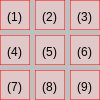
Example of accessing all cells of the grid.
(The numbers inside the cells represent the order in which the cells are returned)
If the col number is zero then OEImageGrid.GetCells
returns an iterator over the cells of the specified row.
Example (Figure Example of accessing a specific row of the grid)
row = 2
for cell in grid.GetCells(row, 0):
    pass
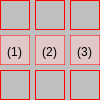
Example of accessing a specific row of the grid.
(The numbers inside the cells represent the order in which the cells are returned)
If the row number is zero then OEImageGrid.GetCells
returns an iterator over the cells of the specified column.
Example (Figure Example of accessing a specific column of the grid)
col = 2
for cell in grid.GetCells(0, col):
    pass
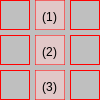
Example of accessing a specific column of the grid.
(The numbers inside the cells represent the order in which the cells are returned)
GetMargin
GetMargin(margin: int) -> float
Returns the size of a specific margin of the OEImageGrid object.
- margin
This value has to be from the
OEMarginnamespace.
See also
OEImageGrid.SetMarginmethodOEImageGrid.SetMarginsmethod
NumCols
NumCols() -> int
Returns the number of columns of the OEImageGrid object.
NumRows
NumRows() -> int
Returns the number of rows of the OEImageGrid object.
SetCellGap
SetCellGap(size: float) -> bool
Sets the space between the cells of the OEImageGrid object to the given size.
- size
This value has to be a positive number.
See also
OEImageGrid.GetCellGapmethod
SetMargin
SetMargin(margin: int, size: float) -> bool
Sets the size of a specific margin of the OEImageGrid object.
- margin
This value has to be from the
OEMarginnamespace.- size
This value has to be a positive number.
See also
OEImageGrid.GetMarginmethod
SetMargins
SetMargins(size: float) -> bool
Sets the size of all margins of the OEImageGrid object.
- size
This value has to be a positive number.
See also
OEImageGrid.GetMarginmethod