🆕 Depict Monomer
Problem
You want to depict a monomer from OEChem TK’s built-in monomer sets
or a custom monomer set defined in a json file.
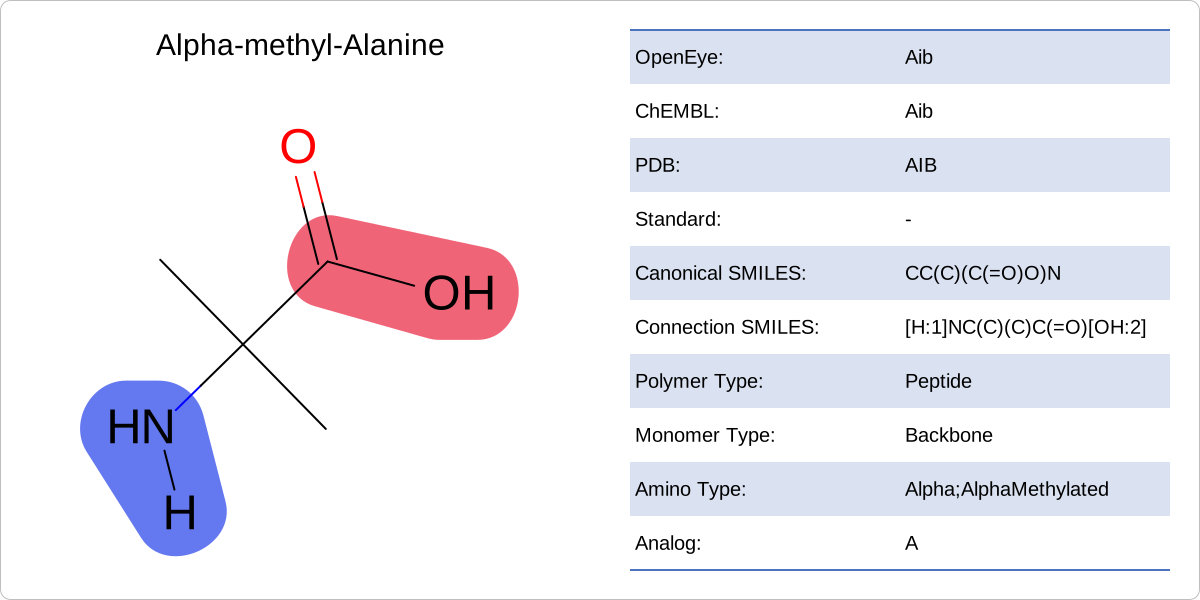
Example of monomer depiction.
Ingredients
|
Difficulty Level
🌶️
Download
Source Code
monomer2img
#!/usr/bin/env python3
# (C) 2026 Cadence Design Systems, Inc. (Cadence)
# All rights reserved.
# TERMS FOR USE OF SAMPLE CODE The software below ("Sample Code") is
# provided to current licensees or subscribers of Cadence products or
# SaaS offerings (each a "Customer").
# Customer is hereby permitted to use, copy, and modify the Sample Code,
# subject to these terms. Cadence claims no rights to Customer's
# modifications. Modification of Sample Code is at Customer's sole and
# exclusive risk. Sample Code may require Customer to have a then
# current license or subscription to the applicable Cadence offering.
# THE SAMPLE CODE IS PROVIDED "AS IS", WITHOUT WARRANTY OF ANY KIND,
# EXPRESS OR IMPLIED.  OPENEYE DISCLAIMS ALL WARRANTIES, INCLUDING, BUT
# NOT LIMITED TO, WARRANTIES OF MERCHANTABILITY, FITNESS FOR A
# PARTICULAR PURPOSE AND NONINFRINGEMENT. In no event shall Cadence be
# liable for any damages or liability in connection with the Sample Code
# or its use.

"""Depict monomer."""

import argparse
import io
import json
import os
import pathlib
import sys

import rich.console
from openeye import oechem, oedepict, oegrapheme
from PIL import Image
from rich_argparse import HelpPreviewAction, RichHelpFormatter

__SCRIPT_NAME__ = pathlib.Path(__file__).absolute().stem
__SCRIPT_DESC__ = "Depict monomer."
__SCRIPT_TOOLKITS__ = ["oechem", "oedepict", "oegrapheme"]
__SCRIPT_KEYWORDS__ = ["monomer", "peptide", "peptide-informatics", "depiction"]
__SCRIPT_CATEGORIES__ = ["depiction", "peptide-informatics"]


def parse_options() -> argparse.Namespace:
    """Set up command line options."""
    parser = argparse.ArgumentParser(
        add_help=True,
        formatter_class=RichHelpFormatter,
        description="[yellow]"
        + __SCRIPT_DESC__
        + " -- supported image formats: svg, png"
        + "[/yellow]",
    )
    monomers_group = parser.add_argument_group("Monomer set options")
    _add_monomer_collection(monomers_group)

    image_group = parser.add_argument_group("Image options")
    image_group.add_argument(
        "--image",
        type=str,
        required=False,
        metavar="IMAGE-FILE",
        help="output image file (PNG, SVG) (required: %(required)s) -- if no output is provided the image will be displayed on the  screen",
    )
    image_group.add_argument(
        "--width",
        type=int,
        default=900,
        help="width of output image (default: %(default)s)",
    )
    image_group.add_argument(
        "--height",
        type=int,
        default=600,
        help="height of output image (default: %(default)s)",
    )
    depiction_group = parser.add_argument_group("Depiction options")
    depiction_group.add_argument(
        "--show-monomer-data",
        default=False,
        action="store_true",
        help="show additional monomer data",
    )

    parser.add_argument("--help-image", action=HelpPreviewAction)
    return parser.parse_args()


def main() -> int:
    """Depict monomer."""
    args = parse_options()

    monomers = _get_monomer_collection(args)
    console = rich.console.Console()

    _check_image_file(args)

    primary_code_set = (
        monomers.GetPrimaryCodeSet() if args.code_set is None else args.code_set
    )
    code_sets: list[str] = [
        primary_code_set,
        *[c for c in monomers.GetCodeSets() if c != primary_code_set],
    ]

    monomer: oechem.OEMonomer | None = monomers.GetMonomer(primary_code_set, args.code)
    if monomer is None:
        console.print()
        console.print(
            f"[red]'{args.code}' code does not exist in code_sets = {primary_code_set} ![/red]"
        )
        return os.EX_DATAERR

    image = oedepict.OEImage(args.width, args.height)
    depict_monomer(image, monomer, code_sets, args.show_monomer_data)

    if args.image:
        oedepict.OEWriteImage(args.image, image)
    else:
        _img = Image.open(io.BytesIO(oedepict.OEWriteImageToBytes("png", image)))
        _img.show()

    return os.EX_OK


def depict_monomer(
    image: oedepict.OEImage,
    monomer: oechem.OEMonomer,
    code_sets: list[str],
    show_monomer_data: bool,
) -> None:
    """Depicts monomer with additional data."""
    width, height = image.GetWidth(), image.GetHeight()
    main_frame: oedepict.OEImageBase
    data_frame: oedepict.OEImageBase | None = None

    if show_monomer_data:
        main_frame = oedepict.OEImageFrame(
            image, width * 0.5, height, oedepict.OE2DPoint(0.0, 0.0)
        )
        data_frame = oedepict.OEImageFrame(
            image, width * 0.5, height, oedepict.OE2DPoint(width * 0.5, 0.0)
        )
    else:
        main_frame = oedepict.OEImageFrame(
            image, width, height, oedepict.OE2DPoint(0.0, 0.0)
        )

    oegrapheme.OEDrawMonomer(main_frame, monomer)

    if data_frame:
        # depict monomer data in a table
        data: list[tuple[str, str]] = [
            (s, monomer.GetCode(s)) if monomer.HasCode(s) else (s, "-")
            for s in code_sets
        ]

        data.append(("Canonical SMILES", monomer.GetCanonicalSmiles()))
        data.append(("Connection SMILES", monomer.GetSmiles()))
        data.append(
            ("Polymer Type", oechem.OEPolymerTypeToString(monomer.GetPolymerType()))
        )
        data.append(
            ("Monomer Type", oechem.OEMonomerTypeToString(monomer.GetMonomerType()))
        )
        data.append(
            ("Amino Type", oechem.OEAminoAcidTypeToString(monomer.GetAminoAcidType()))
        )
        analog = oechem.OEGetStandardAnalog(monomer.GetCanonicalSmiles())
        data.append(
            (
                "Analog",
                (
                    oechem.OEGetAminoAcidCode(analog)
                    if analog != oechem.OEResidueIndex_UNK
                    else "-"
                ),
            )
        )
        table_options = _get_table_options(len(data))
        table = oedepict.OEImageTable(data_frame, table_options)
        for idx, (tag, value) in enumerate(data):
            table.DrawText(table.GetBodyCell(idx + 1, 1), tag + ":")
            table.DrawText(table.GetBodyCell(idx + 1, 2), value)

    oedepict.OEDrawCurvedBorder(image, oedepict.OELightGreyPen, 10.0)


def _get_table_options(num_data: int) -> oedepict.OEImageTableOptions:
    table_options = oedepict.OEImageTableOptions(
        num_data, 2, oedepict.OEImageTableStyle_LightBlue
    )
    table_options.SetHeader(False)
    table_options.SetBaseFontSize(20)
    table_options.SetMargins(5.0)
    cell_font: oedepict.OEFont = table_options.GetCellFont()
    cell_font.SetAlignment(oedepict.OEAlignment_Left)
    table_options.SetCellFont(cell_font)
    return table_options


class MonomerSetParameter:  # noqa: PLW1641
    """Utility class to handle both built-in and user defined monomer sets."""

    def __init__(self) -> None:  # noqa: D107
        self._monomer_sets = ["Standard", "OpenEye", "JSON-FILENAME"]

    def __repr__(self) -> str:  # noqa: D105
        return ",".join(self._monomer_sets)

    def __eq__(self, param: object) -> bool:  # noqa: D105
        if not isinstance(param, str):
            return False
        if param in ["Standard", "OpenEye"]:
            return True

        console = rich.console.Console()
        monomer_set_filepath = pathlib.Path(param)
        if (
            not monomer_set_filepath.exists()
            or monomer_set_filepath.suffix.lower() != ".json"
        ):
            console.print(f"[red]Invalid monomer set file '{param}' ![/red]")
            return False
        try:
            with monomer_set_filepath.open("r") as json_file:
                json.load(json_file)
        except json.JSONDecodeError as e:
            console.print(f"[red]Invalid monomer set file '{param}' ![/red]")
            console.print(f"[red]Error decoding JSON: {e} ![/red]")
            return False
        return True


def _add_monomer_collection(arg_group: argparse._ArgumentGroup) -> None:
    arg_group.add_argument(
        "-m",
        "--monomers",
        type=str,
        default="Standard",
        choices=[MonomerSetParameter()],
        help="built-in monomer-set type or json file of monomers",
    )
    arg_group.add_argument(
        "-c",
        "--code",
        type=str,
        required=True,
        default=None,
        help="monomer code",
    )
    arg_group.add_argument(
        "--code-set",
        type=str,
        metavar="CODE-SET",
        required=False,
        default=None,
        help="code-set, if not specified primary code-set is used",
    )


def _get_monomer_collection(args: argparse.Namespace) -> oechem.OEMonomerSet:
    monomers = oechem.OEMonomerSet()
    match args.monomers:
        case "Standard":
            oechem.OELoadStandardMonomerSet(monomers)
        case "OpenEye":
            oechem.OELoadOpenEyeMonomerSet(monomers)
        case _:
            oechem.OEReadMonomerSet(monomers, args.monomers)
    return monomers


def _check_image_file(args: argparse.Namespace) -> None:
    # script will terminate if there is some issues
    if not args.image:
        # image will be displayed on the screen
        return
    ext = pathlib.Path(args.image).suffix[1:].upper()
    if not oedepict.OEIsRegisteredImageFile(ext):
        oechem.OEThrow.Fatal("Unknown image output type!")

    ofs = oechem.oeofstream()
    if not ofs.open(args.image):
        oechem.OEThrow.Fatal("Cannot open output image file!")


setattr(main, "__SCRIPT_NAME__", __SCRIPT_NAME__)
setattr(main, "__SCRIPT_DESC__", __SCRIPT_DESC__)
setattr(main, "__SCRIPT_TOOLKITS__", __SCRIPT_TOOLKITS__)
setattr(main, "__SCRIPT_KEYWORDS__", __SCRIPT_KEYWORDS__)
setattr(main, "__SCRIPT_CATEGORIES__", __SCRIPT_CATEGORIES__)

if __name__ == "__main__":
    sys.exit(main())
Solution
def depict_monomer(
    image: oedepict.OEImage,
    monomer: oechem.OEMonomer,
    code_sets: list[str],
    show_monomer_data: bool,
) -> None:
    """Depicts monomer with additional data."""
    width, height = image.GetWidth(), image.GetHeight()
    main_frame: oedepict.OEImageBase
    data_frame: oedepict.OEImageBase | None = None

    if show_monomer_data:
        main_frame = oedepict.OEImageFrame(
            image, width * 0.5, height, oedepict.OE2DPoint(0.0, 0.0)
        )
        data_frame = oedepict.OEImageFrame(
            image, width * 0.5, height, oedepict.OE2DPoint(width * 0.5, 0.0)
        )
    else:
        main_frame = oedepict.OEImageFrame(
            image, width, height, oedepict.OE2DPoint(0.0, 0.0)
        )

    oegrapheme.OEDrawMonomer(main_frame, monomer)

    if data_frame:
        # depict monomer data in a table
        data: list[tuple[str, str]] = [
            (s, monomer.GetCode(s)) if monomer.HasCode(s) else (s, "-")
            for s in code_sets
        ]

        data.append(("Canonical SMILES", monomer.GetCanonicalSmiles()))
        data.append(("Connection SMILES", monomer.GetSmiles()))
        data.append(
            ("Polymer Type", oechem.OEPolymerTypeToString(monomer.GetPolymerType()))
        )
        data.append(
            ("Monomer Type", oechem.OEMonomerTypeToString(monomer.GetMonomerType()))
        )
        data.append(
            ("Amino Type", oechem.OEAminoAcidTypeToString(monomer.GetAminoAcidType()))
        )
        analog = oechem.OEGetStandardAnalog(monomer.GetCanonicalSmiles())
        data.append(
            (
                "Analog",
                (
                    oechem.OEGetAminoAcidCode(analog)
                    if analog != oechem.OEResidueIndex_UNK
                    else "-"
                ),
            )
        )
        table_options = _get_table_options(len(data))
        table = oedepict.OEImageTable(data_frame, table_options)
        for idx, (tag, value) in enumerate(data):
            table.DrawText(table.GetBodyCell(idx + 1, 1), tag + ":")
            table.DrawText(table.GetBodyCell(idx + 1, 2), value)

    oedepict.OEDrawCurvedBorder(image, oedepict.OELightGreyPen, 10.0)
Usage
See Download section to download the script.
> monomer2img --help
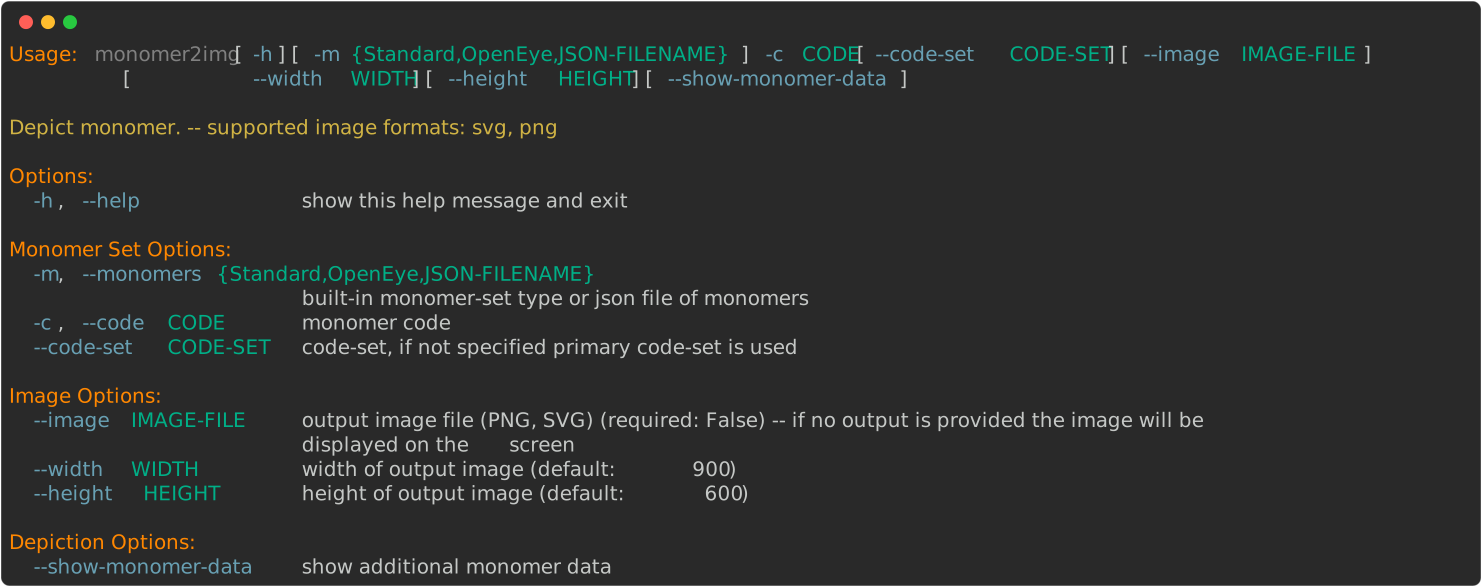
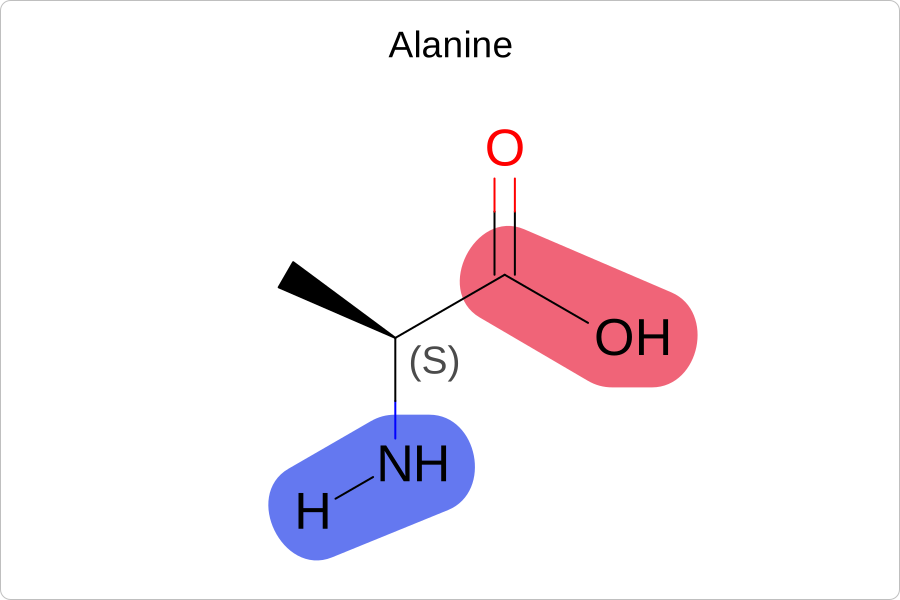
By default, the monomer2img script loads OEChem TK’s
built-in Standard monomer set.
> monomer2img --code A --image image.svg
- --monomers OpenEye
OEChem TK’s built-in OpenEye monomer-set can be loaded with the --monomers OpenEye
parameter.
> monomer2img --monomers OpenEye --code Aib --show-monomer-data --width 1200 --image image.svg
- --monomers JSON-MONOMER-FILE
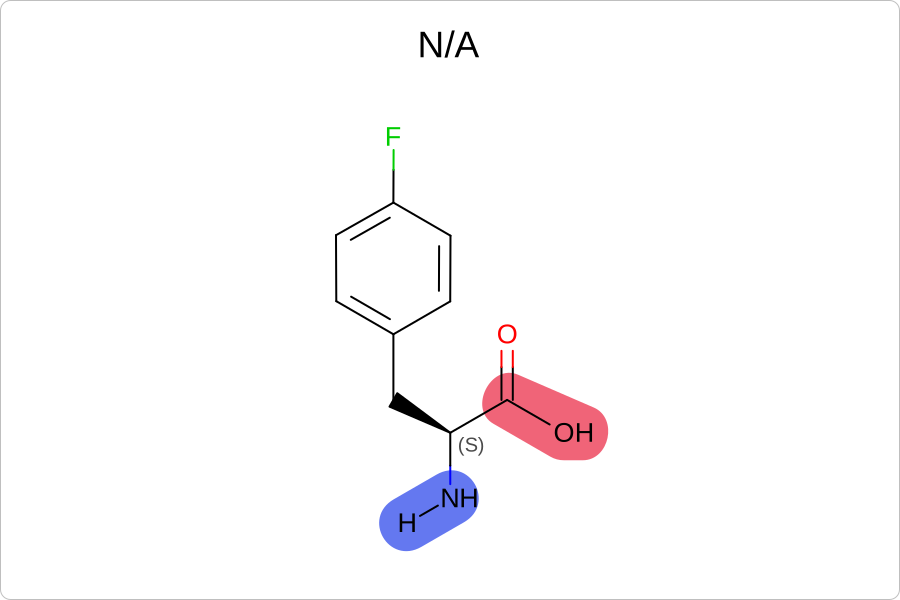
The following example shows how to depict a monomer from a custom monomer set
defined in a json file
(custom-monomers.json)
> monomer2img --monomers custom-monomers.json --code 'Phe(4-F)' --image image.svg
See also in OEChem TK manual
API
OEMonomer class
OEMonomerSet class
See also in OEGrapheme TK manual
API
OEDrawMonomer function