🆕 Depict Peptide
Problem
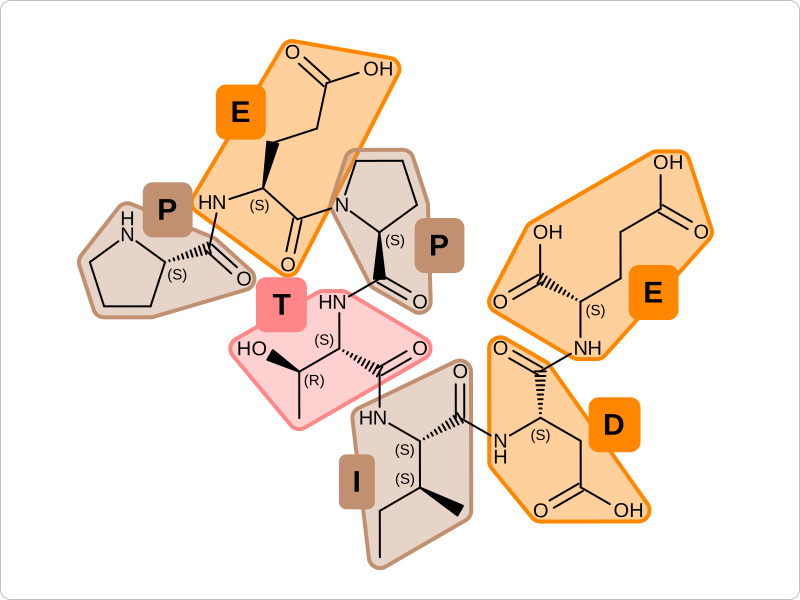
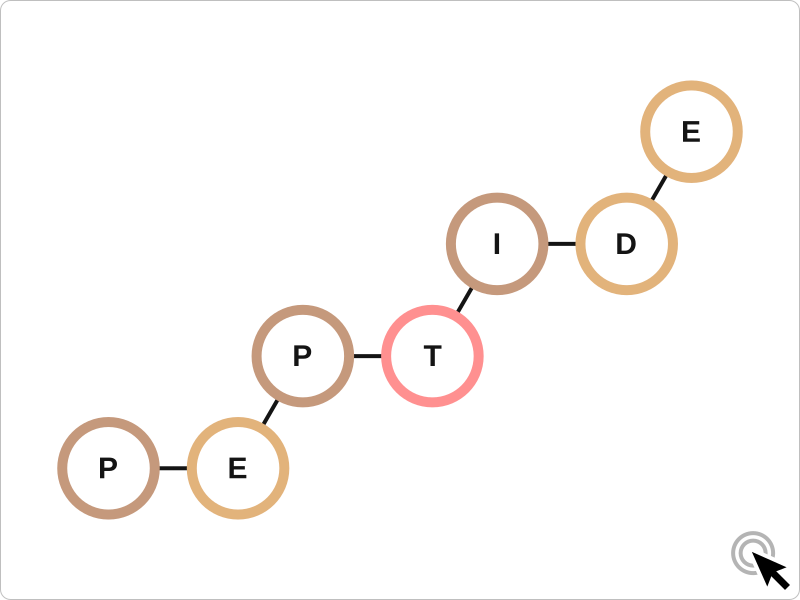
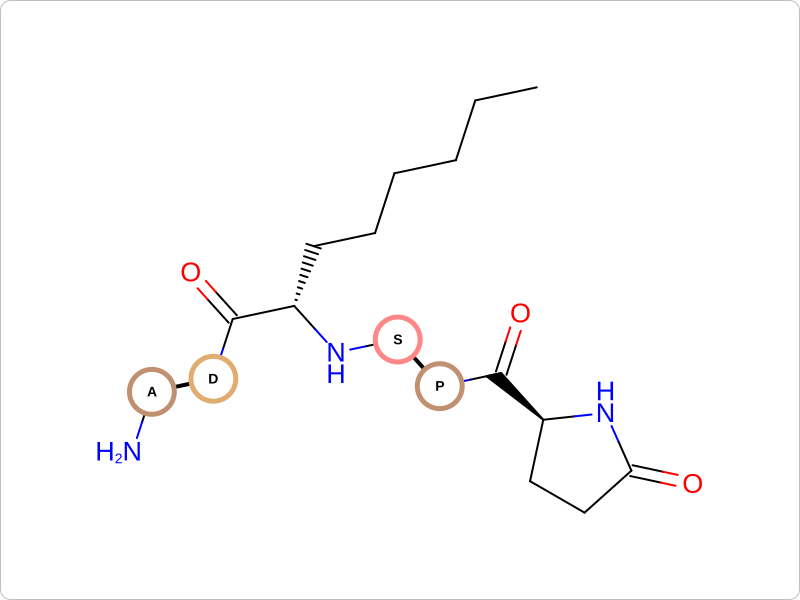
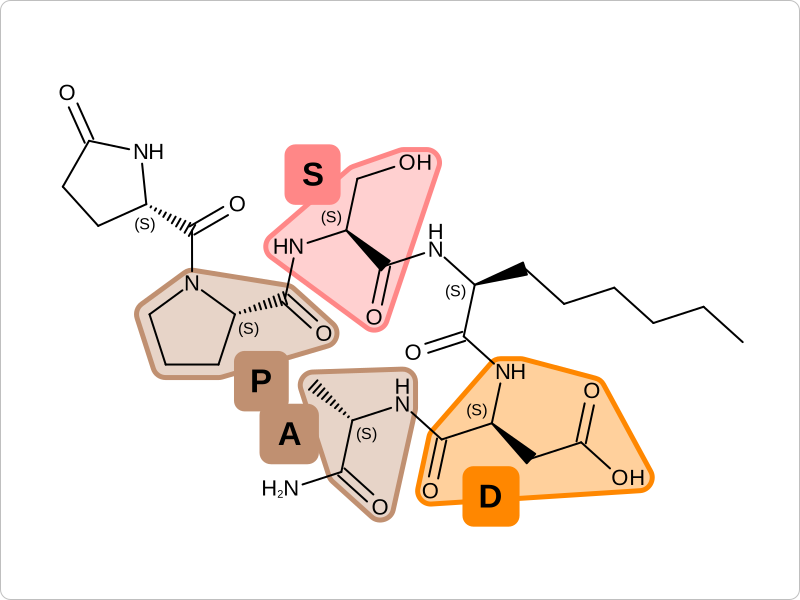
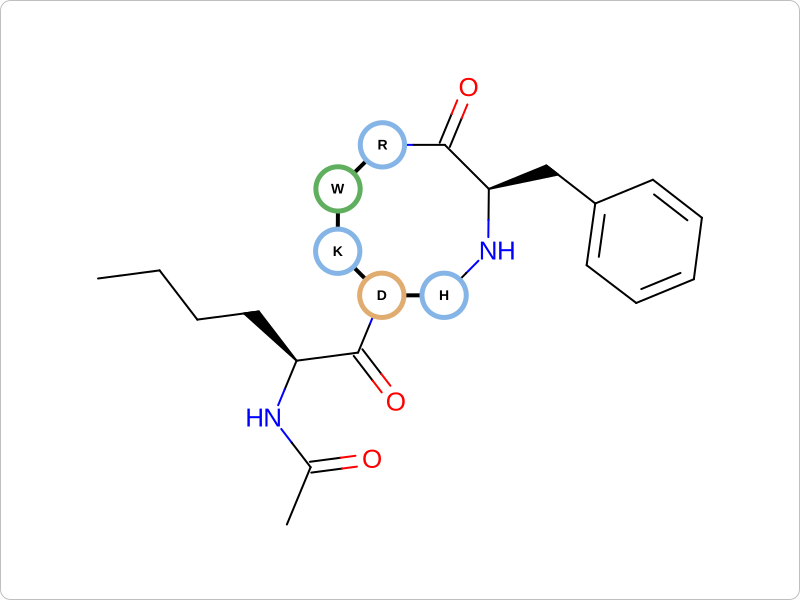
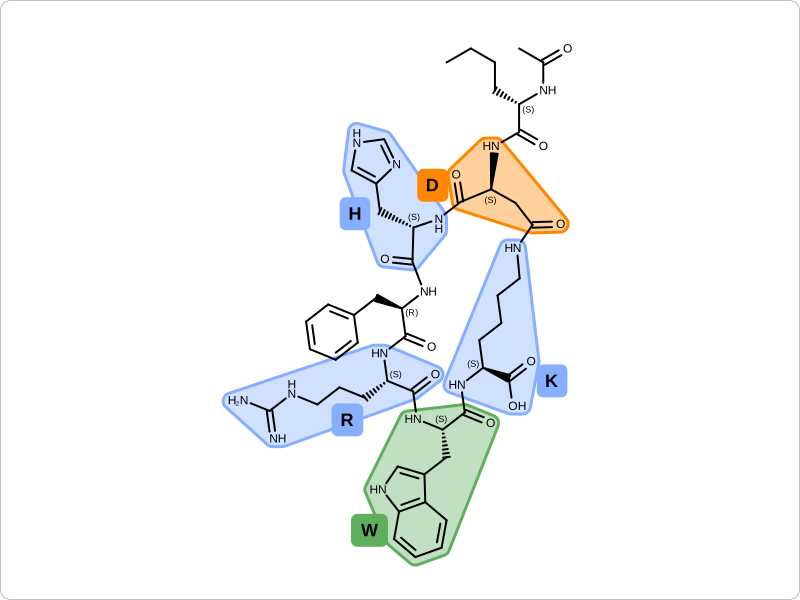
You want to depict a peptide initialized from either a HELM string, a SMILES string, or read from a molecule file, and then depict either its monomer graph or the whole molecule with monomer highlights.
|
|
monomer graph depiction style |
monomer highlight depiction style |
See also
[Zhang-2012] publication
Ingredients
|
Difficulty Level
🌶️ 🌶️
Download
Source Code
peptide2img
#!/usr/bin/env python3
# (C) 2026 Cadence Design Systems, Inc. (Cadence)
# All rights reserved.
# TERMS FOR USE OF SAMPLE CODE The software below ("Sample Code") is
# provided to current licensees or subscribers of Cadence products or
# SaaS offerings (each a "Customer").
# Customer is hereby permitted to use, copy, and modify the Sample Code,
# subject to these terms. Cadence claims no rights to Customer's
# modifications. Modification of Sample Code is at Customer's sole and
# exclusive risk. Sample Code may require Customer to have a then
# current license or subscription to the applicable Cadence offering.
# THE SAMPLE CODE IS PROVIDED "AS IS", WITHOUT WARRANTY OF ANY KIND,
# EXPRESS OR IMPLIED.  OPENEYE DISCLAIMS ALL WARRANTIES, INCLUDING, BUT
# NOT LIMITED TO, WARRANTIES OF MERCHANTABILITY, FITNESS FOR A
# PARTICULAR PURPOSE AND NONINFRINGEMENT. In no event shall Cadence be
# liable for any damages or liability in connection with the Sample Code
# or its use.

"""Depict peptide."""

import argparse
import enum
import io
import json
import os
import pathlib
import sys

import rich.console
from openeye import oechem, oedepict, oegrapheme
from PIL import Image
from rich_argparse import HelpPreviewAction, RichHelpFormatter

__SCRIPT_NAME__ = pathlib.Path(__file__).absolute().stem
__SCRIPT_DESC__ = "Depict peptide."
__SCRIPT_TOOLKITS__ = ["oechem", "oedepict", "oegrapheme"]
__SCRIPT_KEYWORDS__ = ["HELM", "monomer", "peptide", "peptide-informatics", "depiction"]
__SCRIPT_CATEGORIES__ = ["depiction", "peptide-informatics"]


class DepictionStyle(enum.Enum):
    """Utility enum class for peptide depiction style."""

    MonomerHighlight = "highlight"
    MonomerGraph = "graph"

    def __str__(self) -> str:
        """Convert to string representation."""
        return self.value


class InteractiveEffect(enum.Enum):
    """Utility enum class for peptide interactive effect."""

    none = "none"
    hover = "hover"
    toggle = "toggle"

    def __str__(self) -> str:
        """Convert to string representation."""
        return self.value


def parse_options() -> argparse.Namespace:
    """Set up command line options."""
    parser = argparse.ArgumentParser(
        add_help=True,
        formatter_class=RichHelpFormatter,
        description="[yellow]"
        + __SCRIPT_DESC__
        + " Supported image formats: svg, png"
        + "[/yellow]",
    )

    # input options
    input_group = parser.add_argument_group("Input peptide")
    exclusive_input_group = input_group.add_mutually_exclusive_group(required=True)
    exclusive_input_group.add_argument(
        "--helm",
        metavar="HELM",
        type=str,
        required=False,
        help="input HELM string",
    )
    exclusive_input_group.add_argument(
        "--smiles",
        metavar="SMILES",
        type=str,
        required=False,
        help="input SMILES string",
    )
    exclusive_input_group.add_argument(
        "--mol",
        metavar="MOL-FILE",
        type=str,
        required=False,
        help="input molecule file (oeb, sdf, fasta)",
    )

    monomers_group = parser.add_argument_group("Monomer set options")
    _add_monomer_collection(monomers_group)

    image_group = parser.add_argument_group("Image options")
    image_group.add_argument(
        "--image",
        type=str,
        required=False,
        metavar="IMAGE-FILE",
        help="output image file (PNG, SVG) (required: %(required)s) -- if no output is provided the image will be displayed on the  screen",
    )
    image_group.add_argument(
        "--width",
        type=int,
        default=800,
        help="width of output image (default: %(default)s)",
    )
    image_group.add_argument(
        "--height",
        type=int,
        default=600,
        help="height of output image (default: %(default)s)",
    )

    depiction_group = parser.add_argument_group("Depiction options")
    depiction_group.add_argument(
        "--style",
        type=DepictionStyle,
        default=DepictionStyle.MonomerGraph,
        choices=list(DepictionStyle),
        help="peptide depiction style (default: %(default)s)",
    )
    depiction_group.add_argument(
        "--highlight-backbone",
        default=False,
        action="store_true",
        help="highlight backbone atoms (default: %(default)s)",
    )
    depiction_group.add_argument(
        "--label-backbone-atoms",
        default=False,
        action="store_true",
        help="label backbone atoms (default: %(default)s)",
    )
    depiction_group.add_argument(
        "--interactive",
        type=InteractiveEffect,
        default=InteractiveEffect.none,
        choices=list(InteractiveEffect),
        help="monomers of HELM graph depicted on mouse over or click (SVG-only feature) (default: %(default)s)",
    )
    depiction_group.add_argument(
        "--algorithmic-layout",
        default=False,
        action="store_true",
        help="use algorithmic layout for coordinate generation in highlight mode (default: %(default)s)",
    )
    parser.add_argument("--help-image", action=HelpPreviewAction)
    return parser.parse_args()


def main() -> int:
    """Depict peptide."""
    args = parse_options()

    console = rich.console.Console()

    monomers = _get_monomer_collection(args)
    code_set = monomers.GetPrimaryCodeSet() if args.code_set is None else args.code_set
    if not monomers.HasCodeSet(code_set):
        console.print(
            f"[red]Warning: invalid code set `{code_set}. available sets are: {monomers.GetCodeSets()}`![/red]"
        )
        return os.EX_DATAERR

    _check_image_file(args)

    mol: oechem.OEMolBase | None = _get_molecule(args, monomers, console)
    if not mol:  # error message already printed
        return os.EX_DATAERR

    if not args.helm:
        oechem.OEDetectMonomers(mol, monomers, code_set)
    if args.highlight_backbone or args.label_backbone_atoms:
        oechem.OEPerceivePeptideBackbone(mol)

    if oechem.OECount(mol, oechem.OEIsMonomerGroup()) == 0:
        console.print("[red]Warning: No monomer is detected in input molecule![/red]")
        return os.EX_DATAERR

    image = oedepict.OEImage(args.width, args.height)
    match args.style:
        case DepictionStyle.MonomerHighlight:
            depict_monomer_highlight(
                image,
                mol,
                args.algorithmic_layout,
                args.highlight_backbone,
                args.label_backbone_atoms,
            )
        case DepictionStyle.MonomerGraph:
            interactive = args.interactive
            if args.image is None or pathlib.Path(args.image).suffix != ".svg":
                interactive = InteractiveEffect.none

            if not depict_monomer_graph(image, mol, code_set, interactive):
                console.print("[red]Failed to draw monomer graph![/red]")
                return os.EX_DATAERR
        case _:
            console.print("[red]Unknown depiction style![/red]")
            return os.EX_DATAERR

    oedepict.OEDrawCurvedBorder(image, oedepict.OELightGreyPen, 10)

    if args.image:
        oedepict.OEWriteImage(args.image, image)
    else:
        _img = Image.open(io.BytesIO(oedepict.OEWriteImageToBytes("png", image)))
        _img.show()

    return os.EX_OK


def depict_monomer_graph(
    image: oedepict.OEImage,
    mol: oechem.OEMolBase,
    code_set: str,
    interactive: InteractiveEffect,
) -> bool:
    """Depict peptide in monomer graph style."""
    opts = oegrapheme.OEMonomerGraphDisplayOptions()
    opts.SetMonomerColorFunctor(OEAnalogColor(code_set))
    if interactive == InteractiveEffect.toggle:
        opts.SetInteractiveEffect(oedepict.OEInteractiveEffect_Toggle)
        opts.SetMonomerScale(0.33)
    elif interactive == InteractiveEffect.hover:
        opts.SetInteractiveEffect(oedepict.OEInteractiveEffect_Hover)

    if not oegrapheme.OEDrawMonomerGraph(image, mol, opts):
        return False
    if interactive != InteractiveEffect.none:
        oedepict.OEAddInteractiveIcon(image, oedepict.OEIconLocation_Default, 0.5)
    return True


def depict_monomer_highlight(
    image: oedepict.OEImageBase,
    mol: oechem.OEMolBase,
    algorithmic_layout: bool,
    highlight_backbone: bool,
    label_backbone_atoms: bool,
) -> None:
    """Depict the monomer with highlights for the backbone and labels for backbone atoms."""
    prep_opts = oedepict.OEPrepareDepictionOptions()
    if algorithmic_layout:
        prep_opts.SetOptimizeMacrocycles(True)
    oedepict.OEPrepareDepiction(mol, prep_opts)
    highlight_opts = oegrapheme.OEHighlightMonomerDisplayOptions(
        image.GetWidth(), image.GetHeight(), oedepict.OEScale_AutoScale
    )
    highlight_opts.SetTitleLocation(oedepict.OETitleLocation_Hidden)
    highlight_opts.SetAtomStereoStyle(oedepict.OEAtomStereoStyle_Display_All)
    highlight_opts.SetHighlightUnspecifiedStereo(True)
    if label_backbone_atoms:
        highlight_opts.SetAtomPropertyFunctor(BackboneLabel())

    disp = oedepict.OE2DMolDisplay(mol, highlight_opts)
    oegrapheme.OEHighlightMonomers(disp, highlight_opts)

    if highlight_backbone:
        backbone = oechem.OEAtomBondSet()
        for atom in disp.GetMolecule().GetAtoms():
            if oechem.OEGetPDBAtomIndex(atom) in [
                oechem.OEPDBAtomName_C,
                oechem.OEPDBAtomName_O,
                oechem.OEPDBAtomName_OXT,
                oechem.OEPDBAtomName_CA,
                oechem.OEPDBAtomName_CB,
                oechem.OEPDBAtomName_CG,
                oechem.OEPDBAtomName_N,
            ]:
                backbone.AddAtom(atom)
        for bond in disp.GetMolecule().GetBonds():
            if backbone.HasAtom(bond.GetBgn()) and backbone.HasAtom(bond.GetEnd()):
                backbone.AddBond(bond)

        if backbone.NumBonds() > 0:
            line_width = 2.0
            highlight = oedepict.OEHighlightByColor(oechem.OEDarkSalmon)
            highlight.SetLineWidthScale(line_width)
            oedepict.OEAddHighlighting(disp, highlight, backbone)

    oedepict.OERenderMolecule(image, disp)


class BackboneLabel(oedepict.OEDisplayAtomPropBase):
    """Functor that assigns backbone label to displayed atoms."""

    def __init__(self) -> None:
        """Initialize functor."""
        oedepict.OEDisplayAtomPropBase.__init__(self)

    def __call__(self, atom: oechem.OEAtomBase) -> str:
        """Assign label."""
        if oechem.OEGetPDBAtomIndex(atom) not in [
            oechem.OEPDBAtomName_C,
            oechem.OEPDBAtomName_O,
            oechem.OEPDBAtomName_OXT,
            oechem.OEPDBAtomName_CA,
            oechem.OEPDBAtomName_CB,
            oechem.OEPDBAtomName_CG,
            oechem.OEPDBAtomName_N,
        ]:
            return ""
        return atom.GetName()

    def CreateCopy(self):  # noqa: ANN201, N802
        """Copy constructor."""
        return BackboneLabel().__disown__()


class MonomerSetParameter:  # noqa: PLW1641
    """Utility class to handle both built-in and user defined monomer sets."""

    def __init__(self) -> None:  # noqa: D107
        self._monomer_sets = ["Standard", "OpenEye", "JSON-FILENAME"]

    def __repr__(self) -> str:  # noqa: D105
        return ",".join(self._monomer_sets)

    def __eq__(self, param: object) -> bool:  # noqa: D105
        if not isinstance(param, str):
            return False
        if param in ["Standard", "OpenEye"]:
            return True

        console = rich.console.Console()
        monomer_set_filepath = pathlib.Path(param)
        if (
            not monomer_set_filepath.exists()
            or monomer_set_filepath.suffix.lower() != ".json"
        ):
            console.print(f"[red]Invalid monomer set file '{param}' ![/red]")
            return False
        try:
            with monomer_set_filepath.open("r") as json_file:
                json.load(json_file)
        except json.JSONDecodeError as e:
            console.print(f"[red]Invalid monomer set file '{param}' ![/red]")
            console.print(f"[red]Error decoding JSON: {e} ![/red]")
            return False
        return True


def _add_monomer_collection(arg_group: argparse._ArgumentGroup) -> None:
    arg_group.add_argument(
        "-m",
        "--monomers",
        type=str,
        default="Standard",
        choices=[MonomerSetParameter()],
        help="built-in monomer-set type or json file of monomers",
    )
    arg_group.add_argument(
        "--code-set",
        type=str,
        metavar="CODE-SET",
        required=False,
        default=None,
        help="code-set, if not specified primary code-set is used",
    )


def _get_monomer_collection(args: argparse.Namespace) -> oechem.OEMonomerSet:
    monomers = oechem.OEMonomerSet()
    match args.monomers:
        case "Standard":
            oechem.OELoadStandardMonomerSet(monomers)
        case "OpenEye":
            oechem.OELoadOpenEyeMonomerSet(monomers)
        case _:
            oechem.OEReadMonomerSet(monomers, args.monomers)
    return monomers


def _get_molecule(
    args: argparse.Namespace,
    monomers: oechem.OEMonomerSet,
    console: rich.console.Console,
) -> oechem.OEMolBase | None:
    mol = oechem.OEGraphMol()
    if args.smiles:
        if not oechem.OEParseSmiles(mol, args.smiles):
            console.print(f"[red]Failed to parse SMILES: `{args.smiles}`[/red]")
            return None
    elif args.helm:
        result = oechem.OEHelmParsingResult()
        if not oechem.OEHelmToMol(mol, args.helm, monomers, result):
            console.print(f"[red]Failed to parse HELM: `{args.helm}`[/red]")
            console.print(f"[red]Warning: {result.GetWarning()}[/red]")
            console.print(args.helm, markup=False, highlight=False)
            console.print("[red]" + "-" * result.GetErrorPosition() + "^[/red]")
            return None
    elif args.mol:
        ifs = oechem.oemolistream(args.mol)
        if not oechem.OEReadMolecule(ifs, mol):
            console.print(f"[red]Failed to read molecule from '{args.mol}'[/red]")
            return None
    return mol if mol.IsValid() else None


class OEAnalogColor(oegrapheme.OEMonomerColorBase):
    """Functor that assigns color to monomer based on its analog."""

    def __init__(self, code_set: str) -> None:
        """Initialize functor."""
        oegrapheme.OEMonomerColorBase.__init__(self)
        self._code_set = code_set
        self._colors_by_code: dict[str, oechem.OEColor] = {}

    def __call__(self, monomer: oechem.OEMonomerData) -> oechem.OEColor:
        """Assign color to monomer."""
        code: str = monomer.GetCode(self._code_set)
        if code in self._colors_by_code:
            return self._colors_by_code[code]
        color_hex = _get_monomer_analog_color(monomer)
        color = oechem.OEColor(color_hex)
        self._colors_by_code[code] = color
        return color

    def CreateCopy(self) -> oegrapheme.OEMonomerColorBase:  # noqa: N802
        """Copy constructor."""
        copy = OEAnalogColor(self._code_set)
        return copy.__disown__()


def _get_monomer_analog_color(monomer: oechem.OEMonomerData) -> str:  # noqa: PLR0911
    if monomer.GetPolymerType() != oechem.OEPolymerType_Peptide:
        return "#000000"
    analog = oechem.OEGetStandardAnalog(monomer.GetCanonicalSmiles())
    if analog == oechem.OEResidueIndex_UNK:
        return "#AAAAAA"
    match analog:
        case oechem.OEResidueIndex_CYS | oechem.OEResidueIndex_MET:
            return "#e4e488"
        case (
            oechem.OEResidueIndex_ALA
            | oechem.OEResidueIndex_GLY
            | oechem.OEResidueIndex_ILE
            | oechem.OEResidueIndex_LEU
            | oechem.OEResidueIndex_PRO
            | oechem.OEResidueIndex_VAL
        ):
            return "#c09071"
        case (
            oechem.OEResidueIndex_PHE
            | oechem.OEResidueIndex_TRP
            | oechem.OEResidueIndex_TYR
        ):
            return "#5faf5f"
        case oechem.OEResidueIndex_ASP | oechem.OEResidueIndex_GLU:
            return "#e0ac70"
        case (
            oechem.OEResidueIndex_ARG
            | oechem.OEResidueIndex_HIS
            | oechem.OEResidueIndex_LYS
        ):
            return "#85b4e6"
        case oechem.OEResidueIndex_SER | oechem.OEResidueIndex_THR:
            return "#ff8787"
        case oechem.OEResidueIndex_ASN | oechem.OEResidueIndex_GLN:
            return "#5493EA"
    return "#AAAAAA"


def _check_image_file(args: argparse.Namespace) -> None:
    # script will terminate if there is some issues
    if not args.image:
        # image will be displayed on the screen
        return
    ext = pathlib.Path(args.image).suffix[1:].upper()
    if not oedepict.OEIsRegisteredImageFile(ext):
        oechem.OEThrow.Fatal("Unknown image output type!")

    ofs = oechem.oeofstream()
    if not ofs.open(args.image):
        oechem.OEThrow.Fatal("Cannot open output image file!")


setattr(main, "__SCRIPT_NAME__", __SCRIPT_NAME__)
setattr(main, "__SCRIPT_DESC__", __SCRIPT_DESC__)
setattr(main, "__SCRIPT_TOOLKITS__", __SCRIPT_TOOLKITS__)
setattr(main, "__SCRIPT_KEYWORDS__", __SCRIPT_KEYWORDS__)
setattr(main, "__SCRIPT_CATEGORIES__", __SCRIPT_CATEGORIES__)

if __name__ == "__main__":
    sys.exit(main())
Usage
See Download section to download the script.
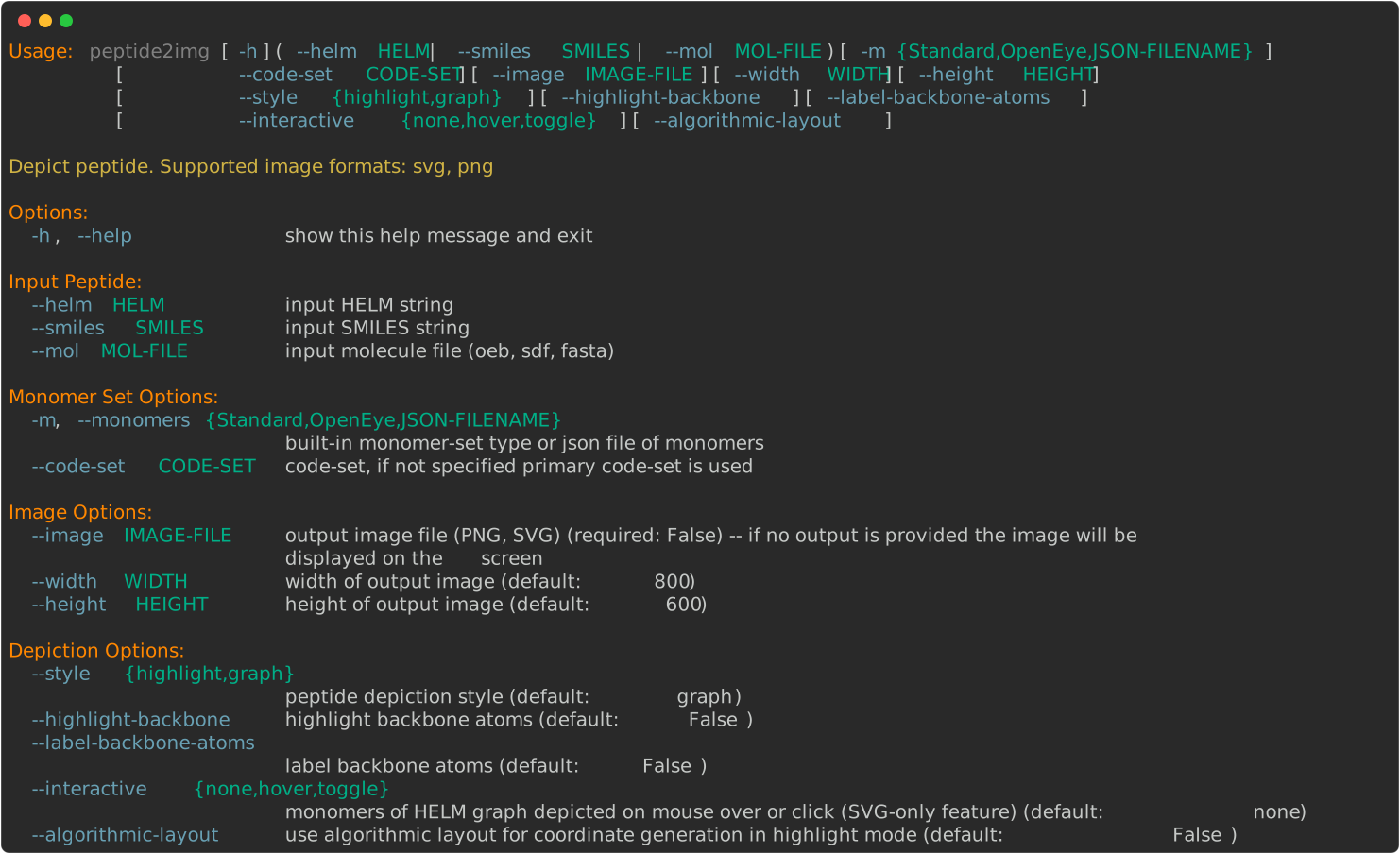
> peptide2img --help
Peptide Input
The peptide2img script supports various ways to define the input peptide:
HELM string
SMILES string
molecule file
- --helm HELM
For HELM input, the program uses the OEHelmToMol function
to convert the HELM string into a molecular representation and generate
either the monomer-graph representation or the atomic representation with monomer highlighting.
By default, the peptide2img script loads OEChem TK’s
built-in Standard monomer set.
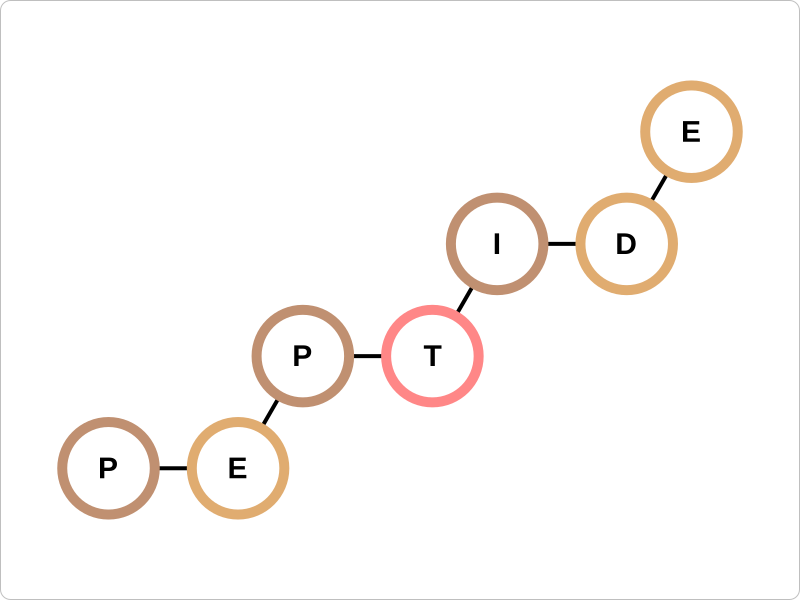
> peptide2img --helm 'PEPTIDE1{P.E.P.T.I.D.E}$$$$' --image image.svg
> peptide2img --style highlight --helm 'PEPTIDE1{P.E.P.T.I.D.E}$$$$' --image image.svg
- --smiles SMILES
For SMILES input, the OEDetectMonomers function is used to identify the monomer components of the peptide. Atoms that are not assigned to any recognized monomer are retained in the monomer-graph representation and remain un-highlighted in the atomic representation.
> peptide2img --smiles 'CCCCCC[C@@H](C(=O)N[C@@H](CC(=O)O)C(=O)N[C@@H](C)C(=O)N)NC(=O)[C@H](CO)NC(=O)[C@@H]1CCCN1C(=O)[C@@H]2CCC(=O)N2' --image image.svg
> peptide2img --style highlight --smiles 'CCCCCC[C@@H](C(=O)N[C@@H](CC(=O)O)C(=O)N[C@@H](C)C(=O)N)NC(=O)[C@H](CO)NC(=O)[C@@H]1CCCN1C(=O)[C@@H]2CCC(=O)N2' --image image.svg
- --mol MOL-FILE
For molecule file input, the OEDetectMonomers function is used to identify the
monomer components of the first molecule in the file.
Similar to the SMILES input, atoms that are not assigned to any recognized monomer
are retained in the monomer-graph representation and remain un-highlighted in the
atomic representation.
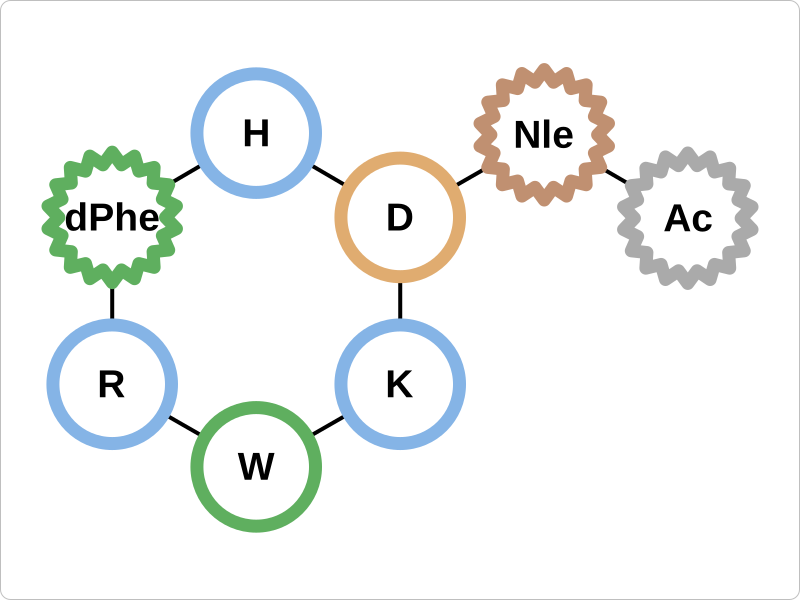
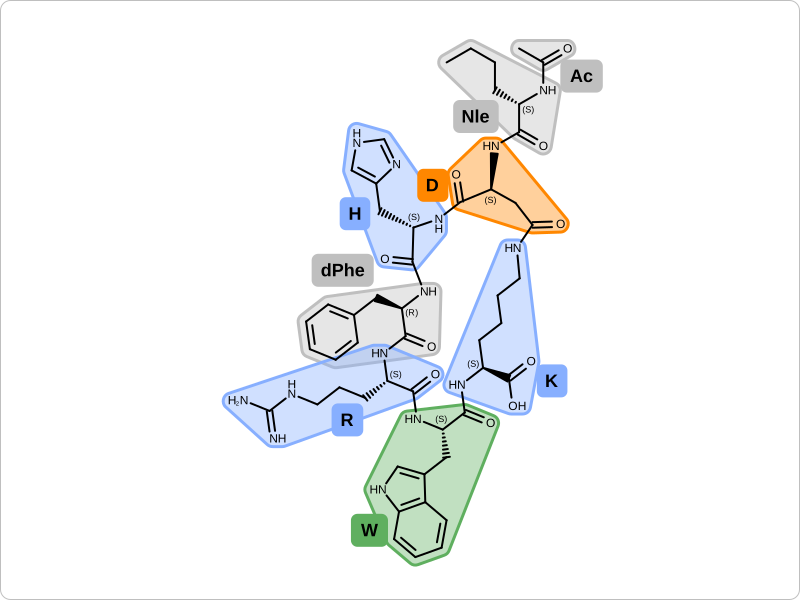
The image generated for bremelanotide.sdf
is shown below.
> peptide2img --mol bremelanotide.sdf --image image.svg
> peptide2img --mol bremelanotide.sdf --style highlight --image image.svg
Depiction Options
- --style {highlight,graph}
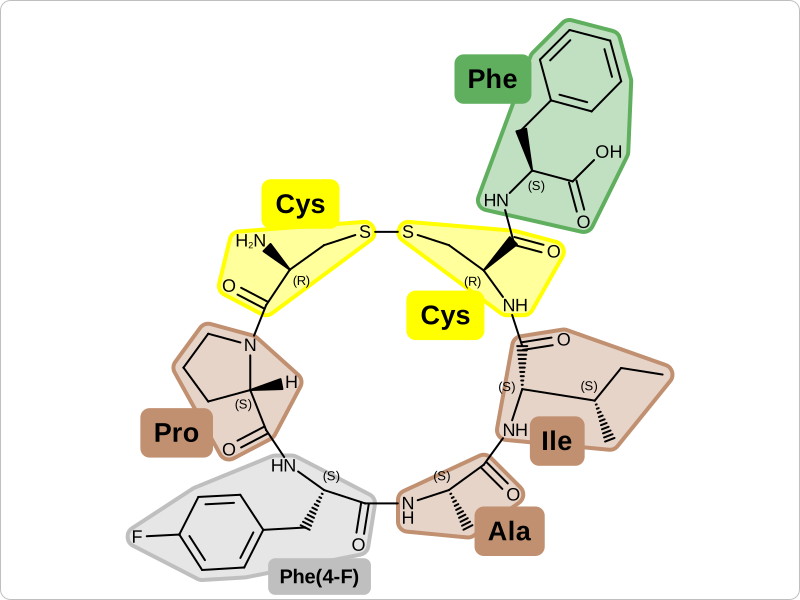
The depiction style can be set to either highlight or graph. The highlight style depicts the whole molecule with detected monomers highlighted along with their code, while the graph style presents a more compact monomer-graph representation of the peptide structure.
When using the highlight style, any unspecified atom and bond stereo-centers in the molecule are marked in the image, emphasizing potential issues that may arise when generating a HELM representation.
> peptide2img --code-set ChEMBL --mol bremelanotide.sdf --monomers OpenEye --style highlight --image image.svg
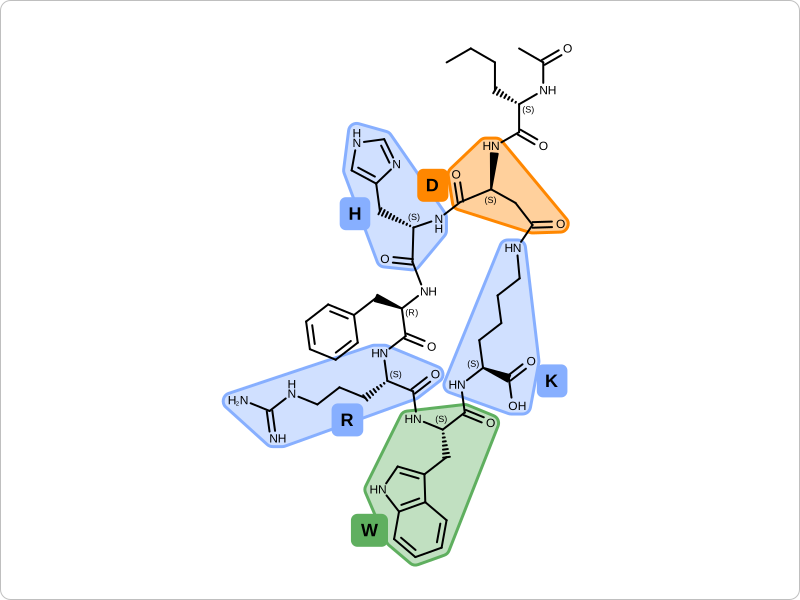
Example of molecule with unspecified atom and bond stereo centers marked.
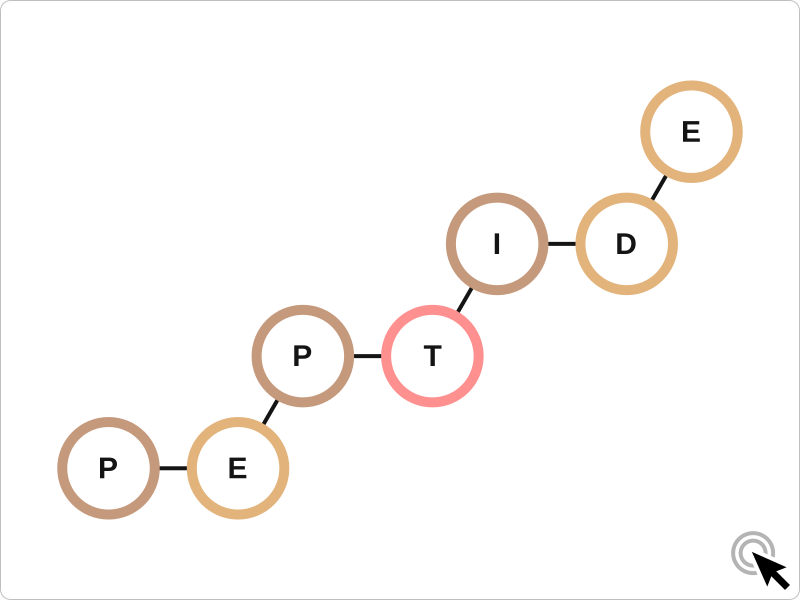
- --interactive {none,hover,toggle}
When using the default monomer graph representation and generating an SVG image,
the --interactive option enables mouse-over or click interactions to display the monomers in the
image.
> peptide2img --helm 'PEPTIDE1{P.E.P.T.I.D.E}$$$$' --interactive hover --image image.svg
hover mouse over monomer labels to see monomer structures
> peptide2img --helm 'PEPTIDE1{P.E.P.T.I.D.E}$$$$' --interactive toggle --image image.svg
click on monomer labels to turn on/off monomer structure depiction
- --highlight-backbone
- --label-backbone-atoms
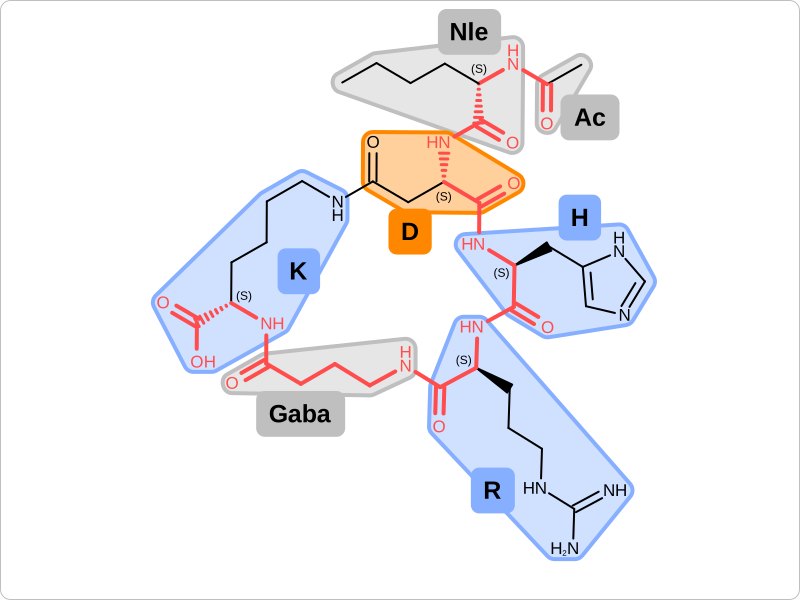
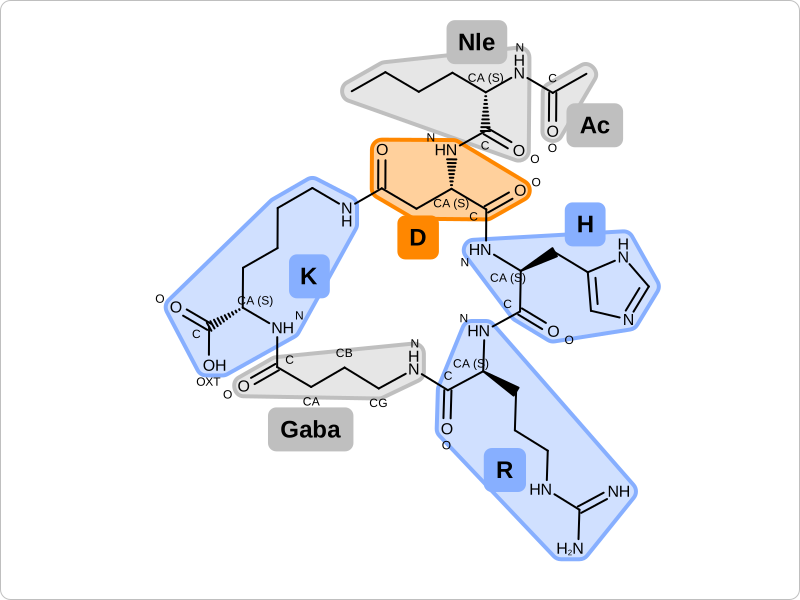
In highlight mode, the backbone atoms of the peptide can be highlighted or labeled. CB, CG, CD labels are used to mark carbon backbone atoms of β, γ, and δ amino acids.
> peptide2img --helm 'PEPTIDE1{[Ac].[Nle].D.H.R.[Gaba].K}$PEPTIDE1,PEPTIDE1,3:R3-7:R3$$$' --monomers OpenEye --style highlight --highlight-backbone --image image.svg
> peptide2img --helm 'PEPTIDE1{[Ac].[Nle].D.H.R.[Gaba].K}$PEPTIDE1,PEPTIDE1,3:R3-7:R3$$$' --monomers OpenEye --style highlight --label-backbone-atoms --image image.svg
See also
OEPerceivePeptideBackbone function
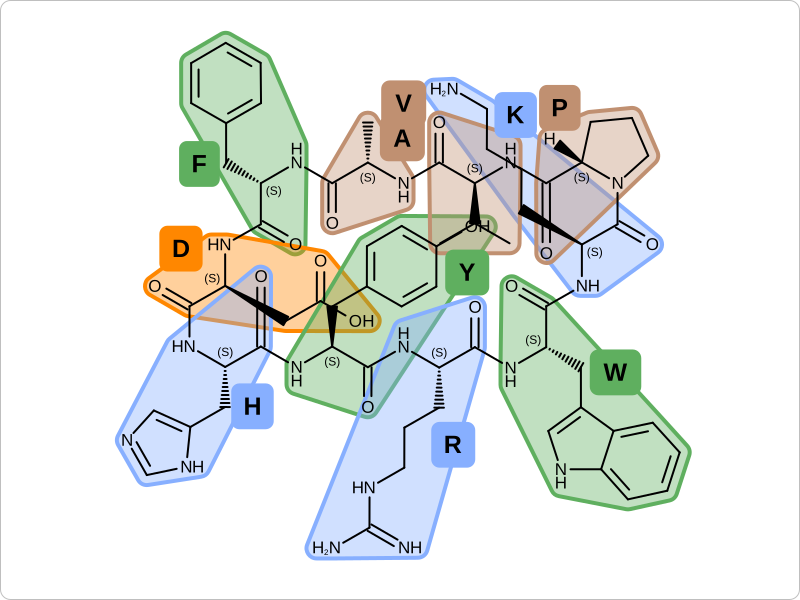
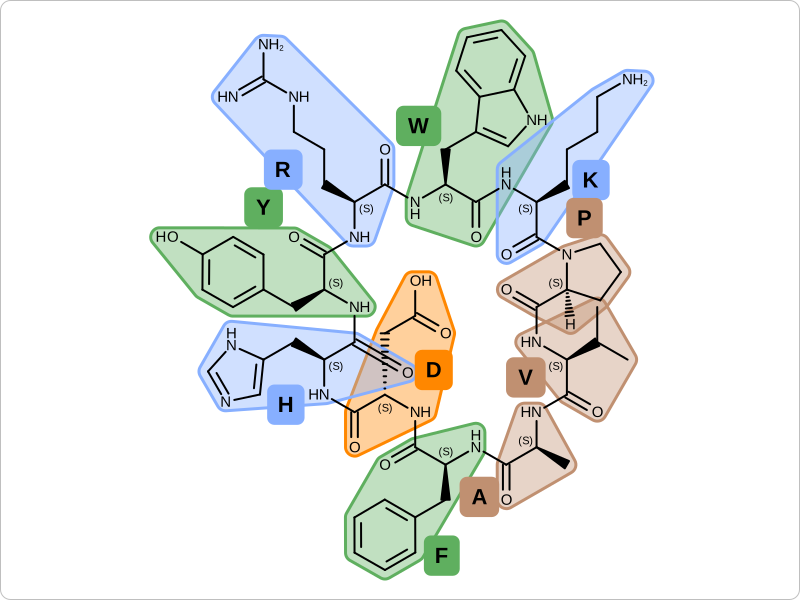
- --algorithmic-layout
The default ring template based 2D coordinate generation sometimes produces a layout that is not optimal
for depicting of marge macrocyclic peptides. In this case the --algorithmic-layout option can be used to
enable an alternative layout algorithm that optimizes the depiction of macrocycles.
This new algorithm is still under development but in some cases it can produce a better layout for depiction.
> peptide2img --helm 'PEPTIDE1{A.F.D.H.Y.R.W.K.P.V}$PEPTIDE1,PEPTIDE1,1:R1-10:R2$$$' --style highlight --image image.svg
> peptide2img --helm 'PEPTIDE1{A.F.D.H.Y.R.W.K.P.V}$PEPTIDE1,PEPTIDE1,1:R1-10:R2$$$' --style highlight --algorithmic-layout --image image.svg
See also
2D Coordinate Generation chapter in OEChem TK manual
Monomer Set Options
- --monomers Openeye
> peptide2img --mol bremelanotide.sdf --monomers OpenEye --image image.svg
> peptide2img --mol bremelanotide.sdf --monomers OpenEye --style highlight --image image.svg
- --code-set CODE-SET
Monomer sets can store multiple code sets. By default, the primary code set is used when detecting monomers with peptide2img.
A code set is considered primary if it contains the most monomers. In the case of the OpenEye monomer set, the primary code set is also
called OpenEye, but some monomers are also associated with codes in the ChEMBL, PDB, and Standard code-sets.
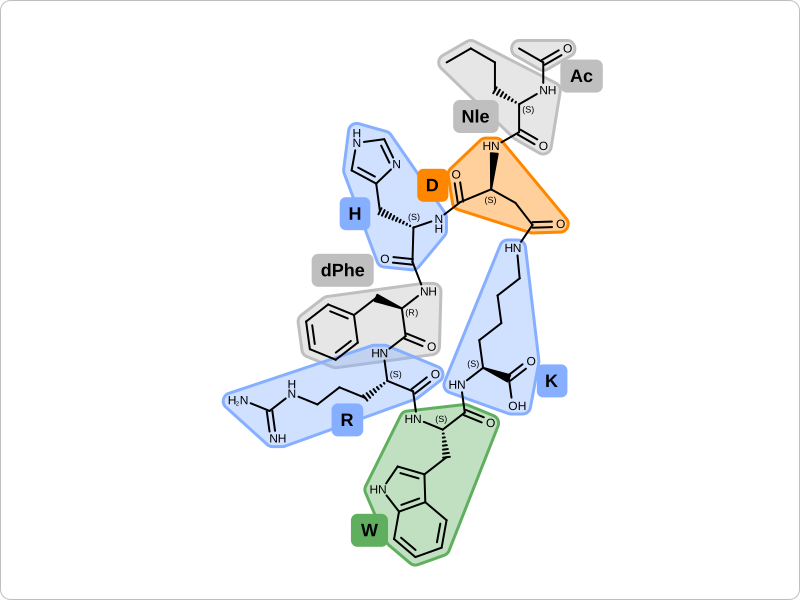
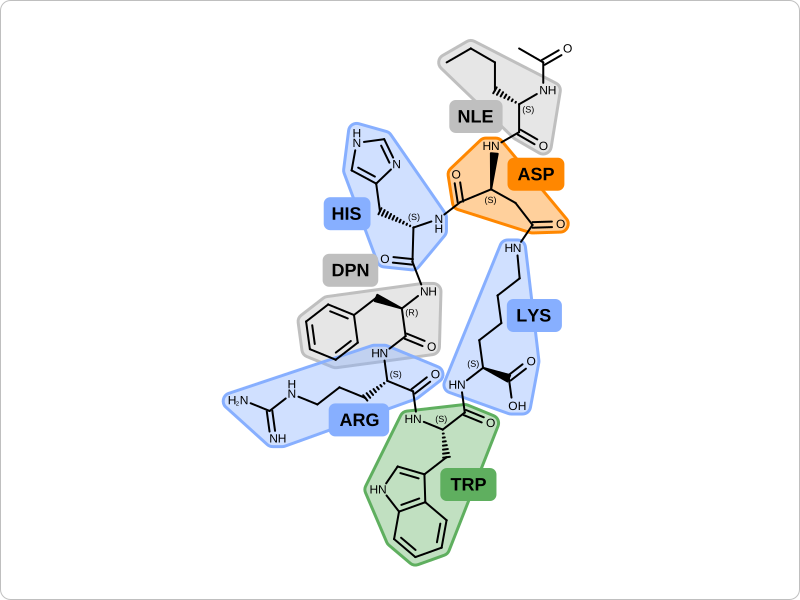
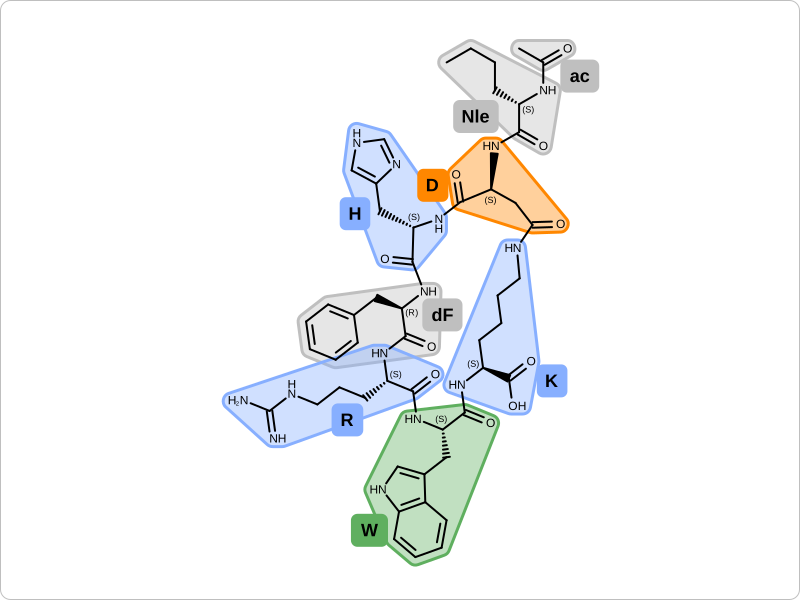
The following example shows the depiction of the same peptide using different code sets.
Examples of peptide depiction with different code-sets
> peptide2img --code-set OpenEye --mol bremelanotide.sdf --monomers OpenEye --style highlight --image image.svg
> peptide2img --code-set PDB --mol bremelanotide.sdf --monomers OpenEye --style highlight --image image.svg
> peptide2img --code-set ChEMBL --mol bremelanotide.sdf --monomers OpenEye --style highlight --image image.svg
> peptide2img --code-set Standard --mol bremelanotide.sdf --monomers OpenEye --style highlight --image image.svg
- --monomers JSON-MONOMER-FILE
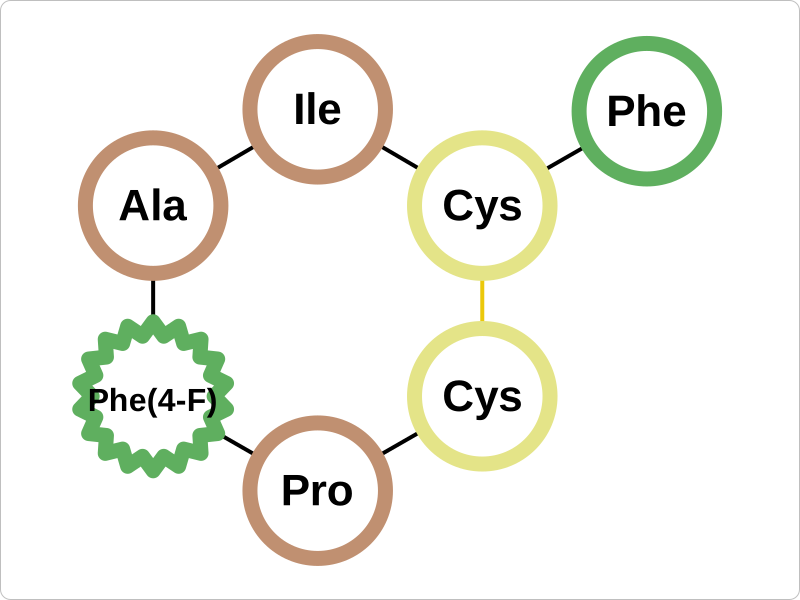
peptide2img can also depict molecules with custom monomer sets.
The following examples using the
custom-monomers.json
custom monomer set.
> peptide2img --helm 'PEPTIDE1{[Cys].[Pro].[Phe(4-F)].[Ala].[Ile].[Cys].[Phe]}$PEPTIDE1,PEPTIDE1,1:R3-6:R3$$$' --monomers custom-monomers.json --image image.svg
> peptide2img --style highlight --helm 'PEPTIDE1{[Cys].[Pro].[Phe(4-F)].[Ala].[Ile].[Cys].[Phe]}$PEPTIDE1,PEPTIDE1,1:R3-6:R3$$$' --monomers custom-monomers.json --image image.svg
See also in OEChem TK manual
API
OEDetectMonomers function
OEMonomerSet class
OEHelmToMol function
See also in OEGrapheme TK manual
API
OEHighlightMonomerDisplayOptions class and OEHighlightMonomers function
OEMonomerGraphDisplayOptions class and OEDrawMonomerGraph function