🆕 Depict SMILES in Interactive Web Application
Problem
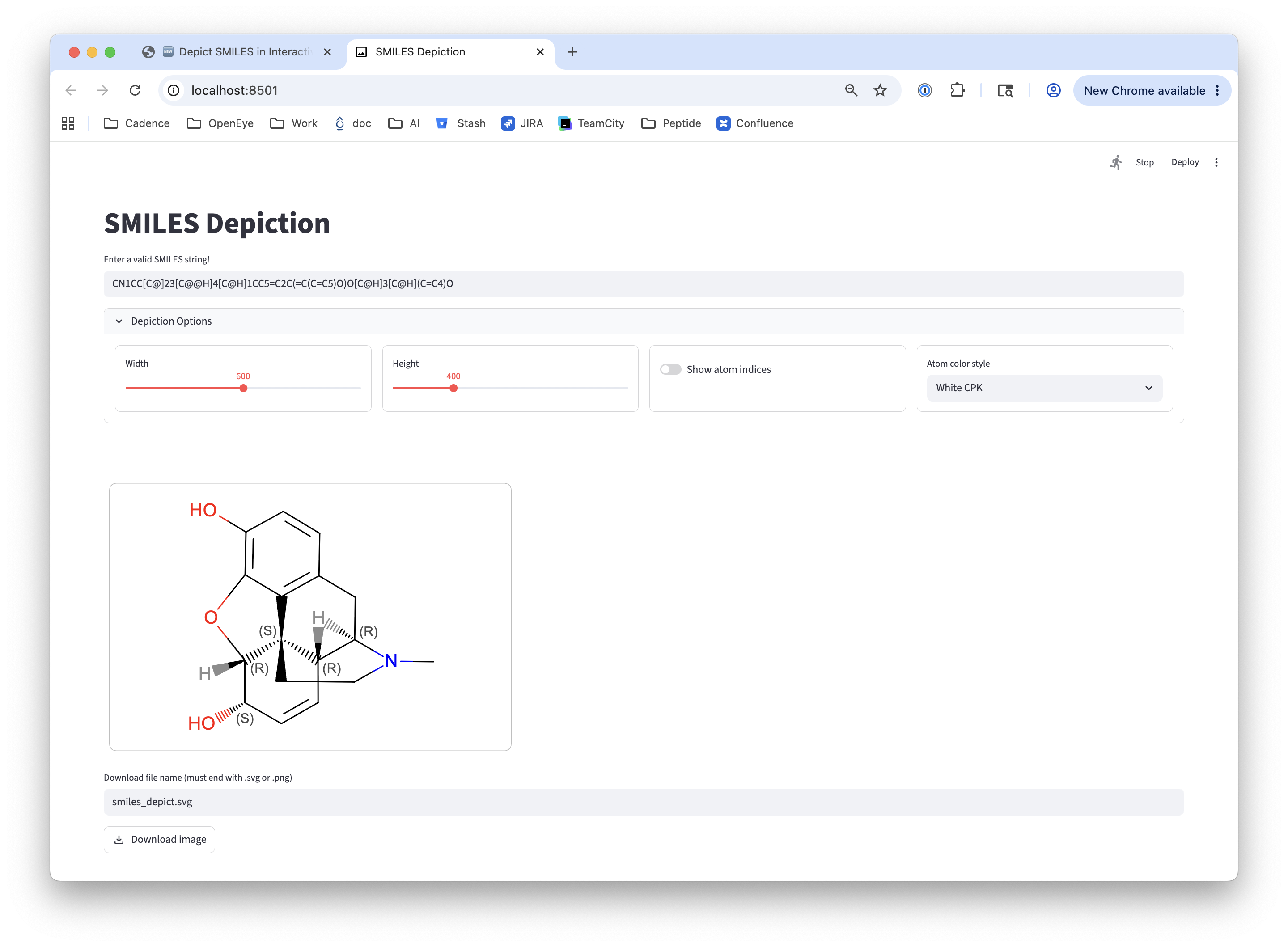
You want to depict a molecule from SMILES in an interactive web application with options to control atom color style and atom index display.
Ingredients
|
Difficulty Level
🌶️
Source Code
smiles_depict
#!/usr/bin/env python3
# (C) 2026 Cadence Design Systems, Inc. (Cadence)
# All rights reserved.
# TERMS FOR USE OF SAMPLE CODE The software below ("Sample Code") is
# provided to current licensees or subscribers of Cadence products or
# SaaS offerings (each a "Customer").
# Customer is hereby permitted to use, copy, and modify the Sample Code,
# subject to these terms. Cadence claims no rights to Customer's
# modifications. Modification of Sample Code is at Customer's sole and
# exclusive risk. Sample Code may require Customer to have a then
# current license or subscription to the applicable Cadence offering.
# THE SAMPLE CODE IS PROVIDED "AS IS", WITHOUT WARRANTY OF ANY KIND,
# EXPRESS OR IMPLIED.  OPENEYE DISCLAIMS ALL WARRANTIES, INCLUDING, BUT
# NOT LIMITED TO, WARRANTIES OF MERCHANTABILITY, FITNESS FOR A
# PARTICULAR PURPOSE AND NONINFRINGEMENT. In no event shall Cadence be
# liable for any damages or liability in connection with the Sample Code
# or its use.

"""Simple streamlit app for SMILES depiction."""

import base64
import enum
import os
import sys

import streamlit as st
from openeye import oechem, oedepict


class AtomColorStyle(enum.Enum):
    """Utility class for atom color style."""

    BlackCPK = "Black CPK"
    BlackMonochrome = "Black Monochrome"
    WhiteCPK = "White CPK"
    WhiteMonochrome = "White Monochrome"


_ATOM_COLOR_STYLE_MAP: dict[AtomColorStyle, int] = {
    AtomColorStyle.BlackCPK: oedepict.OEAtomColorStyle_BlackCPK,
    AtomColorStyle.BlackMonochrome: oedepict.OEAtomColorStyle_BlackMonochrome,
    AtomColorStyle.WhiteCPK: oedepict.OEAtomColorStyle_WhiteCPK,
    AtomColorStyle.WhiteMonochrome: oedepict.OEAtomColorStyle_WhiteMonochrome,
}


def main() -> int:
    """Generate streamlit main application."""
    st.set_page_config(
        page_title="SMILES Depiction",
        page_icon=":material/image:",
        layout="wide",
        initial_sidebar_state="collapsed",
    )

    st.title("SMILES Depiction")

    mol: oechem.OEMolBase | None = _get_molecule_from_smiles()

    image_width, image_height, show_atom_indices, atom_color_style = (
        _generate_depiction_options_section()
    )

    st.divider()

    if mol is not None:
        image = oedepict.OEImage(image_width, image_height)
        oedepict.OEPrepareDepiction(mol)

        opts = oedepict.OE2DMolDisplayOptions(
            image_width, image_height, oedepict.OEScale_AutoScale
        )
        opts.SetTitleLocation(oedepict.OETitleLocation_Hidden)
        opts.SetAtomStereoStyle(oedepict.OEAtomStereoStyle_Display_All)
        opts.SetAtomColorStyle(_ATOM_COLOR_STYLE_MAP[atom_color_style])

        if show_atom_indices:
            opts.SetAtomPropertyFunctor(oedepict.OEDisplayAtomIdx())

        disp = oedepict.OE2DMolDisplay(mol, opts)
        oedepict.OERenderMolecule(image, disp)
        oedepict.OEDrawCurvedBorder(image, oedepict.OELightGreyPen, 10)

        image_str = oedepict.OEWriteImageToString("svg", image)
        image_str = image_str.decode("utf-8")

        svg_b64 = base64.b64encode(image_str.encode("utf-8")).decode("utf-8")
        data_uri = f"data:image/svg+xml;base64,{svg_b64}"
        st.components.v1.html(
            f'<object data="{data_uri}" type="image/svg+xml" width="{image_width}" height="{image_height}"></object>',
            height=image_height + 20,
        )

        png_data: bytes = oedepict.OEWriteImageToString("png", image)

        file_name = st.text_input(
            "Download file name (must end with .svg or .png)",
            value="smiles_depict.svg",
        )

        if not file_name.endswith((".svg", ".png")):
            st.error("File name must end with .svg or .png")
        elif file_name.endswith(".svg"):
            st.download_button(
                label="Download image",
                data=image_str,
                file_name=file_name,
                mime="image/svg+xml",
                icon=":material/download:",
            )
        else:
            st.download_button(
                label="Download image",
                data=png_data,
                file_name=file_name,
                mime="image/png",
                icon=":material/download:",
            )

    return os.EX_OK


def _generate_depiction_options_section() -> tuple[int, int, bool, AtomColorStyle]:
    """Set up depiction option widgets."""
    with st.expander("Depiction Options", expanded=True):
        col_width, col_height, col_indices, col_color = st.columns(4, border=True)
        with col_width:
            image_width = st.slider(
                label="Width", min_value=200, max_value=1000, step=25, value=600
            )
        with col_height:
            image_height = st.slider(
                label="Height", min_value=200, max_value=1000, step=25, value=400
            )
        with col_indices:
            show_atom_indices = st.toggle("Show atom indices")
        with col_color:
            atom_color_style = AtomColorStyle(
                st.selectbox(
                    "Atom color style",
                    [s.value for s in AtomColorStyle],
                    index=2,
                )
            )

    return (image_width, image_height, show_atom_indices, atom_color_style)


def _get_molecule_from_smiles() -> oechem.OEMolBase | None:
    """Get a molecule by parsing SMILES."""
    mol = oechem.OEGraphMol()
    smiles = st.text_input(
        "Enter a valid SMILES string!",
        value="CN1CC[C@]23[C@@H]4[C@H]1CC5=C2C(=C(C=C5)O)O[C@H]3[C@H](C=C4)O",
    )

    if not oechem.OESmilesToMol(mol, smiles):
        st.error(f"Cannot parse: {smiles}")
        return None
    return mol


if __name__ == "__main__":
    sys.exit(main())
Usage
> smiles_depict_app
The Streamlit app will be available at:
You can now view your Streamlit app in your browser.

Local URL: http://localhost:8501
...
The app allows you to:
Enter a SMILES string to depict a molecule.
Adjust the image width and height.
Toggle atom index display on or off.
Select an atom color style (Black CPK, Black Monochrome, White CPK, White Monochrome).
Download the generated image in SVG or PNG format.
The image is automatically regenerated whenever the SMILES input or any depiction option is changed.
See also in OEDepict TK manual
API
OE2DMolDisplayOptions class
OEPrepareDepiction function
OERenderMolecule function