🆕 Generating Custom Monomer Set
Problem
You want to generate a custom monomer set that can be used in OEChem TK tools.
Ingredients
|
Difficulty Level
🌶️ 🌶️
Download
Source Code
aminoacids2monomerset
#!/usr/bin/env python3
# (C) 2023 Cadence Design Systems, Inc. (Cadence)
# All rights reserved.
# TERMS FOR USE OF SAMPLE CODE The software below ("Sample Code") is
# provided to current licensees or subscribers of Cadence products or
# SaaS offerings (each a "Customer").
# Customer is hereby permitted to use, copy, and modify the Sample Code,
# subject to these terms. Cadence claims no rights to Customer's
# modifications. Modification of Sample Code is at Customer's sole and
# exclusive risk. Sample Code may require Customer to have a then
# current license or subscription to the applicable Cadence offering.
# THE SAMPLE CODE IS PROVIDED "AS IS", WITHOUT WARRANTY OF ANY KIND,
# EXPRESS OR IMPLIED.  OPENEYE DISCLAIMS ALL WARRANTIES, INCLUDING, BUT
# NOT LIMITED TO, WARRANTIES OF MERCHANTABILITY, FITNESS FOR A
# PARTICULAR PURPOSE AND NONINFRINGEMENT. In no event shall Cadence be
# liable for any damages or liability in connection with the Sample Code
# or its use.

"""Generate custom monomer set."""

import argparse
import os
import pathlib
import sys

import rich.console
from openeye import oechem, oeiupac
from rich_argparse import HelpPreviewAction, RichHelpFormatter

__SCRIPT_NAME__ = pathlib.Path(__file__).absolute().stem
__SCRIPT_DESC__ = "Generate custom monomer set."
__SCRIPT_TOOLKITS__ = ["oechem"]
__SCRIPT_KEYWORDS__ = [
    "HELM",
    "monomer",
    "peptide",
    "peptide-informatics",
    "amino-acid",
]
__SCRIPT_CATEGORIES__ = ["peptide-informatics"]


def parse_options() -> argparse.Namespace:
    """Set up command line options."""
    parser = argparse.ArgumentParser(
        add_help=True,
        formatter_class=RichHelpFormatter,
        description="[yellow]" + __SCRIPT_DESC__ + "[/yellow]",
    )
    monomers_group = parser.add_argument_group("Monomer set options")
    monomers_group.add_argument(
        "--code-set",
        type=str,
        default="CUSTOM",
        help="name of the code set in the generated monomer set (default: %(default)s)",
    )
    monomers_group.add_argument(
        "--monomer-set-version",
        metavar="X.Y.Z",
        type=str,
        default="1.0.0",
        help="version of generated monomer set (default: %(default)s)",
    )

    io_group = parser.add_argument_group("Input/Output options")
    io_group.add_argument(
        "--amino",
        "--amino-acids",
        metavar="MOL-FILE",
        type=str,
        required=True,
        help="input molecule file (ism, sdf)",
    )
    io_group.add_argument(
        "--monomers",
        metavar="JSON-FILE",
        type=str,
        required=True,
        help="output monomer set file (json)",
    )

    parser.add_argument("--help-image", action=HelpPreviewAction)
    parser.add_argument(
        "--save-console-svg",
        default=False,
        action="store_true",
        help=f"run command and capture console output in {__SCRIPT_NAME__}.svg file",
    )
    return parser.parse_args()


def main() -> int:
    """Generate custom monomer set."""
    args = parse_options()

    console = rich.console.Console(record=args.save_console_svg, highlight=False)
    ifs = oechem.oemolistream()
    if not pathlib.Path(args.amino).exists() or not ifs.open(args.amino):
        oechem.OEThrow.Fatal(f"Can not open {args.amino} input file!")

    monomer_file = pathlib.Path(args.monomers)
    if monomer_file.suffix != ".json":
        oechem.OEThrow.Fatal(
            f"Output monomer set file {args.monomers} requires json extension!"
        )

    code_set = args.code_set
    monomers = oechem.OEMonomerSet()
    monomers.SetVersion(args.monomer_set_version)

    monomers.AddCodeSet(code_set)
    console.print(f"[blue]Adding monomers to '{code_set}' code set![/blue]")

    for idx, amino_mol in enumerate(ifs.GetOEGraphMols(), start=1):
        monomer_data: oechem.OEMonomerData | None = generate_monomer_data(
            idx, amino_mol, code_set, console
        )
        if monomer_data:
            code = monomer_data.GetCode(code_set)
            can_smiles = monomer_data.GetCanonicalSmiles()
            if monomers.HasCodeInCodeSet(code_set, code):
                console.print(
                    f"[red]{idx:3} ❌ monomer code '{code}' already exists in '{code_set}'[/red]!"
                )
                continue

            if monomers.HasMonomer(monomer_data):
                console.print(
                    f"[red]{idx:3} ❌ monomer '{code}' {can_smiles} already exists in monomer set![/red]"
                )
                continue

            if monomers.AddMonomer(monomer_data):
                polymer_type = oechem.OEPolymerTypeToString(
                    monomer_data.GetPolymerType()
                )
                console.print(
                    f"{idx:3} ✅ {code:20s} as {polymer_type:8s} {monomer_data.GetSmiles()}"
                )
            else:
                console.print(
                    f"[red]{idx:3} ❌ adding monomer {can_smiles} to set is failed!s[/red]"
                )

    console.print(
        f"[blue]Writing {monomers.NumMonomers()} monomers to {args.monomers} file![/blue]"
    )

    oechem.OEWriteMonomerSet(monomers, args.monomers)

    if args.save_console_svg:
        console.save_svg(f"{__SCRIPT_NAME__}.svg", title="output")
    return os.EX_OK


def generate_monomer_data(
    idx: int, amino_mol: oechem.OEMolBase, code_set: str, console: rich.console.Console
) -> oechem.OEMonomerData | None:
    """Generate a monomers data for the give amino acid molecule."""
    smiles = oechem.OEMolToSmiles(amino_mol)
    if not amino_mol.GetTitle():
        console.print(
            f"[red]{idx:3} ❌ {smiles} is rejected due to missing molecule title![/red]"
        )
        return None

    code = amino_mol.GetTitle()
    if oechem.OECount(amino_mol, oechem.OEHasMapIdx(0)) > 0:
        # keep input map indices
        pass
    elif not oechem.OEPerceivePeptideMonomerConnections(amino_mol):
        console.print(
            f"[red]{idx:3} ❌ {code} {smiles} is rejected due unidentifiable connection points![/red]"
        )
        return None

    monomer_smiles = oechem.OEMolToSmiles(amino_mol)
    polymer_type = oechem.OEGetPolymerType(amino_mol)
    monomer_type = oechem.OEGetMonomerType(amino_mol)

    if polymer_type not in [oechem.OEPolymerType_Peptide, oechem.OEPolymerType_Chem]:
        console.print(
            f"[red]{idx:3} ❌ {code} {smiles} is rejected due to wrong polymer type![/red]"
        )
        return None

    monomer_data = oechem.OEMonomerData(monomer_smiles, polymer_type, monomer_type)
    monomer_data.AddCode(code_set, amino_mol.GetTitle())
    monomer_data.SetName(oeiupac.OECreateIUPACName(amino_mol, oeiupac.OENamStyleIUPAC))
    result = oechem.OEMonomerValidationResult()
    if not oechem.OEIsValidMonomerData(monomer_data, result):
        console.print(
            f"[red]{idx:3} ❌ {code} {smiles} is rejected due to {result.GetWarning()}[/red]"
        )
        return None

    return monomer_data


setattr(main, "__SCRIPT_NAME__", __SCRIPT_NAME__)
setattr(main, "__SCRIPT_DESC__", __SCRIPT_DESC__)
setattr(main, "__SCRIPT_TOOLKITS__", __SCRIPT_TOOLKITS__)
setattr(main, "__SCRIPT_KEYWORDS__", __SCRIPT_KEYWORDS__)
setattr(main, "__SCRIPT_CATEGORIES__", __SCRIPT_CATEGORIES__)


if __name__ == "__main__":
    sys.exit(main())
Solution
The core of the aminoacids2monomerset script is the generate_monomer_data function that checks the input molecule, perceives properties that are necessary in order to generate a OEMonomerData object that is validated with the OEIsValidMonomerData function. The valid OEMonomerData object can then be inserted into a monomer set (OEMonomerSet).
def generate_monomer_data(
    idx: int, amino_mol: oechem.OEMolBase, code_set: str, console: rich.console.Console
) -> oechem.OEMonomerData | None:
    """Generate a monomers data for the give amino acid molecule."""
    smiles = oechem.OEMolToSmiles(amino_mol)
    if not amino_mol.GetTitle():
        console.print(
            f"[red]{idx:3} ❌ {smiles} is rejected due to missing molecule title![/red]"
        )
        return None

    code = amino_mol.GetTitle()
    if oechem.OECount(amino_mol, oechem.OEHasMapIdx(0)) > 0:
        # keep input map indices
        pass
    elif not oechem.OEPerceivePeptideMonomerConnections(amino_mol):
        console.print(
            f"[red]{idx:3} ❌ {code} {smiles} is rejected due unidentifiable connection points![/red]"
        )
        return None

    monomer_smiles = oechem.OEMolToSmiles(amino_mol)
    polymer_type = oechem.OEGetPolymerType(amino_mol)
    monomer_type = oechem.OEGetMonomerType(amino_mol)

    if polymer_type not in [oechem.OEPolymerType_Peptide, oechem.OEPolymerType_Chem]:
        console.print(
            f"[red]{idx:3} ❌ {code} {smiles} is rejected due to wrong polymer type![/red]"
        )
        return None

    monomer_data = oechem.OEMonomerData(monomer_smiles, polymer_type, monomer_type)
    monomer_data.AddCode(code_set, amino_mol.GetTitle())
    monomer_data.SetName(oeiupac.OECreateIUPACName(amino_mol, oeiupac.OENamStyleIUPAC))
    result = oechem.OEMonomerValidationResult()
    if not oechem.OEIsValidMonomerData(monomer_data, result):
        console.print(
            f"[red]{idx:3} ❌ {code} {smiles} is rejected due to {result.GetWarning()}[/red]"
        )
        return None

    return monomer_data
Discussion
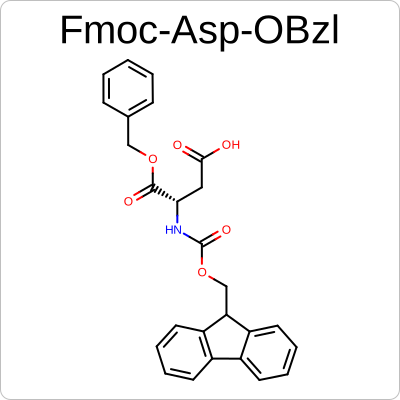
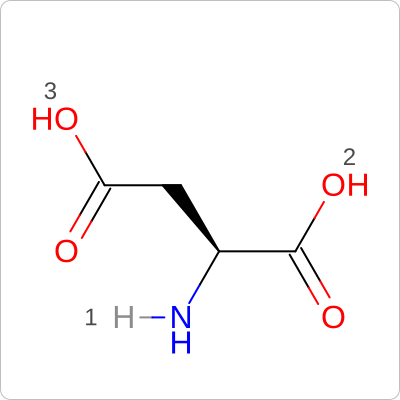
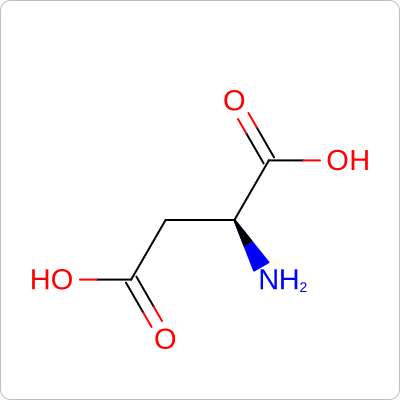
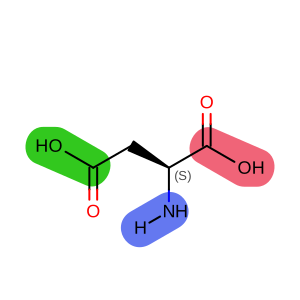
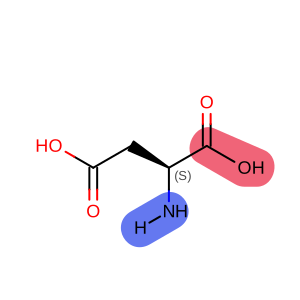
The aminoacids2monomerset script expects the amino acids without protecting groups. If the input has protecting groups (example A), the structure will be rejected. If the input has valid R-group mapping (example B), the mapping will be kept for the monomer connection points; otherwise, the backbone connections (R1, R2) will be perceived using the OEPerceivePeptideMonomerConnections function.
|
|
|
( A ) - INVALID |
( B ) - VALID |
( C ) - VALID |
generated monomer with side-chain connection |
generated monomer with only backbone connections |
|
|
|
Usage
See Download section to download the script.
> aminoacids2monomerset --help
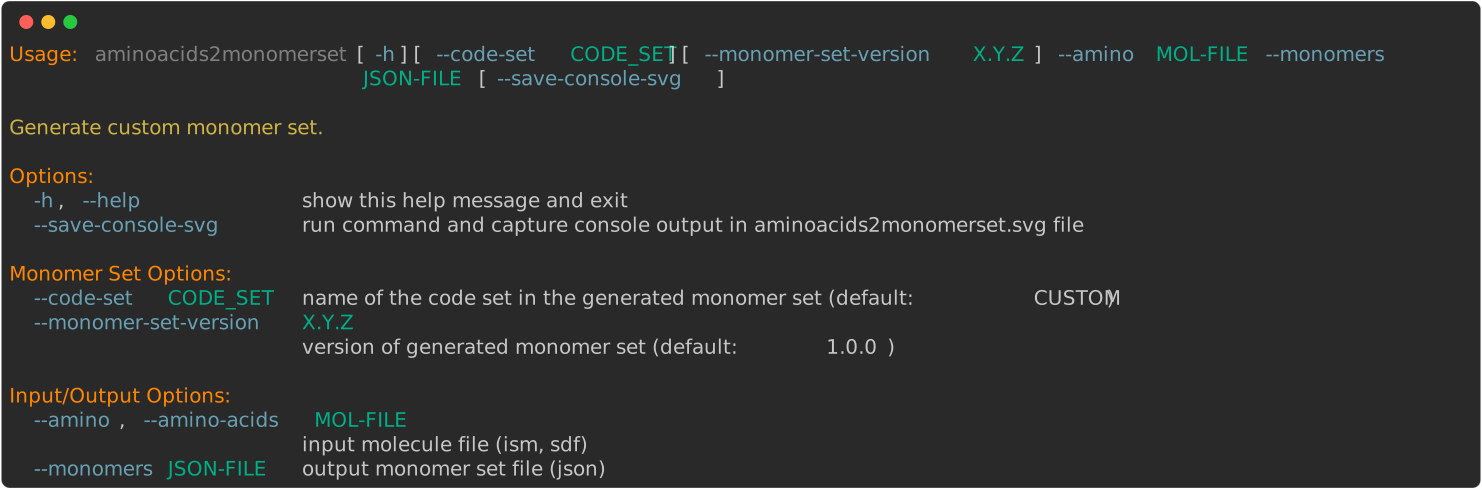
The following example shows how to generate a monomer set using a small subset of unnatural amino acids
(enamine.ism) available
from Enamine.
Note
The aminoacids2monomerset script expects a code that will be associated with each monomer (i.e., transformed amino acid) to be present as a molecule title in the input file.
> aminoacids2monomerset --amino-acid enamine.ism --monomers monomers.json
The aminoacids2monomerset script will print a warning message if an amino acid cannot be converted into valid monomer data or inserted into a monomer set.
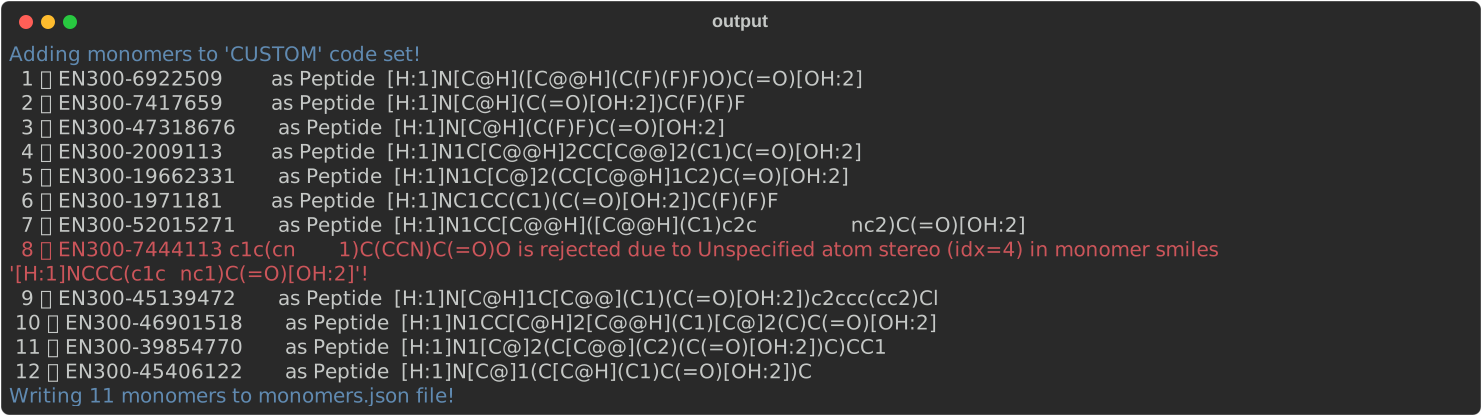
The script will generate (monomers.json) file
that can be loaded with the OEReadMonomerSet function and used in any script in the
🆕 Peptide Informatics section.
monomers2console script will output the following for
monomers.json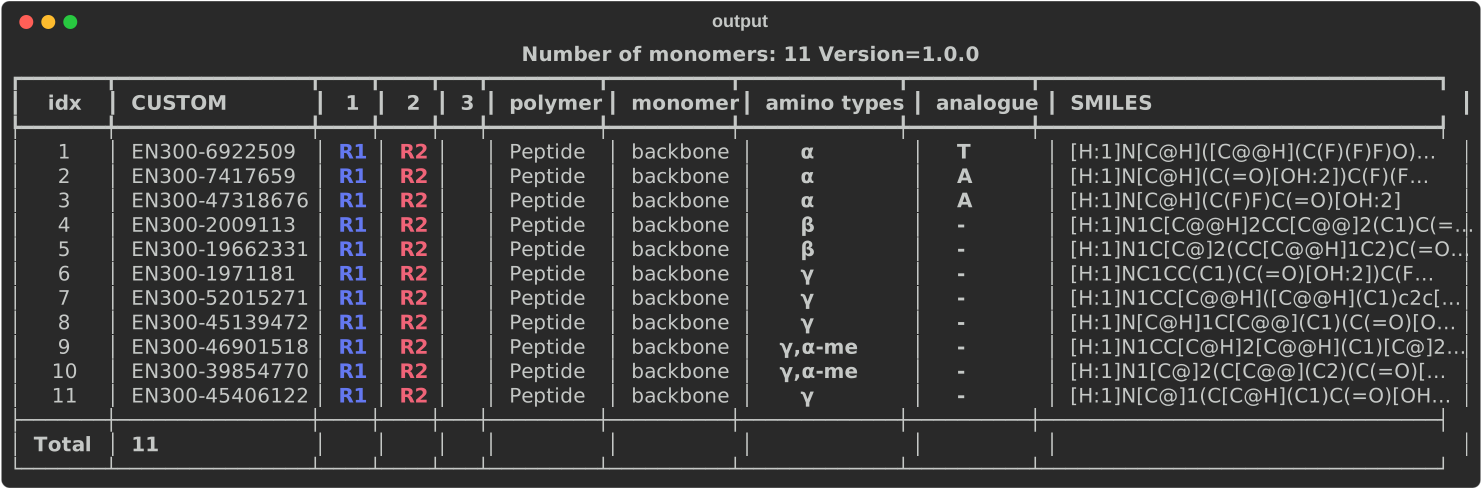
monomer2img script will generate images of monomers of
monomers.json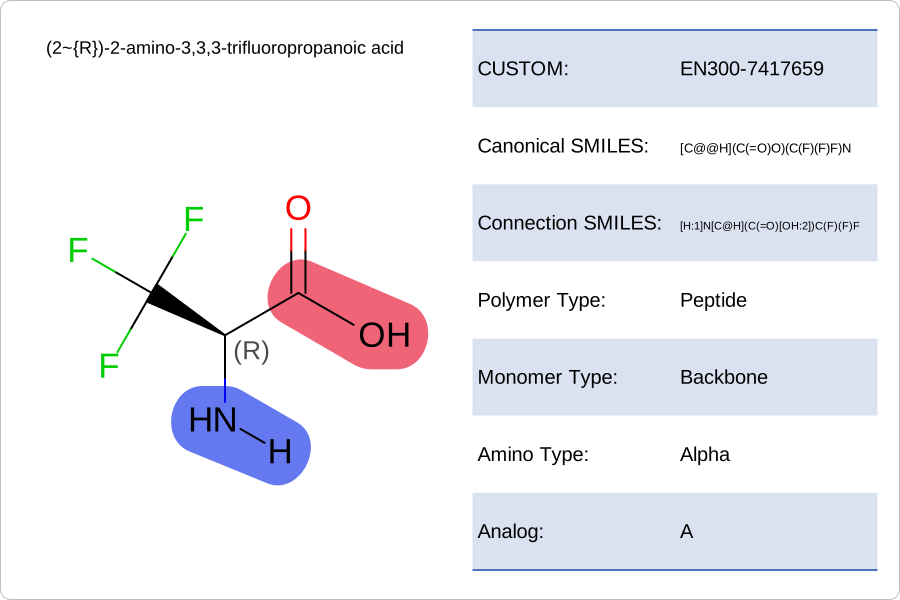
API
OEIsValidMonomerData function
OEMonomerData class
OEMonomerSet class
OEMonomerType namespace
OEPolymerType namespace
OEPerceivePeptideMonomerConnections function
OEWriteMonomerSet function