OEHighlightMonomers
Attention
This is a preliminary API and may be improved based on user feedback. It is currently available in C++ and Python.
OEHighlightMonomers(image: OEImageBase,
                    mol: Union[OEGraphMol,OEMol,OEQMol]) -> bool
OEHighlightMonomers(image: OEImageBase,
                    mol: Union[OEGraphMol,OEMol,OEQMol],
                    opts: OEHighlightMonomerDisplayOptions) -> bool
The OEHighlightMonomers function is designed to depict a molecule
initialized from a HELM string and highlight its monomer components.
- image
The image on which the molecule is drawn.
- mol
The molecule being depicted.
- opts
The
OEHighlightMonomerDisplayOptionsobject that stores properties that determine the styles of the molecule depiction.
Example:
monomers = oechem.OEMonomerSet()
oechem.OELoadOpenEyeMonomerSet(monomers)

mol = oechem.OEGraphMol()
helm = "PEPTIDE1{[N1[C@@H](CCC1=O)C([R2])=O].P.S.K.D.A.F.I.G.L.M.[am]}$$$$"

oechem.OEHelmToMol(mol, helm, monomers)
oedepict.OEPrepareDepiction(mol)

image =  oedepict.OEImage(800, 400)
opts = oegrapheme.OEHighlightMonomerDisplayOptions()
opts.SetAtomStereoStyle(oedepict.OEAtomStereoStyle_Display_All)

oegrapheme.OEHighlightMonomers(image, mol, opts)
oedepict.OEDrawCurvedBorder(image, oedepict.OELightGreyPen, 10)
oedepict.OEWriteImage("HighlightMonomers.svg", image)
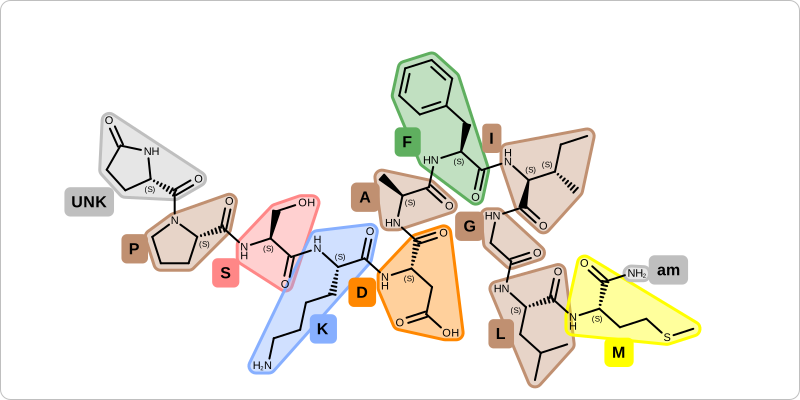
Example of using OEHighlightMonomers function
OEHighlightMonomers(molDisplay: OE2DMolDisplay,
                    opts: OEHighlightMonomerDisplayOptions) -> bool
This overload of the OEHighlightMonomers function renders the
molecule with the monomer highlighting to the display object.
- disp
The display object for the molecule being depicted.
- opts
The
OEHighlightMonomerDisplayOptionsobject that stores properties that determine the styles of the molecule depiction.
See also
OEDrawMonomerGraphfunction to depict the monomer graph of molecule initialized from HELMOEDrawPeptidefunction to depict a peptide with standard amino acidsOEDrawResiduesfunction to depict residues of a peptide
Code Example
Depict Peptide OpenEye Python Cookbook recipe