Downloading Trajectories from Floe Reports
Overview
The Trajectory Downloader Floe Report provides download links for the molecular dynamics (MD) trajectories generated by a floe. It is produced by the FE-NES for Binding Affinity Prediction Floe, as well as by other floes that run MD simulations, such as:
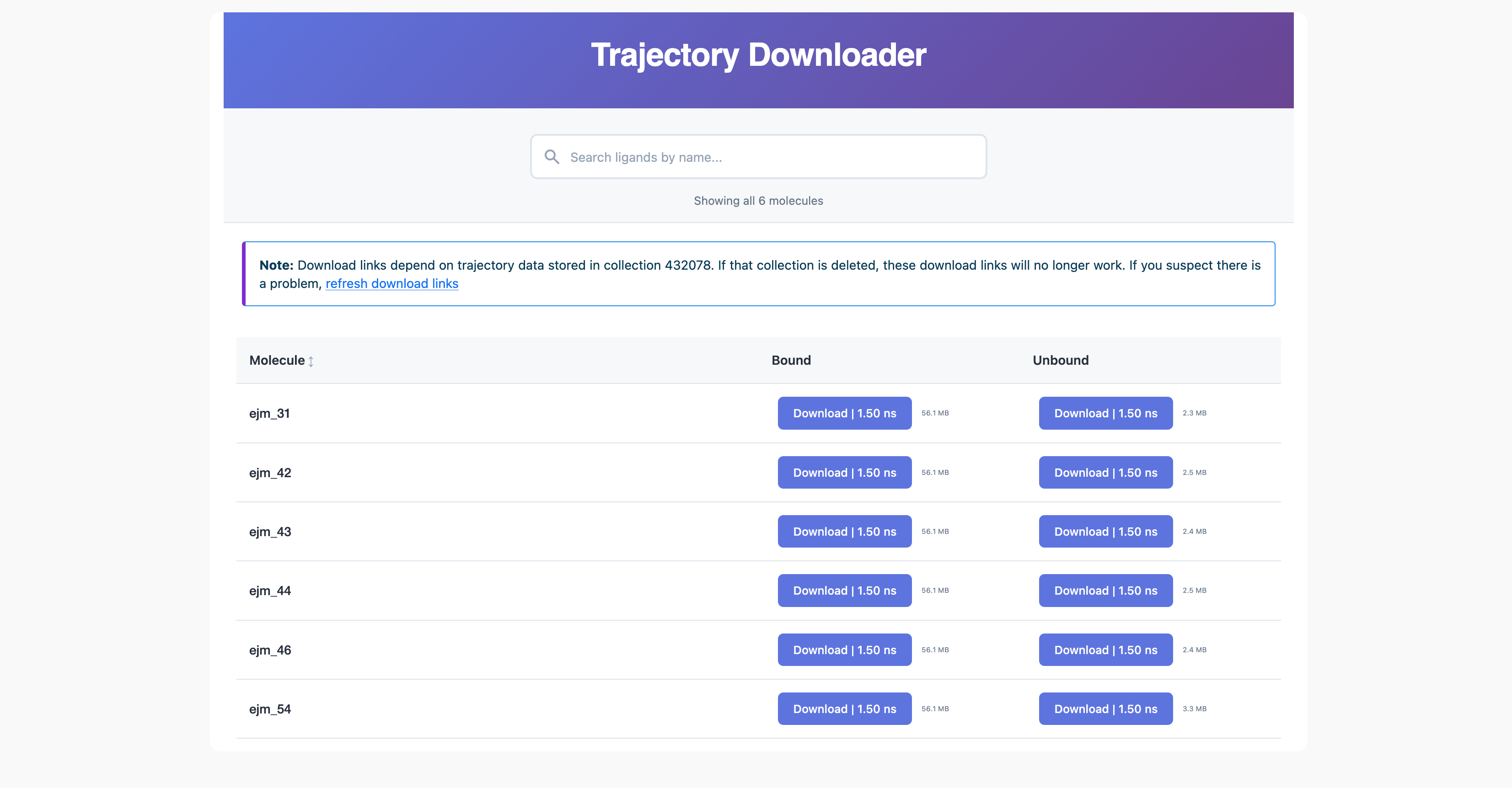
Figure 1. The Trajectory Downloader Floe Report.
Using the Trajectory Downloader
The Trajectory Downloader page contains a download button for every molecule provided as input to the floe.
There is a search bar at the top of the page that allows you to filter the molecules by name. The search is case-insensitive and supports partial matches.
For every molecule, a Bound and an Unbound trajectory is available. However, depending on the floe, specific buttons may be disabled. The following table summarizes the availability of the buttons for each floe:
For the FE-NES for Binding Affinity Prediction Floe, the inputs correspond to the molecules in the Posed Ligands input.
Both the bound and unbound trajectories are available for download.
For the Short Trajectory MD with Analysis Floe, the inputs correspond to the molecules in the Posed Ligands input.
Both the bound and unbound trajectories are available for download.
For the Bound Protein-Ligand MD Floe, the inputs correspond to the molecules in the Posed Ligands input.
Only the bound trajectory is available for download.
For the Solvate and Run MD Floe, the inputs correspond to the input molecules.
These may include holo or apo proteins in addition to ligands.
Depending on the input molecules, the bound and unbound trajectories may be available for download.
For the Extend MD Simulations Floe, the inputs correspond to the molecules in the input dataset on which the extension is performed.
Depending on the input molecules, the bound and unbound trajectories may be available for download.
Multiple Trajectories for a Molecule
If a floe generates multiple trajectories for either the bound or unbound state of a given molecule, separate download buttons are provided for each trajectory. The buttons are labeled with the duration of the trajectory in nanoseconds (ns).
Click a “Download” button to download a trajectory file.
The trajectory is downloaded as a tar.gz file. Uncompress it to obtain the
contents. On macOS or Linux, run:
tar -xzvf <trajectory_file>.tar.gz
When the MD engine is OpenMM, the uncompressed content is an .h5 file.
Offline Analyses of Trajectories
Use the following script to read the trajectory file in .h5 format. It uses MDTraj
to convert it into a .dcd file and also outputs an initial frame .pdb file (for topology).
The script can be modified to obtain a number of other formats supported by MDTraj.
Download the conversion script
Note
By default, the script searches the current directory for trajectory_comb.h5 or trajectory.h5
and writes bound.pdb and bound.dcd. Use --input and --output to specify other paths:
python oemdaffinity_convert_h5_to_dcd.py --input /path/to/trajectory.h5 --output /path/to/out/bound
After conversion, the trajectories can be loaded into third-party visualization programs such as VMD.
List All Trajectories
Access permission for SaaS customers
If you are a SaaS customer, you may not be able to run the script below from the command line due to restricted access. SaaS users with access to OCLI should consult the Quick Start guide for more information on installing and configuring OCLI. Please contact support at support@eyesopen.com for assistance.
Each of these floes listed above generates trajectories that are stored in a shard collection object. Each object is identified by a unique integer ID. This ID is displayed in the Trajectory Downloader Floe Report directly below the search bar at the top of the page (Figure 2).
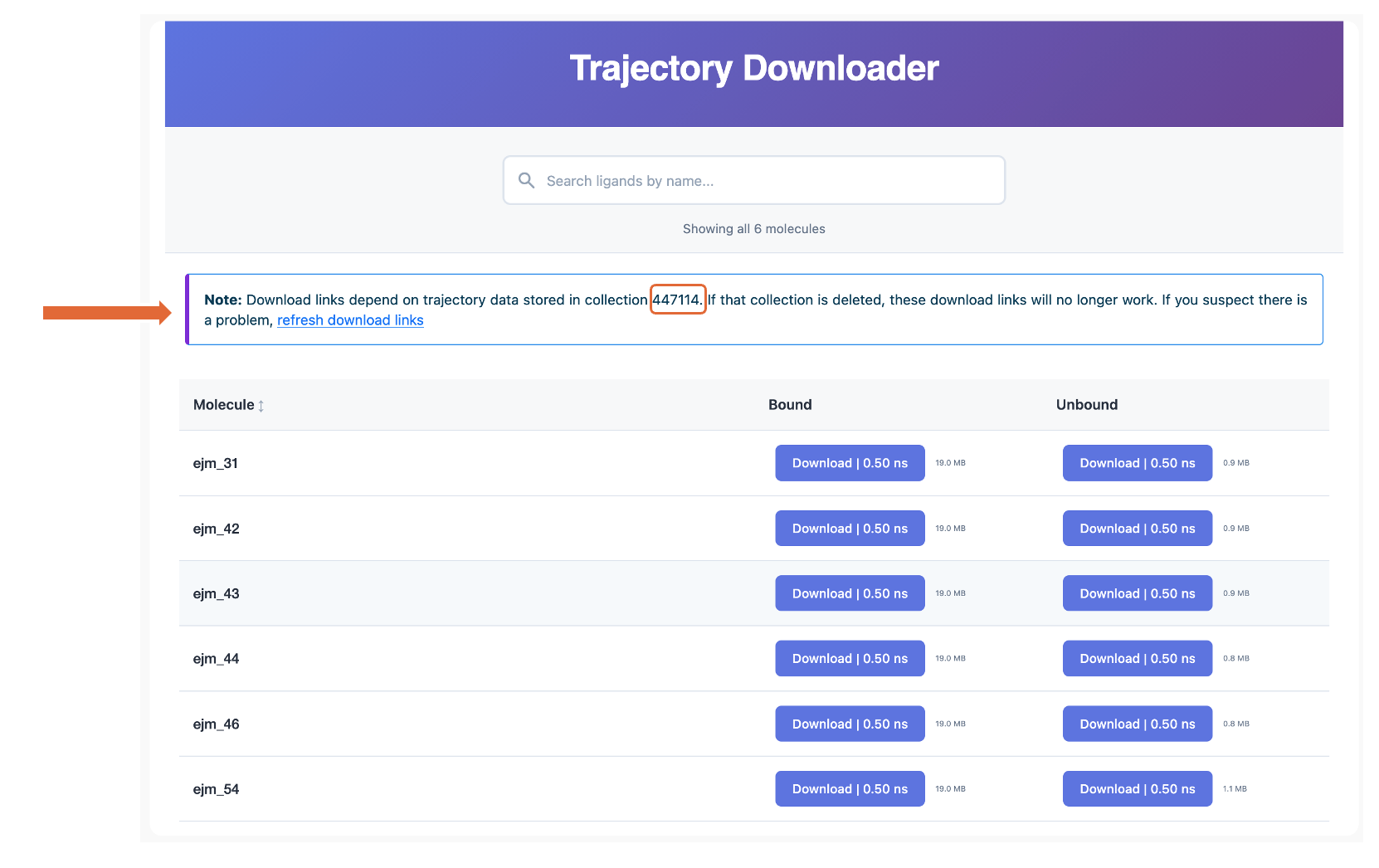
Figure 2. The Trajectory Downloader Floe Report showing the Shard Collection ID.
This collection can be inspected from the command line to list all the trajectories generated by the floe. The collection includes additional data generated by the floe.
Use the following script to list all the trajectories in a collection:
An example of how to use the script is shown below:
python /path/to/oemdaffinity_list_collection.py <collection_id> --kind trajectory
Here, <collection_id> is the integer ID of the collection listed in the Floe Report.
The script prints a list of all trajectories in the collection, along with the size and unique ID
of each trajectory file. It also shows the “leg” of the thermodynamic cycle for each trajectory,
which indicates whether the simulation involved a ligand bound to the protein target or
unbound and free in aqueous solution.
Example output is shown below:
Collection 447114: 'MD Data Collection'  state=ready

                 ID  LEG           SIZE  NAME
------------------------------------------------------------------------------------------------------------------------
 992796288972764693  bound       19.0MB  tmp0yv18njw_p4GIH_A_altA_lejm_43_5-prod_bn_traj.tar.gz
 992796288972764686  bound       19.0MB  tmp2iy8kgku_p4GIH_A_altA_lejm_44_4-prod_bn_traj.tar.gz
 992789704418332911  unbound      1.1MB  tmp43jwn7uz_lejm_54_2-prod_unb_traj.tar.gz
 992796291270774912  bound       19.0MB  tmp5oot4sbu_p4GIH_A_altA_lejm_54_2-prod_bn_traj.tar.gz
 992796182479386239  bound       19.0MB  tmp7rftjqz__p4GIH_A_altA_lejm_42_3-prod_bn_traj.tar.gz
 992796182479386235  bound       19.0MB  tmpa1yo2nou_p4GIH_A_altA_lejm_46_1-prod_bn_traj.tar.gz
 992789569898615004  unbound    790.0KB  tmphzff8i0b_lejm_46_1-prod_unb_traj.tar.gz
 992787482259764793  unbound    880.0KB  tmpn6cx4xzp_lejm_42_3-prod_unb_traj.tar.gz
 992796178779541743  bound       19.0MB  tmpnzlbqwy1_p4GIH_A_altA_lejm_31_0-prod_bn_traj.tar.gz
 992788565958398135  unbound    890.0KB  tmprmigsau4_lejm_31_0-prod_unb_traj.tar.gz
 992788565958398157  unbound    880.0KB  tmptrzzbp9__lejm_43_5-prod_unb_traj.tar.gz
 992787512030466206  unbound    830.0KB  tmpuqxsb0kt_lejm_44_4-prod_unb_traj.tar.gz
------------------------------------------------------------------------------------------------------------------------
12 shards, total 119.4MB
Lost metadata with Extend MD Simulations Floe
The Extend MD Simulations Floe’s architecture causes trajectory names to lose data that allows this script to infer the leg information. As a result, the leg column will be empty when listing trajectories from an Extend MD Simulations Floe collection.
Deleted Collection
If the collection has been deleted, the download links in the Floe Report will no longer work. This is possible if the folder containing the collection is deleted from Orion, for example.
If you still have the Floe Report, you can check whether the download links work by clicking on “Refresh download links” in the Note header under the search bar. If indeed the links are invalid, all the download buttons will be deactivated.
Warning
If you have deleted the collection, you will be able to recover it from Trash folder on the Data page. If removed from the Trash folder, the collection is permanently deleted and cannot be recovered.
The script to list all trajectories in a collection will also fail if the collection has been deleted.