Use a Tversky Scoring Function for a ROCS X Search
Context
You want to use a Tversky scoring function instead of the default Tanimoto Combo for a ROCS X 3D Search.
Procedure
The key to changing the scoring function in a ROCS X 3D Search is that you must change it in both the ROCS X - Initialize 3D Search Floe and the ROCS X - Run 3D Search Floe. For more information about scoring functions, see the Theory section of Shape TK and a discussion of Similarity Measures in GraphSim TK.
Note
You cannot change the scoring function in the Multi-Stage ROCS X Search Floe.
In the ROCS X - Initialize 3D Search Floe, you can change the scoring function in the FastROCS Similarity Type and ROCS Score Field parameters under Options: Overlay. These are set to Tanimoto Combo by default. To change the scoring function to Fit Tversky, for example, make sure both parameters are in agreement, as shown in Figure 1.

Figure 1. Using the Fit Tversky scoring function in the ROCS X - Initialize 3D Search Floe.
Now the hit list for the FastROCS search that’s used to seed the model will use the Fit Tversky scoring function. Next, you must also change the scoring function when you run a search with this model. In the ROCS X - Run 3D Search Floe under Options: Overlay, change the ROCS Score Sorter Type and Sort Field parameters to be in agreement with the scoring function you used to initialize the model.
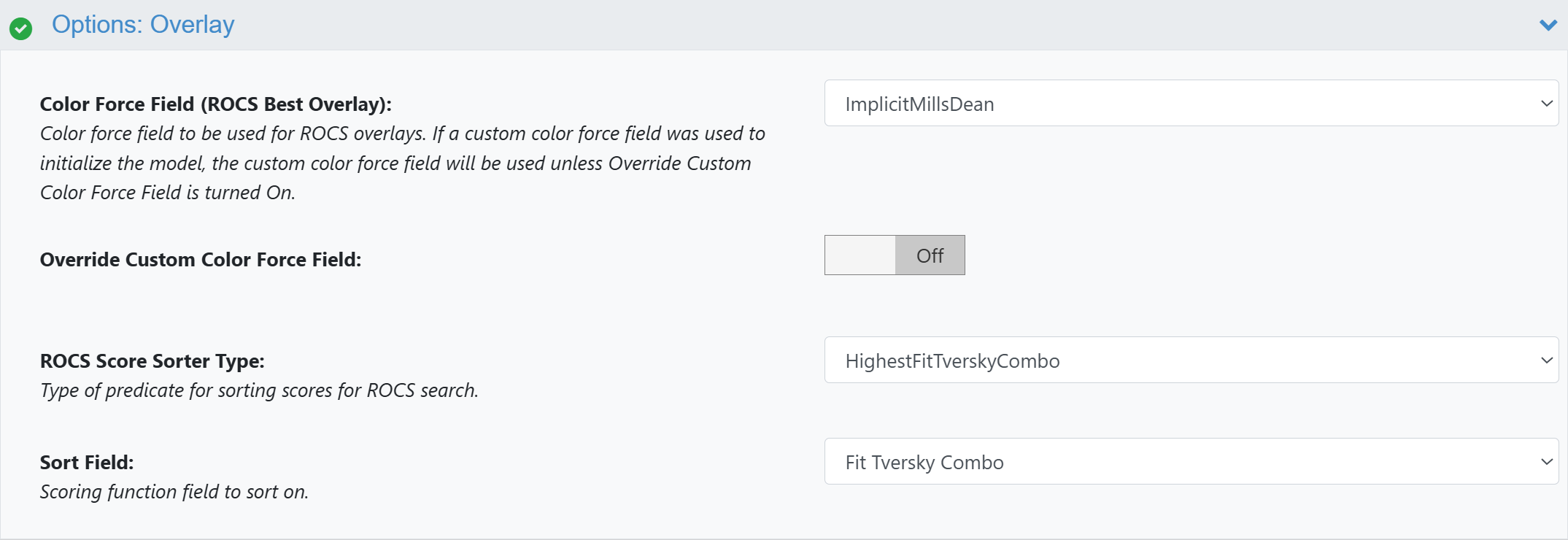
Figure 2. Using the Fit Tversky scoring function in the ROCS X - Run 3D Search Floe.
Warning
It is recommended to always use the same scoring function for initializing and running a search on the model. Otherwise, the search results may be degraded even if the floes still run.