OEHighlightByLasso
class OEHighlightByLasso : public OEHighlightBase
The OEHighlightByLasso class allows the
customization of the lasso highlighting style that is
associated with the OEHighlightStyle.Lasso
constant.
See example in Figure: Example of highlighting using the
‘lasso’ style.
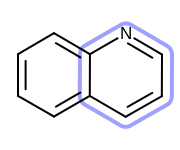
Example of highlighting using the ‘lasso’ style
The OEHighlightByLasso class stores the following properties:
Property |
Get method |
Set method |
Corresponding namespace / class / type |
|---|---|---|---|
atom label color |
boolean |
||
atom label box |
boolean |
||
color |
|||
pen |
|||
position |
|
||
lasso scale |
floating point number |
||
line width scale |
floating point |
See also
OEAddHighlightingfunctionOEHighlightStylenamespaceOEHighlightByColor class
OEHighlightByCogwheel class
OEHighlightByStick class
Highlighting chapter
Constructors
OEHighlightByLasso(const OESystem::OEColor& color,
                   double lassoScale = 3.0, bool monochrome = true,
                   bool considerAtomLabelBox = false,
                   unsigned int position = OELayerPosition::Below,
                   double lineWidthScale = 1.0)
Creates an OEHighlightByLasso object with the specified parameters.
- color
The color used for highlighting. See also
OEHighlightByLasso.SetColormethod.- lassoScale
The multiplier that can be used to increase or decrease the distance of the “lasso” from the highlighted atom(s) and bond(s). See also
OEHighlightByLasso.SetLassoScalemethod.- monochrome
Defines whether or not to change the color of the atom label of the highlighted atom(s). See also
OEHighlightByLasso.SetAtomLabelMonochromemethod.- considerAtomLabelBox
Determines whether or not to consider the atom label bounding boxes when generating the ‘lasso’ highlights. See also
OEHighlightByLasso.SetConsiderAtomLabelBoundingBoxmethod.- position
Defines whether the ‘lasso’ highlight is going to be rendered below or above the molecule. See also
OEHighlightByLasso.SetPositionmethod.- lineWidthScale
The multiplier that can be used to increase or decrease the line width of lasso. See also
OEHighlightByLasso.SetLineWidthScalemethod.
OEHighlightByLasso(const OEHighlightByLasso& rhs)
Copy constructor.
CreateCopy
OEHighlightBase* CreateCopy() const
Deep copy constructor that returns a copy of the object. The memory for the returned OEHighlightByLasso object is dynamically allocated and owned by the caller.
GetAtomLabelMonochrome
bool GetAtomLabelMonochrome() const
Returns whether or not the color of the atom label of the highlighted atom(s) is changed.
See also
GetConsiderAtomLabelBoundingBox
bool GetConsiderAtomLabelBoundingBox() const
Returns whether or not to consider the atom label bounding boxes when generating the ‘lasso’ highlights.
See also
GetLassoScale
double GetLassoScale() const
Returns the multiplier that can be used to increase or decrease the distance of the line of the ‘lasso’ from the highlighted atom(s) and bonds(s).
See also
GetLineWidthScale
double GetLineWidthScale() const
Returns the multiplier that can be used to increase or decrease the line width of the lasso.
See also
GetColor
const OESystem::OEColor& GetColor() const
Returns the foreground color of the highlighting.
See also
OEHighlightByLasso.GetColormethodOEColor class
GetPen
const OEPen& GetPen() const
Returns the pen of the highlighting.
See also
OEHighlightByLasso.SetPenmethodOEPen class
GetPosition
unsigned int GetPosition() const
Returns whether the ‘lasso’ highlight is going to be render above or
below the molecule.
The return value is taken from the OELayerPosition
namespace.
See also
OELayerPositionnamespace
SetAtomLabelMonochrome
void SetAtomLabelMonochrome(bool monochrome)
Sets whether or not to change the color of the atom label of the highlighted atom(s).
Example (Figure: Example of using the SetAtomLabelMonochrome method)
OEHighlightByLasso highlight = new OEHighlightByLasso(oechem.getOEDarkGreen());
highlight.SetAtomLabelMonochrome(false);
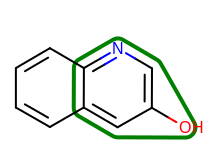
Example of using the SetAtomLabelMonochrome method
See also
SetConsiderAtomLabelBoundingBox
void SetConsiderAtomLabelBoundingBox(bool consider)
Sets whether or not to consider the atom label bounding boxes when generating the ‘lasso’ highlights. By considering the bounding boxes, the number cases when the lines of the highlight clash with the atom label can be reduced.
Example (Figure: Example of using the SetConsiderAtomLabelBoundingBox method)
OEHighlightByLasso highlight = new OEHighlightByLasso(oechem.getOEDarkGreen());
highlight.SetConsiderAtomLabelBoundingBox(true);
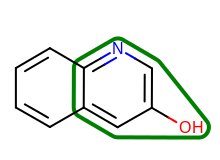
Example of using the SetConsiderAtomLabelBoundingBox method
See also
SetLassoScale
void SetLassoScale(double lassoScale)
Sets the multiplier that can be used to increase or decrease the distance of the line of the ‘lasso’ from the highlighted atom(s) and bond(s).
Example (Figure: Example of using the SetLassoScale method)
OEHighlightByLasso highlight = new OEHighlightByLasso(oechem.getOEDarkGreen());
highlight.SetLassoScale(6.0);
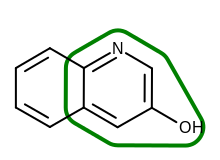
Example of using the SetLassoScale method
See also
SetLineWidthScale
void SetLineWidthScale(double lineWidthScale)
Sets the multiplier that can be used to increase or decrease the line width of the lasso.
Example (Figure: Example of using the SetLineWidthScale method)
OEHighlightByLasso highlight = new OEHighlightByLasso(oechem.getOEDarkGreen());
highlight.SetLineWidthScale(3.0);
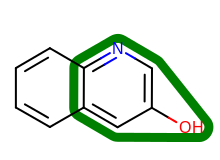
Example of using the SetLineWidthScale method
See also
SetColor
void SetColor(const OESystem::OEColor& color)
Sets the foreground color of the highlighting.
Example (Figure: Example of using the SetColor method)
highlight.SetColor(oechem.getOEDarkGreen());
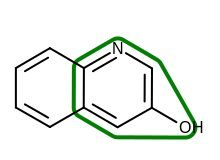
Example of using the SetColor method
See also
OEHighlightByLasso.GetColormethodOEColor class
SetPen
void SetPen(const OEPen& pen)
Sets the pen of the highlighting.
Example (Figure: Example of using the SetPen method)
OEPen pen = new OEPen(oechem.getOEGreenTint(), oechem.getOEDarkGreen(), OEFill.On, 3.0, OEStipple.ShortDash);
highlight.SetPen(pen);
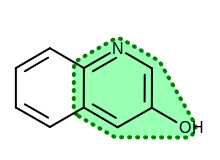
Example of using the SetPen method
See also
OEHighlightByLasso.GetPenmethodOEPen class
SetPosition
void SetPosition(unsigned int position)
Sets whether the ‘lasso’ highlight is going to be render above or below the molecule.
- position
This value has to be from the
OELayerPositionnamespace.
See also