OEColorGradientDisplayOptions
class OEColorGradientDisplayOptions
This class represents the OEColorGradientDisplayOptions class that holds properties that determine how a color gradient is rendered.
See also
OEDrawColorGradientfunction
Constructors
OEColorGradientDisplayOptions()
Default constructor.
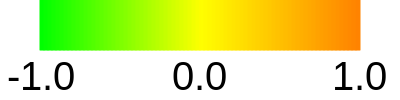
Example of drawing a color gradient with default options
OEColorGradientDisplayOptions(const OEColorGradientDisplayOptions& rhs)
Copy constructor.
AddLabel
void AddLabel(const OEColorGradientLabel& label)
Adds an additional label that will be rendered on the strip of the color gradient.
- label
The OEColorGradientLabel object that defines the label and the position where the label is going to be rendered to the color gradient.
Example:
OEColorGradientDisplayOptions opts = new OEColorGradientDisplayOptions();
opts.AddLabel(new OEColorGradientLabel(-1.0, "dissimilar"));
opts.AddLabel(new OEColorGradientLabel(+1.0, "similar"));
OEGrapheme.OEDrawColorGradient(image, colorg, opts);
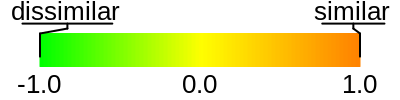
Example of using the AddLabel method
See also
AddMarkedValue
void AddMarkedValue(double value)
Adds an additional value that will be marked on the strip of the color gradient along with the label of the value above the strip.
Example:
OEColorGradientDisplayOptions opts = new OEColorGradientDisplayOptions();
opts.AddMarkedValue(0.20);
OEGrapheme.OEDrawColorGradient(image, colorg, opts);
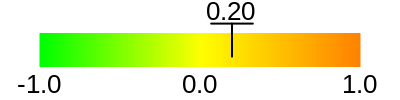
Example of using the AddMarkedValue method
AddMarkedValues
void AddMarkedValues(const std::vector<double>& values)
Adds additional values that will be marked on the strip of the color gradient along with their labels above the strip.
Example:
OEColorGradientDisplayOptions opts = new OEColorGradientDisplayOptions();
OEDoubleVector markedvalues = new OEDoubleVector();
markedvalues.Add(0.20);
markedvalues.Add(0.70);
markedvalues.Add(0.72);
opts.AddMarkedValues(markedvalues);
OEGrapheme.OEDrawColorGradient(image, colorg, opts);
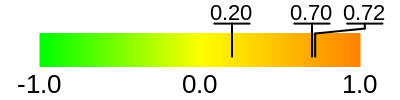
Example of using the AddMarkedValues method
ClearBoxRange
void ClearBoxRange()
Removes the range previously set to be marked on the color gradient.
ClearLabels
void ClearLabels()
Removes labels previously set by the
OEColorGradientDisplayOptions.AddLabel method
to be marked on the color gradient.
See also
ClearMarkedValues
void ClearMarkedValues()
Removes any values previously set to be marked on the color gradient.
GetBoxRangeMax
double GetBoxRangeMax() const
Returns the minimum value of the range being marked on the color gradient.
See also
GetBoxRangeMin
double GetBoxRangeMin() const
Returns the maximum value of the range being marked on the color gradient.
See also
GetBoxRangePen
Returns the pen used to draw the box to mark the range set by the
OEColorGradientDisplayOptions.SetBoxRange method.
const OEDepict::OEPen& GetBoxRangePen() const
See also
GetColorStopLabelFont
const OEDepict::OEFont& GetColorStopLabelFont() const
Returns the font that is used to render the color stops of the color gradient.
See also
GetColorStopLabelFontScale
double GetColorStopLabelFontScale() const
Returns the multiplier that can be used to increase or decrease the size of the color stop label fonts.
See also
GetColorStopPrecision
unsigned int GetColorStopPrecision() const
Returns the precision of the color stop labels i.e. the number of digits that is written to express the floating-point values.
See also
GetColorStopVisibility
bool GetColorStopVisibility() const
Returns whether the color stop labels are rendered.
See also
GetLabels
OESystem::OEIterBase<OEColorGradientLabel>* GetLabels() const
Returns an iterator over the labels that are being rendered onto the color gradient.
See also
GetMarkedValuePen
const OEDepict::OEPen& GetMarkedValuePen() const
Returns the pen that is used to draw the lines for the marked values.
See also
OEPen class
GetMarkedValuePrecision
unsigned int GetMarkedValuePrecision() const
Returns the precision of the marked value labels i.e. the number of digits that is written to express the floating-point values.
See also
GetMarkedValues
OESystem::OEIterBase<double>* GetMarkedValues() const
Returns an iterator over the values that are being marked on the color gradient.
SetBoxRange
void SetBoxRange(double minvalue, double maxvalue)
Sets the range being marked on the color gradient.
- minvalue, maxvalue
The minimum and maximum value of the range.
Example:
OEColorGradientDisplayOptions opts = new OEColorGradientDisplayOptions();
opts.SetBoxRange(-0.5, 0.5);
OEGrapheme.OEDrawColorGradient(image, colorg, opts);
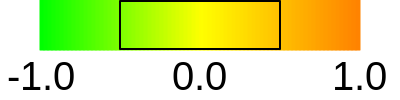
Example of using the SetBoxRange method
SetBoxRangePen
void SetBoxRangePen(const OEDepict::OEPen& pen)
Sets the pen used to mark a specified range on the color gradient.
Example:
OEColorGradientDisplayOptions opts = new OEColorGradientDisplayOptions();
opts.SetBoxRange(-0.5, 0.5);
OEPen pen = new OEPen(OEChem.OEBlack, OEChem.OEBlack, OEFill.On, 2.0, OEStipple.ShortDash);
opts.SetBoxRangePen(pen);
OEGrapheme.OEDrawColorGradient(image, colorg, opts);
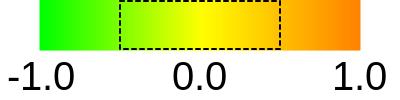
Example of using the SetBoxRangePen method
See also
SetColorStopLabelFont
void SetColorStopLabelFont(const OEDepict::OEFont& font)
Sets the font that is used to render color stops of the color gradient.
Example:
OEColorGradientDisplayOptions opts = new OEColorGradientDisplayOptions();
OEFont font = new OEFont();
font.SetColor(OEChem.OEDarkGreen);
font.SetStyle(OEFontStyle.Bold);
opts.SetColorStopLabelFont(font);
OEGrapheme.OEDrawColorGradient(image, colorg, opts);
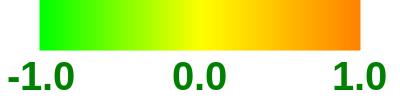
Example of using the SetColorStopLabelFont method
Note
The size of font also depends on dimensions of the image
into which the color gradient is rendered.
See also OEDrawColorGradient function.
See also
SetColorStopLabelFontScale
void SetColorStopLabelFontScale(double scale)
Sets the multiplier that can be used increase or decrease the size of the fonts of the color stop labels.
- scale
This value has to be in the range of
[0.5, 3.0].
Example:
OEColorGradientDisplayOptions opts = new OEColorGradientDisplayOptions();
opts.SetColorStopLabelFontScale(0.5);
OEGrapheme.OEDrawColorGradient(image, colorg, opts);
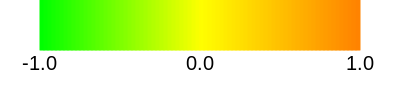
Example of using the SetColorStopLabelFontScale method
SetColorStopPrecision
void SetColorStopPrecision(unsigned int precision)
Sets the precision of the color stop labels i.e. the number of digits that is written to express the floating-point values.
- precision
The zero value means that the precision is determined by the lowest significant digits of the color stop values that is in the range of [1,4].
Example:
OEColorGradientDisplayOptions opts = new OEColorGradientDisplayOptions();
opts.SetColorStopPrecision(4);
OEGrapheme.OEDrawColorGradient(image, colorg, opts);
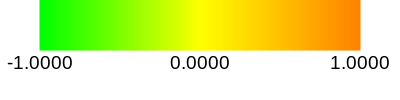
Example of using the SetColorStopPrecision method
See also
SetColorStopVisibility
void SetColorStopVisibility(bool visible)
Sets whether the color stop labels are rendered.
Example:
OEColorGradientDisplayOptions opts = new OEColorGradientDisplayOptions();
opts.SetColorStopVisibility(false);
OEGrapheme.OEDrawColorGradient(image, colorg, opts);
DepictColorGradient(colorg, opts, "OEColorGradientDisplayOptions_SetColorStopVisibility");
}

{
OEColorGradientDisplayOptions opts = new OEColorGradientDisplayOptions();
opts.SetBoxRange(-0.5, 0.5);
OEGrapheme.OEDrawColorGradient(image, colorg, opts);
DepictColorGradient(colorg, opts, "OEColorGradientDisplayOptions_SetBoxRange");
}

{
OEColorGradientDisplayOptions opts = new OEColorGradientDisplayOptions();
opts.SetBoxRange(-0.5, 0.5);
OEPen pen = new OEPen(OEChem.OEBlack, OEChem.OEBlack, OEFill.On, 2.0, OEStipple.ShortDash);
opts.SetBoxRangePen(pen);
OEGrapheme.OEDrawColorGradient(image, colorg, opts);
DepictColorGradient(colorg, opts, "OEColorGradientDisplayOptions_SetBoxRangePen");
}

{
OEColorGradientDisplayOptions opts = new OEColorGradientDisplayOptions();
opts.AddMarkedValue(0.20);
OEGrapheme.OEDrawColorGradient(image, colorg, opts);
DepictColorGradient(colorg, opts, "OEColorGradientDisplayOptions_AddMarkedValue");
}

{
OEColorGradientDisplayOptions opts = new OEColorGradientDisplayOptions();
OEDoubleVector markedvalues = new OEDoubleVector();
markedvalues.Add(0.20);
markedvalues.Add(0.70);
markedvalues.Add(0.72);
opts.AddMarkedValues(markedvalues);
OEGrapheme.OEDrawColorGradient(image, colorg, opts);
DepictColorGradient(colorg, opts, "OEColorGradientDisplayOptions_AddMarkedValues");
}

{
OEColorGradientDisplayOptions opts = new OEColorGradientDisplayOptions();
opts.AddMarkedValue(0.0);
OEDoubleVector markedvalues = new OEDoubleVector();
markedvalues.Add(0.75);
markedvalues.Add(0.50);
opts.SetMarkedValues(markedvalues);
OEGrapheme.OEDrawColorGradient(image, colorg, opts);
DepictColorGradient(colorg, opts, "OEColorGradientDisplayOptions_SetMarkedValues");
}

{
OEColorGradientDisplayOptions opts = new OEColorGradientDisplayOptions();
OEDoubleVector markedvalues = new OEDoubleVector();
markedvalues.Add(0.20);
markedvalues.Add(0.70);
markedvalues.Add(0.72);
opts.SetMarkedValues(markedvalues);
opts.SetMarkedValuePrecision(1);
OEGrapheme.OEDrawColorGradient(image, colorg, opts);
DepictColorGradient(colorg, opts, "OEColorGradientDisplayOptions_SetMarkedValuePrecision");
}

{
OEColorGradientDisplayOptions opts = new OEColorGradientDisplayOptions();
OEDoubleVector markedvalues = new OEDoubleVector();
markedvalues.Add(0.20);
markedvalues.Add(0.70);
markedvalues.Add(0.72);
opts.SetMarkedValues(markedvalues);
OEPen pen = new OEPen(OEChem.OEBlack, OEChem.OEDarkGreen, OEFill.On, 2.0, OEStipple.ShortDash);
opts.SetMarkedValuePen(pen);
OEGrapheme.OEDrawColorGradient(image, colorg, opts);
DepictColorGradient(colorg, opts, "OEColorGradientDisplayOptions_SetMarkedValuePen");
}

{
OEColorGradientDisplayOptions opts = new OEColorGradientDisplayOptions();
opts.AddLabel(new OEColorGradientLabel(-1.0, "dissimilar"));
opts.AddLabel(new OEColorGradientLabel(+1.0, "similar"));
OEGrapheme.OEDrawColorGradient(image, colorg, opts);
DepictColorGradient(colorg, opts, "OEColorGradientDisplayOptions_AddLabel");
}

return 0;

Example of using the SetColorStopVisibility method
See also
SetMarkedValuePen
void SetMarkedValuePen(const OEDepict::OEPen& pen)
Sets the pen that is used to draw the lines for the marked values.
Example:
OEColorGradientDisplayOptions opts = new OEColorGradientDisplayOptions();
OEDoubleVector markedvalues = new OEDoubleVector();
markedvalues.Add(0.20);
markedvalues.Add(0.70);
markedvalues.Add(0.72);
opts.SetMarkedValues(markedvalues);
OEPen pen = new OEPen(OEChem.OEBlack, OEChem.OEDarkGreen, OEFill.On, 2.0, OEStipple.ShortDash);
opts.SetMarkedValuePen(pen);
OEGrapheme.OEDrawColorGradient(image, colorg, opts);
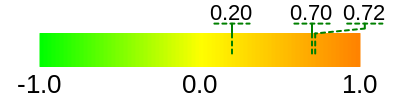
Example of using the SetMarkedValuePen method
See also
OEPen class
SetMarkedValuePrecision
void SetMarkedValuePrecision(unsigned int precision)
Sets the precision of the marked value labels i.e. the number of digits that is written to express the floating-point values. Decreasing the precision can result in collapsing that labels of two or more distinct values into one label.
Example:
OEColorGradientDisplayOptions opts = new OEColorGradientDisplayOptions();
OEDoubleVector markedvalues = new OEDoubleVector();
markedvalues.Add(0.20);
markedvalues.Add(0.70);
markedvalues.Add(0.72);
opts.SetMarkedValues(markedvalues);
opts.SetMarkedValuePrecision(1);
OEGrapheme.OEDrawColorGradient(image, colorg, opts);
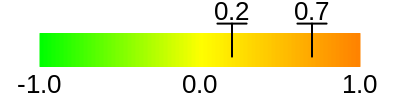
Example of using the SetMarkedValuePrecision method
See also
SetMarkedValues
void SetMarkedValues(const std::vector<double>& values)
Initializes values that will be marked on the strip of the color gradient
along with the value labels above the strip.
OEColorGradientDisplayOptions.SetMarkedValues method
discards the list of values set in prior calls.
Example:
OEColorGradientDisplayOptions opts = new OEColorGradientDisplayOptions();
opts.AddMarkedValue(0.0);
OEDoubleVector markedvalues = new OEDoubleVector();
markedvalues.Add(0.75);
markedvalues.Add(0.50);
opts.SetMarkedValues(markedvalues);
OEGrapheme.OEDrawColorGradient(image, colorg, opts);
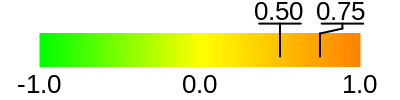
Example of using the SetMarkedValues method