OEColor
class OEColor
The OEColor class represents colors in terms of
RGBA (red, green, blue, alpha) components, where alpha is used as an
opacity channel. Each color component is represented by one byte in the
range of 0 to 255. Meaning that
\(2^8*2^8*2^8 = 16,777,216\) different colors can be
represented.
The value of alpha is also in the range of 0 to 255. If a
color has an alpha value of 0, then the color is fully
transparent, i.e., invisible. If a color has an alpha value
255, then the color is fully opaque.
OESystem provides many predefined colors. For example, the color
black is represented by
OEBlack (R=0, G=0, B=0),
and the color white is represented by
OEWhite (R=255, G=255,
B=255). The full list of pre-defined colors is shown in
Figure: List of pre-defined colors
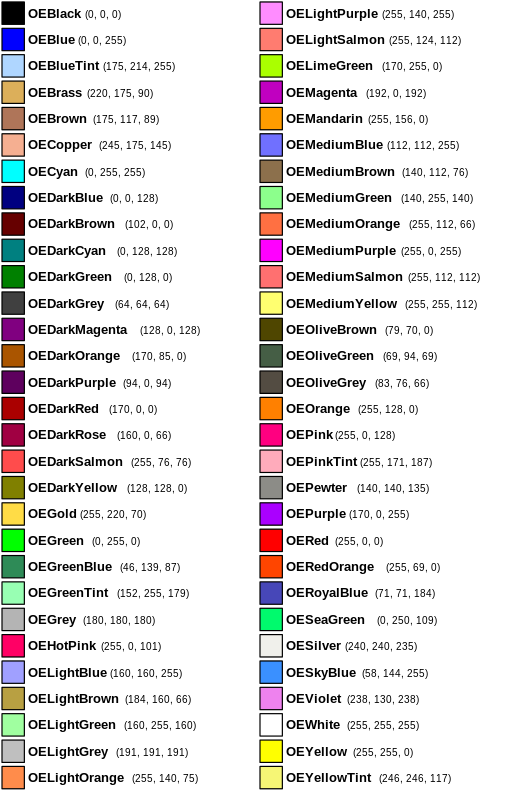
List of pre-defined colors
Note
The alpha for all pre-defined colors is 255, entirely
opaque.
Constructors
OEColor() -> OEColor
The default constructor initializes the color object to white (R=255, B=255, G=255, A=255).
OEColor(rhs: OEColor) -> OEColor
Copy constructor.
OEColor(packed: int) -> OEColor
Create a color object from a packed 32-bit integer. Each 8-bit byte of the integer is assumed to contain a different component of the color.
OEColor(text: str) -> OEColor
Create a color object that is initialized with an RGB or an RGBA
hexadecimal string. The format of an RGB string is #RRGGBB
and format of an RGBA string is #RRGGBBAA, where R,G,B and A
are hexadecimal numbers. For example, the string #FF0000
represents the color red.
OEColor(rgba: str) -> OEColor
Create a color object from an array of unsigned char. The
array is assumed to contain at least 4 bytes, where each byte
corresponds to RGBA components respectively.
OEColor(r: int, g: int, b: int) -> OEColor
Create a color object with a specified red, green, and
blue color components, the alpha component is set to
255. Each argument should be in the range of 0 to
255.
OEColor(r: int, g: int, b: int, a: int) -> OEColor
Create a color object with a specified red, green, blue, and alpha components.
CreateCopy
CreateCopy() -> OEColor
Deep copy constructor that returns a pointer to a copy of the object. The memory for the returned OEColor object is dynamically allocated and owned by the caller.
GetR
GetR() -> int
Returns the red component of the OEColor
object in the range of [0, 255].
See also
OEColor.SetRmethod
GetG
GetG() -> int
Returns the green component of the OEColor
object in the range of [0, 255].
See also
OEColor.SetGmethod
GetB
GetB() -> int
Returns the blue component of the OEColor
object in the range of [0, 255].
See also
OEColor.SetBmethod
GetA
GetA() -> int
Returns the alpha component of the OEColor
object in the range of [0, 255].
See also
OEColor.SetAmethod
GetPackedColor
GetPackedColor() -> int
Returns all the components of the OEColor object packed into a single 32-bit integer. Each 8-bit byte of the integer contains a different component of the color.
GetRGBA
GetRGBA() -> str
Returns all the components of the OEColor object as an array of 4 bytes. The array contains 4 bytes, where each byte corresponds to RGBA components respectively. The pointer returned is owned by the OEColor object and should not be deallocated by the user.
GetText
GetText(a: bool = False) -> str
Returns the hexadecimal string representation of the
OEColor object. By default the format is
#RRGGBB. If the alpha argument is set to true the
returned string will include the alpha component in the format
#RRGGBBAA.
Set
Set(r: int, g: int, b: int) -> OEColor
Set(r: int, g: int, b: int, a: int) -> OEColor
Sets all the components of the OEColor
object. Each argument is assumed to be in the range of 0 to
255. Returns a reference to the OEColor
object.
SetR
SetR(r: int) -> OEColor
Sets the red component of the OEColor
object.
The given value is clamped into the range of [0, 255].
Returns a reference to the OEColor
object.
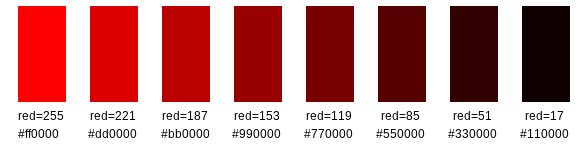
Examples of changing the red color component
See also
OEColor.GetRmethod
SetG
SetG(g: int) -> OEColor
Sets the green component of the OEColor
object.
The given value is clamped into the range of [0, 255].
Returns a reference to the OEColor
object.
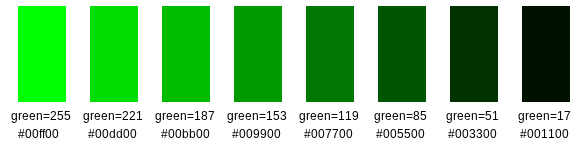
Examples of changing the green color component
See also
OEColor.SetGmethod
SetB
SetB(b: int) -> OEColor
Sets the blue component of the OEColor
object.
The given value is clamped into the range of [0, 255].
Returns a reference to the OEColor
object.
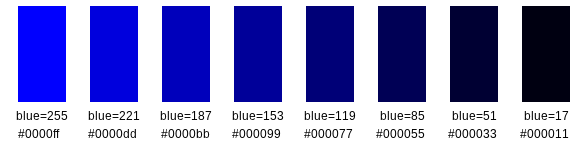
Examples of changing the blue color component
See also
OEColor.SetBmethod
SetA
SetA(a: int) -> OEColor
Sets the alpha component of the OEColor
object.
The given value is clamped into the range of [0, 255].
Returns a reference to the OEColor
object.
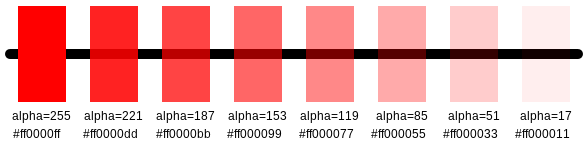
Examples of changing the alpha (transparency) color component
See also
OEColor.SetAmethod
SetPackedColor
SetPackedColor(color: int) -> OEColor
Sets all the components of the OEColor object from a packed 32-bit integer. Each 8-bit byte of the integer is assumed to contain a different component of the color. Returns a reference to the OEColor object.
SetRGBA
SetRGBA(rgba: str) -> OEColor
Sets all the components of the OEColor object
from an array of unsigned char. The array is assumed to
contain at least 4 bytes, where each byte corresponds to RGBA
components respectively. Returns a reference to the
OEColor object.
SetText
SetText(text: str) -> OEColor
Sets all the components of the OEColor object
from a RGB or RGBA hexadecimal string. The format of an RGB
string is #RRGGBB and format of an RGBA string is
#RRGGBBAA, where R,G,B and A are hexadecimal numbers. For
example, the string #FF0000 represents the color
red. Returns a reference to the OEColor
object.