OEImageTableOptions
class OEImageTableOptions
This class represents the OEImageTableOptions class that encapsulates properties that determine how an image table is depicted.
The OEImageTableOptions class stores the following properties:
Property |
Get method |
Set method |
Corresponding namespace / class / type |
|---|---|---|---|
number of columns |
integer greater than 0 |
||
number of rows |
integer greater than 1 |
||
width of columns |
vector of non zero integers |
||
height of rows |
vector of non zero integers |
||
cell font size |
positive non-zero integer |
||
pen used around cells cells |
|||
table cell color |
|||
table cell font |
|||
header |
boolean |
||
header color |
|||
header font |
|||
table margins |
positive floating point number in the range of \([0.0, 25.0]\) |
||
stub column |
boolean |
||
stub column color |
|||
stub column font |
See also
Depicting Molecules in a Table section
OEImageTable class
Constructors
OEImageTableOptions(rows: int, cols: int, style: int) -> OEImageTableOptions
Creates an OEImageTableOptions object with the given parameters.
- rows
The total number of rows in the table including the header.
- cols
The total number of columns in the table including the stub column.
- style
This value has to be from the
OEImageTableStylenamespace.
Note
By default, the columns and rows of a table are created with equal
widths and heights.
The relative width and height ratio of the columns and rows can be adjusted using the
OEImageTableOptions.SetColumnWidths and
OEImageTableOptions.SetRowHeights methods,
respectively.
Example (Example of generating a 4 x 4 image table with header and ‘MediumBlue’ style)
tableopts = oedepict.OEImageTableOptions(4, 4, oedepict.OEImageTableStyle_MediumBlue)
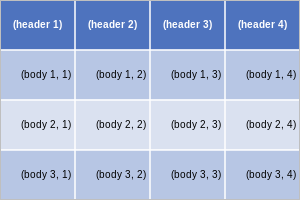
Example of generating a 4 x 4 image table with header and ‘MediumBlue’ style
See also
OEImageTableStylenamespaceOEImageTableOptions.NumRowsmethod
OEImageTableOptions(arg2: OEImageTableOptions) -> OEImageTableOptions
Copy constructor.
GetCellBorderPen
GetCellBorderPen() -> OEPen
Returns the pen that is used to mark the border of the cells in the table.
See also
OEPen class
GetCellColor
GetCellColor(even: bool = True) -> OEColor
See also
Returns the color used to highlight the ‘body’ cells in the table. A cell is considered to be part of the ‘body’ of the table if it is neither in the header nor in the stub column.
- even
This parameter determines whether to return the color of the even or odd rows in the table.
See also
OEColor class
GetCellFont
GetCellFont() -> OEFont
Returns the font used by the OEImageTable.DrawText
method to draw text on the ‘body’ cells.
See also
OEFont class
GetHeaderColor
GetHeaderColor() -> OEColor
Returns the color used to highlight the ‘header’ cells in the table.
See also
OEColor class
GetHeaderFont
GetHeaderFont() -> OEFont
Returns the font used by the OEImageTable.DrawText
method to draw text on the ‘header’ cells.
See also
OEFont class
GetMargin
GetMargin(margin: int) -> float
Returns the ratio of a specific margin of the table.
- margin
This value has to be from the
OEMarginnamespace.
See also
GetStubColumnColor
GetStubColumnColor() -> OEColor
Returns the color used to highlight the ‘stub column’ cells in the table.
See also
OEColor class
GetStubColumnFont
GetStubColumnFont() -> OEFont
Returns the font used by the OEImageTable.DrawText
method to draw text on the ‘stub column’ cells.
See also
OEFont class
HasHeader
HasHeader() -> bool
Returns whether a table has a ‘header’ row. By default, a table is generated with a ‘header’ row.
See also
HasStubColumn
HasStubColumn() -> bool
Returns whether the table has a ‘stub’ column. By default, a table is generated without a ‘stub’ column.
See also
NumColumns
NumColumns() -> int
Returns the total number of columns in the table including the stub column.
NumRows
NumRows() -> int
Returns the total number of rows in the table including the header row.
SetBaseFontSize
SetBaseFontSize(fsize: int) -> None
Controls the font size in add table cells (including cells of header, stub column and body).
See also
The other properties of the used fonts can be controlled with the following methods:
SetCellBorderPen
SetCellBorderPen(p: OEPen) -> None
Sets the pen that is used to mark the border of the cells in the table.
Example (Example of using the SetCellBorderPen method)
tableopts = oedepict.OEImageTableOptions(4, 4, oedepict.OEImageTableStyle_MediumBlue)
pen = oedepict.OEPen(oechem.OEBlack, oechem.OEDarkBlue, oedepict.OEFill_Off, 2.0)
tableopts.SetCellBorderPen(pen)
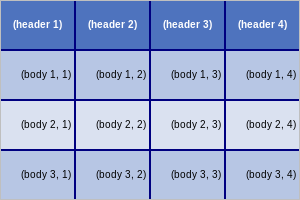
Example of using the SetCellBorderPen method
See also
OEPen class
SetCellColor
SetCellColor(arg2: OEColor, even: bool = True) -> None
Sets the color used to highlight the ‘body’ cells in the table. A cell is considered to be part of the ‘body’ of the table if it is neither in the header nor in the stub column.
- color
The color of the cells.
- even
This parameter determines whether the color is applied to the even or to the odd rows of the table.
Example (Example of using the SetCellColor method)
tableopts = oedepict.OEImageTableOptions(4, 4, oedepict.OEImageTableStyle_MediumBlue)
evenrow = True
tableopts.SetCellColor(oechem.OELightGrey, not evenrow)
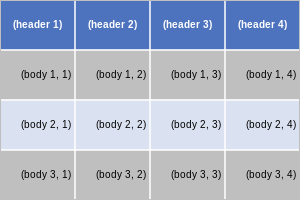
Example of using the SetCellColor method
See also
OEColor class
SetCellFont
SetCellFont(arg2: OEFont) -> None
Sets the font used by the OEImageTable.DrawText
method to draw text on the ‘body’ cells.
A cell is considered to be part of the ‘body’ of the table if it is neither
in the header nor in the stub column.
Example (Example of using the SetCellFont method)
tableopts = oedepict.OEImageTableOptions(4, 4, oedepict.OEImageTableStyle_MediumBlue)
font = oedepict.OEFont(oedepict.OEFontFamily_Default,
                       oedepict.OEFontStyle_Italic | oedepict.OEFontStyle_Bold,
                       8, oedepict.OEAlignment_Left, oechem.OEDarkRed)
tableopts.SetCellFont(font)
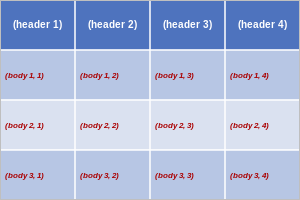
Example of using the SetCellFont method
See also
SetColumnWidths
SetColumnWidths(arg2: OEUIntVector) -> bool
Sets the relative widths of the columns.
- widths
The relative widths of the columns. The size of the vector has to be
OEImageTableOptions.NumColumns().
Example (Example of using the SetColumnWidths method)
The following example show how to adjust the width ratio of the columns.
tableopts = oedepict.OEImageTableOptions(4, 4, oedepict.OEImageTableStyle_MediumBlue)
tableopts.SetColumnWidths([20, 10, 20, 10])
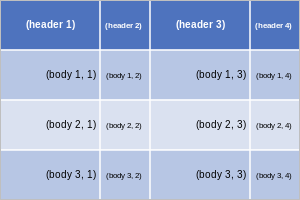
Example of using the SetColumnWidths method
See also
SetHeader
SetHeader(has: bool) -> bool
Sets whether to have a ‘header’ row in the table.
Example (Example of using the SetHeader method)
By default, a table is generated with a header row on the top. The following example show how to remove the header.
tableopts = oedepict.OEImageTableOptions(4, 4, oedepict.OEImageTableStyle_MediumBlue)
tableopts.SetHeader(False)
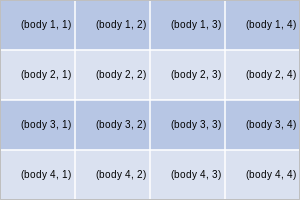
Example of using the SetHeader method
See also
SetHeaderColor
SetHeaderColor(arg2: OEColor) -> None
Sets the color used to highlight the ‘header’ cells in the table.
Example (Example of using the SetHeaderColor method)
tableopts = oedepict.OEImageTableOptions(4, 4, oedepict.OEImageTableStyle_MediumBlue)
tableopts.SetHeaderColor(oechem.OELightGrey)
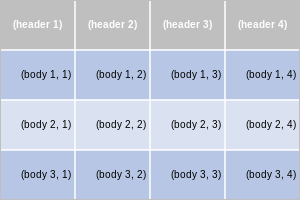
Example of using the SetHeaderColor method
See also
OEColor class
SetHeaderFont
SetHeaderFont(arg2: OEFont) -> None
Sets the font used by the OEImageTable.DrawText
method to draw text on the ‘header’ cells.
Example (Example of using the SetHeaderFont method)
tableopts = oedepict.OEImageTableOptions(4, 4, oedepict.OEImageTableStyle_MediumBlue)
font = oedepict.OEFont(oedepict.OEFontFamily_Default, oedepict.OEFontStyle_Default, 12,
                       oedepict.OEAlignment_Right, oechem.OEPinkTint)
tableopts.SetHeaderFont(font)
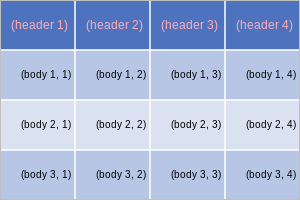
Example of using the SetHeaderFont method
See also
OEFont class
SetMargin
SetMargin(margin: int, percent: float) -> bool
Sets the size of a specific margin of the table.
- marginloc
This value has to be from the
OEMarginnamespace.- margin
This number is considered as a percentage of either the width or the height of image on which the table will be drawn and has to be in the range of \([0.0, 25.0]\). For example, 10.0% means, that the left and right margin are 10% of the total width of the image, and the top and bottom margins are 10% of the total height of the image.
Example (Example of using the SetMargin method)
tableopts = oedepict.OEImageTableOptions(4, 4, oedepict.OEImageTableStyle_MediumBlue)
tableopts.SetMargin(oedepict.OEMargin_Left, 10.0)
tableopts.SetMargin(oedepict.OEMargin_Right, 10.0)
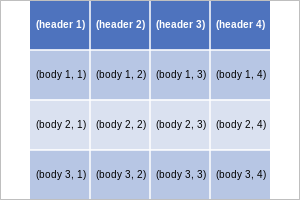
Example of using the SetMargin method
See also
SetMargins
SetMargins(percent: float) -> bool
Sets the size of all margins of the table.
- margin
This number is considered as a percentage of either the width or the height of image on which the table will be drawn and has to be in the range of \([0.0, 25.0]\). For example, 10.0% means, that the left and right margin are 10% of the total width of the image, and the top and bottom margins are 10% of the total height of the image.
Example (Example of using the SetMargins method)
tableopts = oedepict.OEImageTableOptions(4, 4, oedepict.OEImageTableStyle_MediumBlue)
tableopts.SetMargins(10.0)
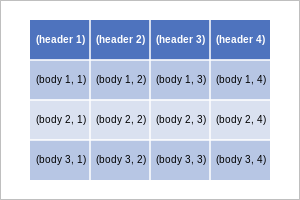
Example of using the SetMargins method
See also
SetRowHeights
SetRowHeights(arg2: OEUIntVector) -> bool
Sets the relative heights of the rows.
- heights
The relative heights of the rows. The size of the vector has to be
OEImageTableOptions.NumRows().
Example (Example of using the SetRowHeights method)
The following example show how to adjust the height ratio of the rows.
tableopts = oedepict.OEImageTableOptions(4, 4, oedepict.OEImageTableStyle_MediumBlue)
tableopts.SetRowHeights([10, 20, 30, 40])
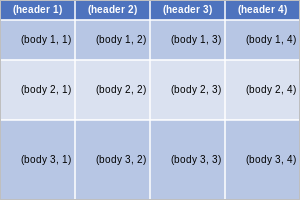
Example of using the SetRowHeights method
See also
SetStubColumn
SetStubColumn(has: bool) -> bool
Sets whether to have a ‘stub’ column in the table.
Example (Example of using the SetStubColumn method)
By default, a table is generated without a ‘stub’ column. The following example show how to add one on the left.
tableopts = oedepict.OEImageTableOptions(4, 4, oedepict.OEImageTableStyle_MediumBlue)
tableopts.SetStubColumn(True)
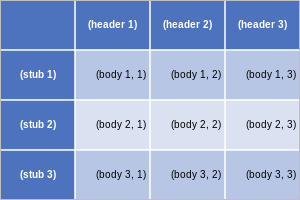
Example of using the SetStubColumn method
See also
SetStubColumnColor
SetStubColumnColor(arg2: OEColor) -> None
Sets the color used to highlight the ‘stub’ cells in the table.
Example (Example of using the SetStubColumnColor method)
tableopts = oedepict.OEImageTableOptions(4, 4, oedepict.OEImageTableStyle_MediumBlue)
tableopts.SetStubColumn(True)
tableopts.SetStubColumnColor(oechem.OELightGrey)
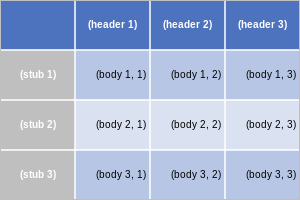
Example of using the SetStubColumnColor method
See also
OEColor class
SetStubColumnFont
SetStubColumnFont(arg2: OEFont) -> None
Sets the font used by the OEImageTable.DrawText
method to draw text on the ‘stub column’ cells.
Example (Example of using the SetStubColumnFont method)
tableopts = oedepict.OEImageTableOptions(4, 4, oedepict.OEImageTableStyle_MediumBlue)
tableopts.SetStubColumn(True)
font = oedepict.OEFont(oedepict.OEFontFamily_Default, oedepict.OEFontStyle_Default, 12,
                       oedepict.OEAlignment_Right, oechem.OEPinkTint)
tableopts.SetStubColumnFont(font)
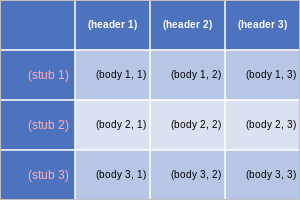
Example of using the SetStubColumnFont method
See also
OEFont class