OE2DPath
class OE2DPath
A sequence of lines and curves.
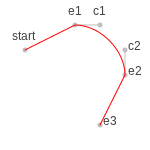
Example of path
See also
Constructors
OE2DPath() -> OE2DPath
Default constructor.
The starting point of the path have to be defined using the
OE2DPath.AddStartPoint method.
OE2DPath(start: OE2DPoint, closed: bool = True) -> OE2DPath
Create a new path with a starting point.
- start
The current point that will be starting point of the first line or curve.
- closed
If true, than a line segment will be added from the starting point to the end point of the last line or curve segment of the path. See examples in Table: Examples of closed and open paths.
Note
The starting point of the path will be associated with the
OE2DPathPointType_Start
type when returned by the OE2DPath.GetPoints method.
closed paths |
open paths |
|---|---|
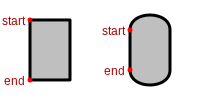
|
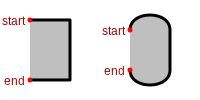
|
OE2DPath(rhs: OE2DPath) -> OE2DPath
Copy constructor.
OE2DPath(rhs: OE2DPath, scale: float) -> OE2DPath
Copy constructor with scaling.
- scale
The scaling factor is used to create a new image from the given one. The scaling factor has to be a positive (non-zero) number.
OE2DPath(rhs: OE2DPath, offset: OE2DPoint) -> OE2DPath
Copy constructor with offset.
- offset
The offset of new path relative to the copied one.
OE2DPath(rhs: OE2DPath, center: OE2DPoint, degree: float) -> OE2DPath
Copy constructor with rotation.
- center
The center of the rotation.
- degree
The rotation in degrees.
AddCurveSegment
AddCurveSegment(c1: OE2DPoint, c2: OE2DPoint, end: OE2DPoint) -> None
Adds a cubic Bézier curve to the path from the end point of the last line or curve segment of the path to the position end using c1 and c2 control points.
- c1, c2
The control points of the curve.
- end
The end point of the curve segment.
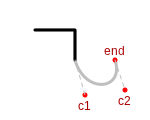
Example of adding a curve segment to a path
Note
Points added to the path with the OE2DPath.AddCurveSegment
method will be associated with the following types when returned by the
OE2DPath.GetPoints method:
See also
OE2DPoint class
OEImageBase.DrawCubicBeziermethodOE2DPath.GetPointsmethod
AddLineSegment
AddLineSegment(end: OE2DPoint) -> None
Adds a line to the path from the end point of the last line or curve segment of the path to the position end.
- end
The end point of the line segment.
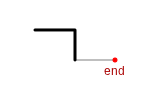
Example of adding a line segment to a path
Note
Points added to the path with the OE2DPath.AddLineSegment
method will be associated with the OE2DPathPointType_LineEnd
type when returned by the OE2DPath.GetPoints method.
See also
OE2DPoint class
OEImageBase.DrawLinemethod
AddStartPoint
AddStartPoint(start: OE2DPoint) -> None
Adds the starting point of the path. If clears all previously added line or curve segments.
GetEnd
GetEnd() -> OE2DPoint
Returns the end position of the path.
See also
OE2DPath.GetStartmethod
GetPoints
GetPoints() -> Iterable[OE2DPathPoint]
Returns an iterator over all points of the path.
Each point is associated with a type from the
OE2DPathPointType namespace.
Example:
for p in path.GetPoints():
    pos = p.GetPoint()
    print(" %.1f %.1f %d" % (pos.GetX(), pos.GetY(), p.GetPointType()))
See also
OE2DPathPoint class
OE2DPathPointTypenamespace
GetStart
GetStart() -> OE2DPoint
Returns the starting position of the path.
See also
OE2DPath.GetEndmethod
IsClosed
IsClosed() -> bool
Returns whether a line segment will be added from the starting point to the end point of the last line or curve segment of the path. See examples in Table: Examples of closed and open paths.
See also
OE2DPath.SetClosedmethod
IsValid
IsValid() -> bool
Returns whether the OE2DPath object is valid. A path is considered valid if it has a starting point.
SetClosed
SetClosed(closed: bool) -> None
Sets whether a line segment will be added from the starting point to the end point of the last line or curve segment of the path.