Aligning Molecule Based on MCS
A program that aligns molecules based on their maximum common substructure.
Command Line Interface
A description of the command line interface can be obtained by executing the program with the –help argument.
prompt> python mcsalign2D.py --help
will generate the following output:
Simple parameter list
 input/output options :
   -fit : Align filename
   -out : Output filename
   -ref : Ref filename
Code
Download code
#!/usr/bin/env python
# (C) 2022 Cadence Design Systems, Inc. (Cadence)
# All rights reserved.
# TERMS FOR USE OF SAMPLE CODE The software below ("Sample Code") is
# provided to current licensees or subscribers of Cadence products or
# SaaS offerings (each a "Customer").
# Customer is hereby permitted to use, copy, and modify the Sample Code,
# subject to these terms. Cadence claims no rights to Customer's
# modifications. Modification of Sample Code is at Customer's sole and
# exclusive risk. Sample Code may require Customer to have a then
# current license or subscription to the applicable Cadence offering.
# THE SAMPLE CODE IS PROVIDED "AS IS", WITHOUT WARRANTY OF ANY KIND,
# EXPRESS OR IMPLIED.  OPENEYE DISCLAIMS ALL WARRANTIES, INCLUDING, BUT
# NOT LIMITED TO, WARRANTIES OF MERCHANTABILITY, FITNESS FOR A
# PARTICULAR PURPOSE AND NONINFRINGEMENT. In no event shall Cadence be
# liable for any damages or liability in connection with the Sample Code
# or its use.

#############################################################################
# Aligns the fit molecule(s) based on their maximum common substructure
# with the reference molecule.
#############################################################################

import sys
from openeye import oechem
from openeye import oedepict


def main(argv=[__name__]):

    itf = oechem.OEInterface(InterfaceData)

    if not oechem.OEParseCommandLine(itf, argv):
        oechem.OEThrow.Fatal("Unable to interpret command line!")

    rname = itf.GetString("-ref")
    fname = itf.GetString("-fit")
    oname = itf.GetString("-out")

    rifs = oechem.oemolistream()
    if not rifs.open(rname):
        oechem.OEThrow.Fatal("Cannot open reference molecule file!")

    refmol = oechem.OEGraphMol()
    if not oechem.OEReadMolecule(rifs, refmol):
        oechem.OEThrow.Fatal("Cannot read reference molecule!")

    fifs = oechem.oemolistream()
    if not fifs.open(fname):
        oechem.OEThrow.Fatal("Cannot open align molecule file!")

    ofs = oechem.oemolostream()
    if not ofs.open(oname):
        oechem.OEThrow.Fatal("Cannot open output file!")
    if not oechem.OEIs2DFormat(ofs.GetFormat()):
        oechem.OEThrow.Fatal("Invalid output format for 2D coordinates")

    oedepict.OEPrepareDepiction(refmol)

    mcss = oechem.OEMCSSearch(oechem.OEMCSType_Approximate)
    atomexpr = oechem.OEExprOpts_DefaultAtoms
    bondexpr = oechem.OEExprOpts_DefaultBonds
    mcss.Init(refmol, atomexpr, bondexpr)
    mcss.SetMCSFunc(oechem.OEMCSMaxBondsCompleteCycles())

    oechem.OEWriteConstMolecule(ofs, refmol)

    for fitmol in fifs.GetOEGraphMols():
        alignres = oedepict.OEPrepareAlignedDepiction(fitmol, mcss)
        if alignres.IsValid():
            oechem.OEThrow.Info("%s  mcs size: %d" % (fitmol.GetTitle(), alignres.NumAtoms()))
            oechem.OEWriteMolecule(ofs, fitmol)

    return 0


#############################################################################
# INTERFACE
#############################################################################

InterfaceData = '''
!BRIEF [-ref] <input> [-fit] <input> [-out] <output>

!CATEGORY "input/output options :"

    !PARAMETER -ref
      !ALIAS -r
      !TYPE string
      !REQUIRED true
      !KEYLESS 1
      !VISIBILITY simple
      !BRIEF Ref filename
    !END

    !PARAMETER -fit
      !ALIAS -f
      !TYPE string
      !REQUIRED true
      !KEYLESS 2
      !VISIBILITY simple
      !BRIEF Align filename
    !END

    !PARAMETER -out
      !ALIAS -o
      !TYPE string
      !REQUIRED true
      !KEYLESS 3
      !VISIBILITY simple
      !BRIEF Output filename
    !END

!END
'''

if __name__ == "__main__":
    sys.exit(main(sys.argv))
See also
Molecule Alignment chapter
OEIs2DFormatfunctionOEPrepareDepictionfunctionOEMCSSearch class
OEPrepareAlignedDepictionfunction
Example
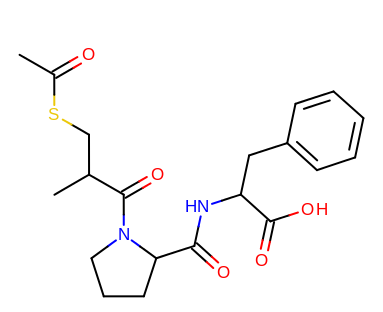
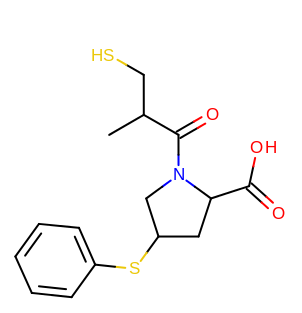
prompt> python mcsalign2D.py -ref ace1.ism -fit ace2.ism -out out.mol
taking the output coordinates and generating the images with the mol2img program will produce the images shown in Table: Example of using the program to align two molecules based on MCS.
reference molecule |
aligned molecule |
|---|---|
|
|
See also
Molecule Alignment chapter