OEHighlightByStick
class OEHighlightByStick : public OEHighlightBase
The OEHighlightByStick class allows the
customization of the stick highlighting style that is
associated with the OEHighlightStyle_Stick
constant.
See example in Figure: Example of highlighting using the
‘stick’ style.
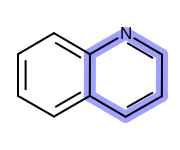
Example of highlighting using the ‘stick’ style
The OEHighlightByStick class stores the following properties:
Property |
Get method |
Set method |
Corresponding namespace / class / type |
|---|---|---|---|
external highlight |
floating point |
||
atom label |
boolean |
||
color |
|||
stick width scale |
floating point number |
See also
OEAddHighlightingfunctionOEHighlightStylenamespaceOEHighlightByColor class
OEHighlightByCogwheel class
OEHighlightByLasso class
Highlighting chapter
Constructors
OEHighlightByStick(color: OEColor, stickWidthScale: float = 3.0,
                   monochrome: bool = True,
                   atomExternalHighlightRatio: float = 0.0) -> OEHighlightByStick
Creates an OEHighlightByStick object with the specified parameters.
- color
The color used for highlighting. See also
OEHighlightByStick.SetColormethod.- stickWidthScale
The multiplier that can be used to increase or decrease the stick width of the highlighted bond(s). See also
OEHighlightByStick.SetStickWidthScalemethod.- monochrome
Defines whether or not to change the color of the atom label of the highlighted atom(s). See also
OEHighlightByStick.SetAtomLabelMonochromemethod.- atomExternalHighlightRatio
A ratio that can be used to extend atom highlights to bonds not being highlighted. See also
OEHighlightByStick.SetAtomExternalHighlightRatiomethod.
OEHighlightByStick(rhs: OEHighlightByStick) -> OEHighlightByStick
Copy constructor.
CreateCopy
CreateCopy() -> OEHighlightByStick
Deep copy constructor that returns a copy of the object. The memory for the returned OEHighlightByStick object is dynamically allocated and owned by the caller.
GetAtomExternalHighlightRatio
GetAtomExternalHighlightRatio() -> float
Returns the ratio of the external highlight of the atoms.
See also
GetAtomLabelMonochrome
GetAtomLabelMonochrome() -> bool
Returns whether or not the color of the atom label of the highlighted atom(s) is changed.
See also
GetColor
GetColor() -> OEColor
Returns the color of the highlighting.
See also
OEHighlightByStick.SetColormethodOEColor class
GetStickWidthScale
GetStickWidthScale() -> float
Returns the multiplier that can be used to increase or decrease the stick width of the highlighted bond(s).
See also
SetAtomExternalHighlightRatio
SetAtomExternalHighlightRatio(ratio: float) -> None
Sets the ratio of the external highlight of the atoms i.e. atom highlights are extended to bonds not being highlighted.
- ratio
This value has to be in the range of
[0.0, 0.5].
Example (Figure: Example of using the SetAtomExternalHighlightRatio method)
highlight = oedepict.OEHighlightByStick(oechem.OELightOrange)
highlight.SetAtomExternalHighlightRatio(0.33)
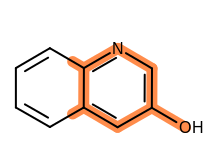
Example of using the SetAtomExternalHighlightRatio method
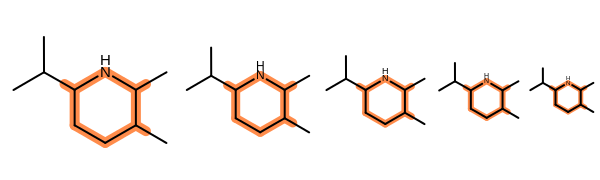
Example of scaling the ‘Stick’ style highlighting along with the molecule
See also
OEHighlightByStick.GetColormethod
SetAtomLabelMonochrome
SetAtomLabelMonochrome(monochrome: bool) -> None
Sets whether or not to change the color of the atom label of the highlighted atom(s).
Example (Figure: Example of using the SetAtomLabelMonochrome method)
highlight = oedepict.OEHighlightByStick(oechem.OELightOrange)
highlight.SetAtomLabelMonochrome(False)
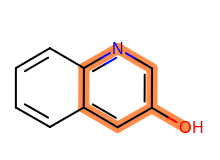
Example of using the SetAtomLabelMonochrome method
See also
SetColor
SetColor(color: OEColor) -> None
Sets the color of the highlighting.
Example (Figure: Example of using the SetColor method)
highlight.SetColor(oechem.OELightOrange)
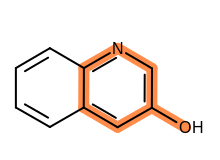
Example of using the SetColor method
See also
OEHighlightByStick.GetColormethodOEColor class
SetStickWidthScale
SetStickWidthScale(stickWidthScale: float) -> None
Sets the multiplier that can be used to increase or decrease the stick width of the highlighted bond(s).
Example (Figure: Example of using the SetStickWidthScale method)
highlight = oedepict.OEHighlightByStick(oechem.OELightOrange)
highlight.SetStickWidthScale(5.0)
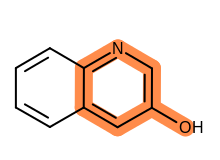
Example of using the SetStickWidthScale method
See also