OEHighlightByLasso
class OEHighlightByLasso : public OEHighlightBase
The OEHighlightByLasso class allows the
customization of the lasso highlighting style that is
associated with the OEHighlightStyle_Lasso
constant.
See example in Figure: Example of highlighting using the
‘lasso’ style.
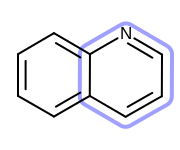
Example of highlighting using the ‘lasso’ style
The OEHighlightByLasso class stores the following properties:
Property |
Get method |
Set method |
Corresponding namespace / class / type |
|---|---|---|---|
atom label color |
boolean |
||
atom label box |
boolean |
||
color |
|||
pen |
|||
position |
|
||
lasso scale |
floating point number |
||
line width scale |
floating point |
See also
OEAddHighlightingfunctionOEHighlightStylenamespaceOEHighlightByColor class
OEHighlightByCogwheel class
OEHighlightByStick class
Highlighting chapter
Constructors
OEHighlightByLasso(color: OEColor, lassoScale: float = 3.0,
                   monochrome: bool = True,
                   considerAtomLabelBox: bool = False,
                   position: int, lws: float = 1.0) -> OEHighlightByLasso
Creates an OEHighlightByLasso object with the specified parameters.
- color
The color used for highlighting. See also
OEHighlightByLasso.SetColormethod.- lassoScale
The multiplier that can be used to increase or decrease the distance of the “lasso” from the highlighted atom(s) and bond(s). See also
OEHighlightByLasso.SetLassoScalemethod.- monochrome
Defines whether or not to change the color of the atom label of the highlighted atom(s). See also
OEHighlightByLasso.SetAtomLabelMonochromemethod.- considerAtomLabelBox
Determines whether or not to consider the atom label bounding boxes when generating the ‘lasso’ highlights. See also
OEHighlightByLasso.SetConsiderAtomLabelBoundingBoxmethod.- position
Defines whether the ‘lasso’ highlight is going to be rendered below or above the molecule. See also
OEHighlightByLasso.SetPositionmethod.- lineWidthScale
The multiplier that can be used to increase or decrease the line width of lasso. See also
OEHighlightByLasso.SetLineWidthScalemethod.
OEHighlightByLasso(rhs: OEHighlightByLasso) -> OEHighlightByLasso
Copy constructor.
CreateCopy
CreateCopy() -> OEHighlightByLasso
Deep copy constructor that returns a copy of the object. The memory for the returned OEHighlightByLasso object is dynamically allocated and owned by the caller.
GetAtomLabelMonochrome
GetAtomLabelMonochrome() -> bool
Returns whether or not the color of the atom label of the highlighted atom(s) is changed.
See also
GetConsiderAtomLabelBoundingBox
GetConsiderAtomLabelBoundingBox() -> bool
Returns whether or not to consider the atom label bounding boxes when generating the ‘lasso’ highlights.
See also
GetLassoScale
GetLassoScale() -> float
Returns the multiplier that can be used to increase or decrease the distance of the line of the ‘lasso’ from the highlighted atom(s) and bonds(s).
See also
GetLineWidthScale
GetLineWidthScale() -> float
Returns the multiplier that can be used to increase or decrease the line width of the lasso.
See also
GetColor
GetColor() -> OEColor
Returns the foreground color of the highlighting.
See also
OEHighlightByLasso.GetColormethodOEColor class
GetPen
GetPen() -> OEPen
Returns the pen of the highlighting.
See also
OEHighlightByLasso.SetPenmethodOEPen class
GetPosition
GetPosition() -> int
Returns whether the ‘lasso’ highlight is going to be render above or
below the molecule.
The return value is taken from the OELayerPosition
namespace.
See also
OELayerPositionnamespace
SetAtomLabelMonochrome
SetAtomLabelMonochrome(monochrome: bool) -> None
Sets whether or not to change the color of the atom label of the highlighted atom(s).
Example (Figure: Example of using the SetAtomLabelMonochrome method)
highlight = oedepict.OEHighlightByLasso(oechem.OEDarkGreen)
highlight.SetAtomLabelMonochrome(False)
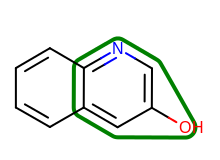
Example of using the SetAtomLabelMonochrome method
See also
SetConsiderAtomLabelBoundingBox
SetConsiderAtomLabelBoundingBox(consider: bool) -> None
Sets whether or not to consider the atom label bounding boxes when generating the ‘lasso’ highlights. By considering the bounding boxes, the number cases when the lines of the highlight clash with the atom label can be reduced.
Example (Figure: Example of using the SetConsiderAtomLabelBoundingBox method)
highligh = oedepict.OEHighlightByLasso(oechem.OEDarkGreen)
highlight.SetConsiderAtomLabelBoundingBox(True)
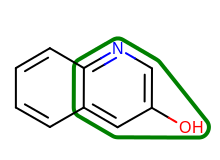
Example of using the SetConsiderAtomLabelBoundingBox method
See also
SetLassoScale
SetLassoScale(lassoScale: float) -> None
Sets the multiplier that can be used to increase or decrease the distance of the line of the ‘lasso’ from the highlighted atom(s) and bond(s).
Example (Figure: Example of using the SetLassoScale method)
highlight = oedepict.OEHighlightByLasso(oechem.OEDarkGreen)
highlight.SetLassoScale(6.0)
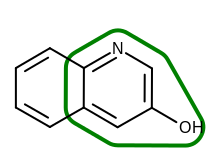
Example of using the SetLassoScale method
See also
SetLineWidthScale
SetLineWidthScale(lineWidthScale: float) -> None
Sets the multiplier that can be used to increase or decrease the line width of the lasso.
Example (Figure: Example of using the SetLineWidthScale method)
highligh = oedepict.OEHighlightByLasso(oechem.OEDarkGreen)
highlight.SetLineWidthScale(3.0)
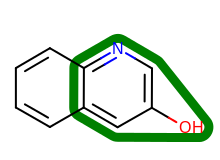
Example of using the SetLineWidthScale method
See also
SetColor
SetColor(color: OEColor) -> None
Sets the foreground color of the highlighting.
Example (Figure: Example of using the SetColor method)
highlight.SetColor(oechem.OEDarkGreen)
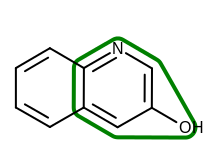
Example of using the SetColor method
See also
OEHighlightByLasso.GetColormethodOEColor class
SetPen
SetPen(pen: OEPen) -> None
Sets the pen of the highlighting.
Example (Figure: Example of using the SetPen method)
pen = oedepict.OEPen(oechem.OEGreenTint, oechem.OEDarkGreen,
                     oedepict.OEFill_On, 3.0, oedepict.OEStipple_Dot)
highlight.SetPen(pen)
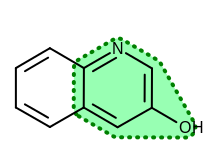
Example of using the SetPen method
See also
OEHighlightByLasso.GetPenmethodOEPen class
SetPosition
SetPosition(arg2: int) -> None
Sets whether the ‘lasso’ highlight is going to be render above or below the molecule.
- position
This value has to be from the
OELayerPositionnamespace.
See also